
Auto-fill my return not working: how to get the CRA connection back
Short answer
When Auto-fill my return is not working, the cause is usually one of three things: you signed in with a provincial partner (Alberta.ca or BC Services Card), which the service does not accept; the CRA has not processed your slips yet, which it expects by mid-March; or a slip issuer used a wrong SIN or name. Each has a different fix, and none requires new software.
- 01Sign-in needed
- CRA user ID and password or a Sign-in Partner; provincial partner alone does not work
- 02Slips at the CRA
- Most by end of February, processed by mid-March
- 03Tax years covered
- 2016 and later
- 04T5008 limit
- Up to 500 slips; 501 or more must be entered by hand
- 05Also fills in
- The 8-character NETFILE access code
Why is Auto-fill my return not working?
Auto-fill my return not working almost always traces back to the sign-in step or to data the CRA does not yet hold, not to a fault in your tax program. The CRA says the service can only send information it has on file at the moment your software asks for it, so an early-season request returns an incomplete or empty result.
Auto-fill my return is a CRA service that lets certified tax software download your slips and account details straight into your return after you sign in to your CRA account from inside the program. Nothing is filed at this step; it only fills fields you would otherwise type yourself.
| What you see | Most likely cause | Where to look |
|---|---|---|
| Sign-in window rejects you or loops | Provincial partner used as the only sign-in, or CRA account problem | Your CRA sign-in method |
| Download works but some slips are missing | CRA has not received or processed the slip | Date and slip issuer |
| One slip never appears, even in April | SIN or name on the slip does not match CRA records | The paper or PDF slip |
| Only your own data loads, not your spouse's | Each person must sign in separately or be authorized | Representative access |
| Brokerage slips stop partway | More than 500 T5008 slips | Manual entry |
How the Auto-fill my return service connects your software to the CRA
The connection has three links, and a failure at any one looks the same from your screen. Your software opens a CRA sign-in page, the CRA confirms who you are, and then the CRA sends back what it holds for the tax year you picked.
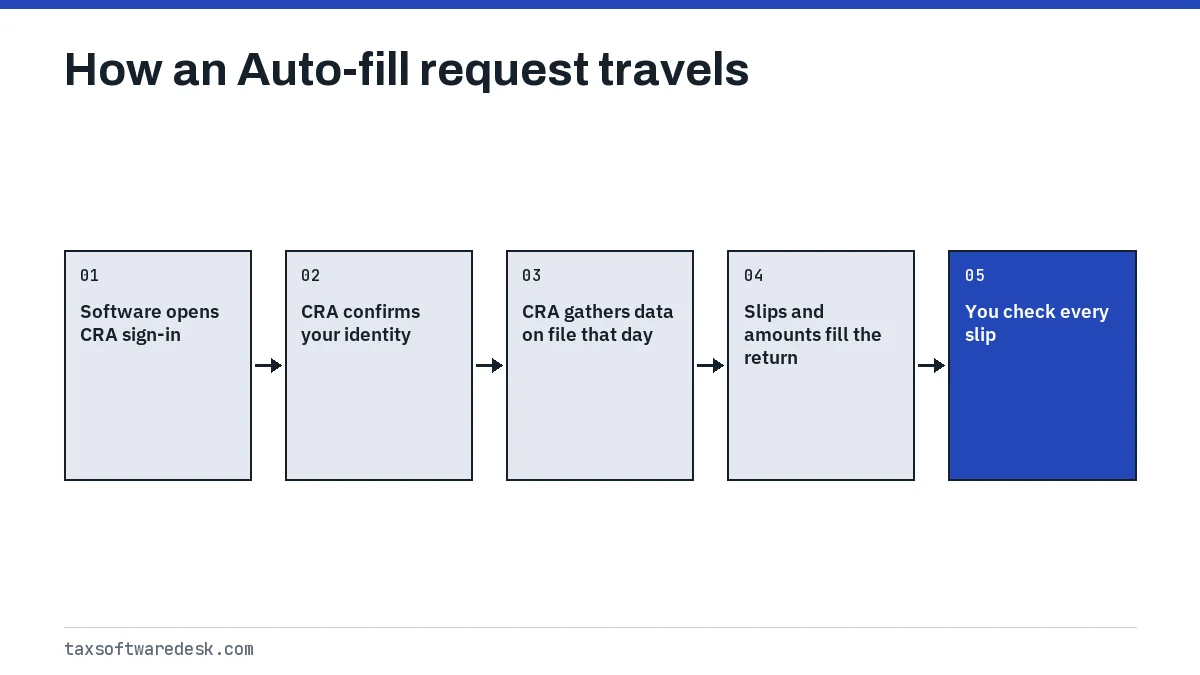
Only software the CRA has certified for the current tax year can make the request. The CRA publishes its list of certified products each year, so a program that is not yet certified for the new season may not offer the Auto-fill option until the new edition or update is installed.
Information is available for the 2016 and later tax years. Some items, such as the RRSP deduction limit and Home Buyers' Plan repayment details, are listed by the CRA only for the most recent return.
CRA account sign-in problems that block Auto-fill
The single most common sign-in trap is the provincial partner. The CRA says that if Alberta.ca or a BC Services Card is your only way into your CRA account, you cannot use Auto-fill my return and must register a CRA user ID and password as well.
- Sign in to your CRA account in a normal browser first, outside the tax software. If that fails, the problem is the account, not the program.
- Check which method you used. A CRA user ID and password or a Sign-in Partner (your bank login) are accepted; a provincial partner on its own is not.
- If you registered recently, finish every step of registration, including any security code the CRA sends by mail, before trying again.
- Return to the software and start the Auto-fill request again from the beginning rather than using the browser back button.
If the sign-in page shows a lockout or an account error, the CRA's own sign-in help pages are the place to resolve it. Your tax software company cannot reset a CRA account.
Why are some slips missing from Auto-fill?
Slips go missing from Auto-fill because the CRA has not processed them yet or because the slip carries a SIN or name the CRA cannot match to you. The CRA expects to receive most third-party slips by the end of February and to have them processed and available by mid-March.
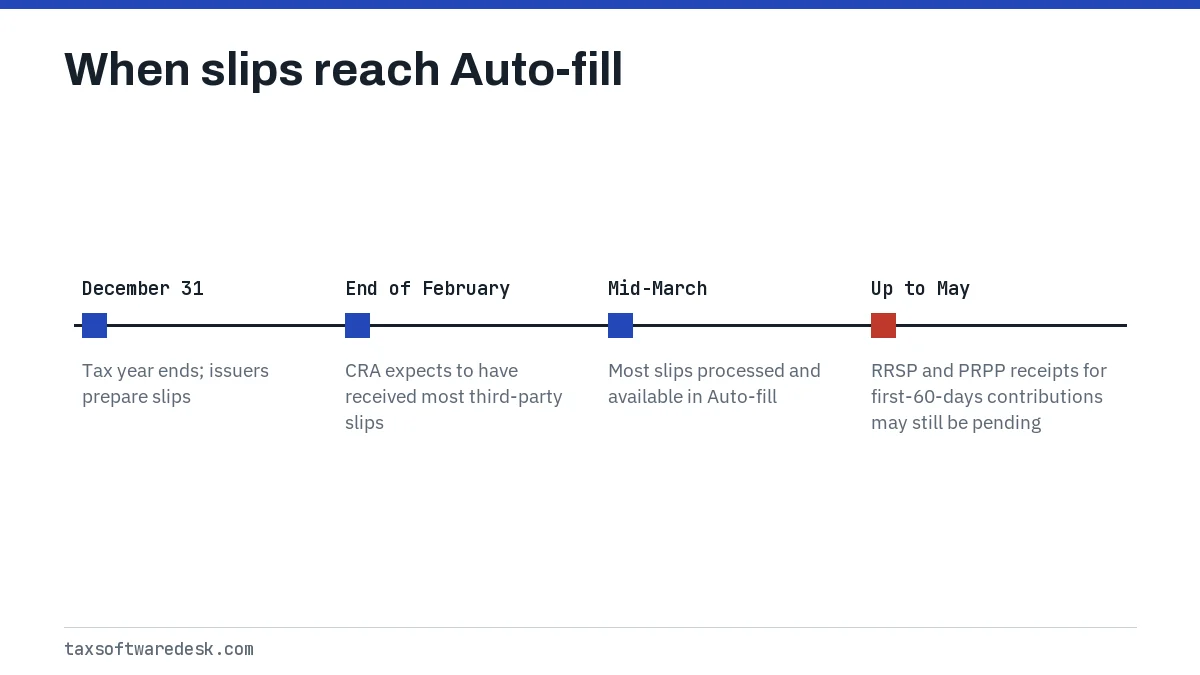
Slips that arrive late by design
- RRSP and PRPP receipts: the CRA warns that receipts for contributions made in the first 60 days of the year may not be available until May.
- T5008 securities slips: the service sends a maximum of 500. If you have 501 or more, the CRA says to enter all of them by hand.
- T5 slips for joint accounts: these may appear at the full amount. You report only your share, based on what you contributed, and most software lets you enter a percentage.
A slip that never shows up
If one slip is still absent in April while others have loaded, compare the paper or PDF copy with your records. The CRA points to errors in the SIN or name on the slip as a common cause and says to contact the issuer to correct it. Until then, type the slip in yourself from the copy you received.
UFile autofill not working and other product-specific fixes
When UFile autofill is not working, or the same problem shows up in TurboTax Canada, StudioTax or H&R Block's Canadian software, the CRA side of the connection is identical. What differs is where the program puts the button and how it handles the sign-in window.
- Pop-up blocked: online products open the CRA page in a new window or tab. Allow pop-ups for the software's site and try again.
- Old edition installed: desktop products need the edition for the tax year you are filing and the latest update, since certification is per year.
- Wrong year selected: make sure the return you opened is for the year you want. Auto-fill returns data for that year only.
- Data already on the return: some products will not overwrite slips you typed earlier. Delete duplicates before or after importing so income is not counted twice.
Product pages with more detail: UFile NETFILE errors, StudioTax NETFILE problems, Wealthsimple Tax autofill problems and H&R Block not connecting to the CRA.
How do I get my Auto-fill back after it stops working?
To get Auto-fill back, fix the sign-in method, wait until the slips are processed, then request the download again from inside the same return. A second request replaces the earlier snapshot with whatever the CRA holds that day.
- Confirm you can sign in to your CRA account directly with a CRA user ID or Sign-in Partner.
- Update the software to its latest release for the tax year.
- Open the correct year's return and run Auto-fill again.
- Compare the imported slips with the paper copies you hold, line by line.
- Enter any slip that is still missing by hand, then review the return before sending.
Also check that the NETFILE window is open. For the 2026 season it ran from February 23, 2026 to January 29, 2027, and the CRA takes NETFILE down every day from 3 a.m. to 6 a.m. Eastern for maintenance. The opening date for 2026 returns in 2027 is not yet announced; the CRA usually confirms it in January or February.
Can I file without Auto-fill my return?
Yes. Auto-fill is a convenience, not a requirement, and entering slips manually produces the same return. The CRA also makes clear that the taxpayer stays responsible for reporting all income accurately, whether or not a slip came through Auto-fill.
One side effect of skipping it: Auto-fill normally places your 8-character NETFILE access code on the return. Without it, the field stays empty or you type it from your notice of assessment. The CRA says the code is not mandatory, but a mistyped one can trigger NETFILE error code 21. For every other refusal code, use our NETFILE error codes list.
Step by step
Test your CRA sign-in
Sign in to your CRA account directly with a CRA user ID and password or a Sign-in Partner.
Update the software
Install the latest release for the tax year you are filing.
Request Auto-fill again
Open the right year's return and start the Auto-fill request from the beginning.
Check and complete slips
Compare imported slips with your copies and enter any missing slip by hand.
Common questions
Why does Auto-fill say no information is available?
Either the CRA has not processed slips for that year yet, which it expects by mid-March, or you selected a tax year before 2016. Check the date and the year on the return.
Can I use Auto-fill with my BC Services Card login?
Not if it is your only sign-in method. The CRA says provincial partner users must register a CRA user ID and password to use Auto-fill my return.
Does Auto-fill work for a prior-year return?
Yes, for tax years from 2016 onward, as long as your software edition for that year is certified and supports the service.
Can I run Auto-fill a second time later in the season?
Yes. A new request pulls whatever the CRA holds that day, so running it again in late March often picks up slips that were missing in February. Check for duplicate slips afterward.
Is the information from Auto-fill always correct?
Not necessarily. It reflects what issuers sent the CRA. Compare each slip with your own copy; the CRA says reporting accurate income remains your responsibility.
Sources
- Auto-fill my return (individuals) canada.ca
- About Auto-fill my return canada.ca
- Sending a tax return with certified software canada.ca
- NETFILE eligibility and dates canada.ca
- Completing a tax return with certified software canada.ca
We check figures against these official pages. Rules change; confirm anything that affects a deadline or payment with the agency before you act.
Tell us what happened
Describe your situation and our editors will use it to improve this guide. If you leave your email, we may reply with a pointer to the right page or official contact. We never share your details.