
Topic
H&R Block not working: find your problem and the fix
When H&R Block is not working, the fix depends on which product you use. H&R Block Online runs in a web browser, so most problems clear after signing out, clearing temporary internet files and trying a supported browser. The download software runs on your computer, where installs, updates, activation codes and Windows installer errors cause most failures. Match your symptom below.
11 guides in this topic Updated September 18, 2026
- H&R Block AI Tax Assist: What You Get and What You Don'tAI Tax Assist is H&R Block's built-in AI help, included with its paid online products at no extra charge. It answers questions about deductions, cred…
- H&R Block Activation Code Not Working: Fixes and ChecksAn H&R Block activation code not working is usually a typing problem, a code for a different product or year, or a fresh install on a second computer…
- H&R Block Cannot Connect to Server: Windows and Mac FixesWhen H&R Block software cannot connect to the server during an update, a state download or e-file, the block is almost always on your side: H&R Block…
- H&R Block Error 1722: Fix the Windows Installer ProblemH&R Block error 1722 is a Windows Installer error, not a tax error. Windows is saying that a program run as part of setup did not finish as expected.…
- H&R Block Error Codes: What Common Codes Mean and FixesMost H&R Block error codes with four digits, such as 1152, 1500, 1721 and 1722, come from the Windows installer, not from H&R Block, and are fixed in…
- H&R Block Failed to Open Database: Fix for Desktop SoftwareH&R Block failed to open database is a start-up error in the desktop program, reported mostly with Premium and Business editions. H&R Block has not p…
- H&R Block Rejected Return: Fix and Resubmit in the SoftwareAn H&R Block rejected return means the IRS or state refused the e-file, so nothing is filed yet. In H&R Block Online, go to Overview, then Next Steps…
- H&R Block Software Not Installing: Fix Download and InstallWhen H&R Block software is not installing, H&R Block points to four causes: installing somewhere other than the default location, no administrator ri…
- H&R Block Software Won't Update: Manual Update StepsWhen H&R Block software won't update, the cause is usually one of four things H&R Block lists: the program is not on the C: drive, you lack administr…
- H&R Block Software on Windows 10: Support Status for 2027H&R Block's system requirements page, checked 20 October 2026, lists Windows 10 or higher for its consumer tax software, so Windows 10 is still on it…
- H&R Block Trouble Signing In: Login Code and Lockout FixesIf you have trouble signing in to H&R Block, wait 20 minutes if the account locked after three failed attempts, choose Resend my security code if the…
Why H&R Block is not working: Online or Desktop first
H&R Block sells two very different products under one name. H&R Block Online is a website: nothing is installed, your return is stored in your account, and a problem is usually the browser, the connection or the sign-in. The H&R Block Tax Software (the download or CD edition) is a program on your Windows PC or Mac, and a problem is usually the installation, an update, the activation code or Windows itself.
The quickest test: if you type an address into a browser to reach your return, you use Online. If you double-click an H&R Block icon on your desktop or in the Applications folder, you use the software. The rest of this page is split along that line.
Read the video transcript
H&R Block not working: find your problem and the fix
When H&R Block is not working, the fix depends on which product you use.
Software minimum on Windows: Windows 10 or higher (H&R Block requirements page).
Software minimum on Mac: Mac OS X 10.15.7 or higher.
Disk space for tax software: 170 MB.
Most H&R Block problems fall into one of six patterns. Find the line that matches what you see, then go to the page that covers it in detail.
H&R Block's own help for Online problems is short: if you cannot move forward or backward in your return, sign out first, then clear your browser's temporary internet files and sign back in.
A rejection is not a software fault. It means the IRS or state turned the return away, usually over one mismatch such as last year's AGI or a Social Security number.
Why is H&R Block not working today? Test from another device on another network. If the site works there, clear your browser cache after signing out, or try another browser.
Match your symptom to the fix
Most H&R Block problems fall into one of six patterns. Find the line that matches what you see, then go to the page that covers it in detail.
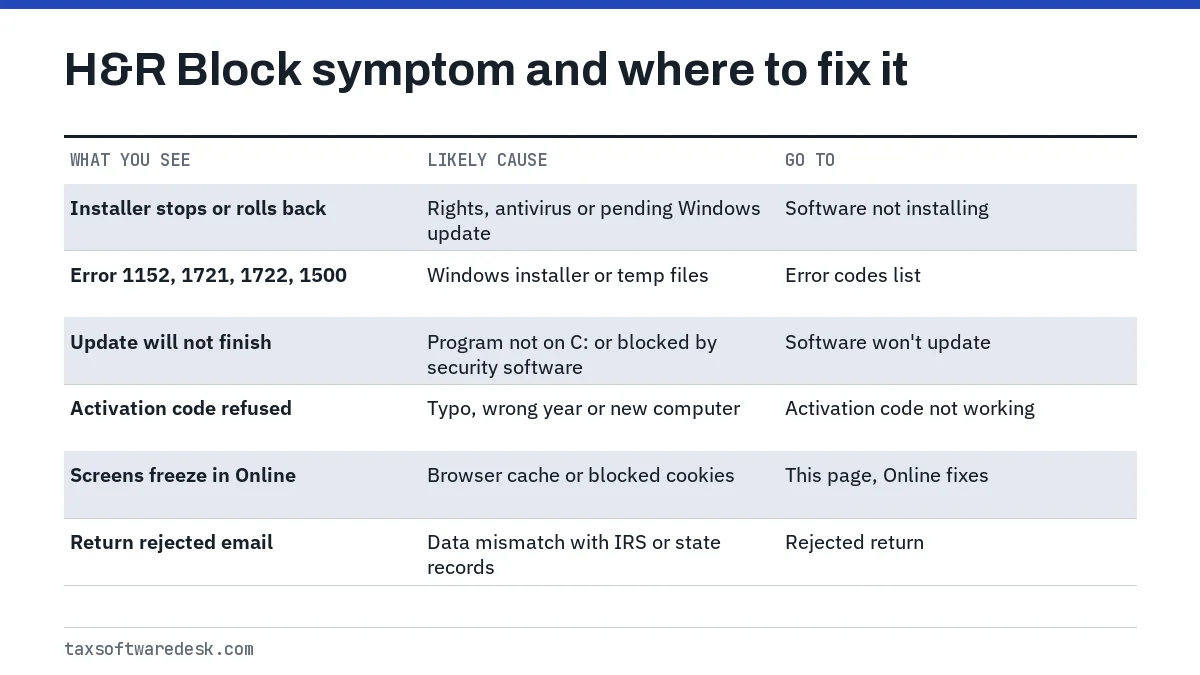
If the symptom is a numbered message, start with the H&R Block error codes list. Four-digit codes in the 1100 to 1900 range almost always come from the Windows installer rather than from H&R Block, which changes where the fix lives.
H&R Block website not working: fixes for Online
H&R Block's own help for Online problems is short: if you cannot move forward or backward in your return, sign out first, then clear your browser's temporary internet files and sign back in. Clearing the cache while you are still signed in can leave the stuck page in place.
- Save your place and sign out of H&R Block Online.
- Clear the browser cache (temporary internet files) using your browser's settings.
- Close every browser window, reopen one, and sign in again.
- If the same screen still freezes, try a second browser such as Edge, Chrome or Firefox.
- Check that cookies and JavaScript are turned on; H&R Block says the browser must accept them.
H&R Block's browser compatibility page still lists older systems such as Windows 7 and macOS High Sierra, so treat it as a floor rather than a current list. A current version of a mainstream browser on an updated computer is the safer setup.
H&R Block not working today: is it down or is it you
We have not found an official H&R Block service-status page, so there is no single place to confirm an outage. A practical check is to open the site on a different device on a different network, such as a phone on mobile data. If it works there, the fault is on your computer or connection; if it fails everywhere, wait and try again later rather than resetting your account.
If the problem is the sign-in itself, such as a code that never arrives or a password reset loop, the steps are different; see H&R Block trouble signing in.
H&R Block software problems on Windows and Mac
Before troubleshooting the program, confirm the computer qualifies. H&R Block's requirements page, as checked on 18 September 2026, lists these minimums for the consumer tax software:
| Item | Windows | Mac |
|---|---|---|
| Operating system | Windows 10 or higher | Mac OS X 10.15.7 or higher |
| Browser listed | Internet Explorer 11 or higher | Safari 15.6.1 or higher |
| Disk space | 170 MB | 170 MB |
| Monitor | 1024 x 768 SVGA color | 1024 x 768 SVGA color |
| Internet | Needed for updates, states and e-file | Needed for updates, states and e-file |
The H&R Block Business product has a much higher bar on the same page: Windows 11, 8 GB of RAM, 15 GB of disk space and an Intel Core 10th generation i5 or better. If you run Business on an older PC, that gap alone can explain crashes or a refused install.
The program will not install
H&R Block names four causes: installing somewhere other than the default location, no administrator rights, Windows updates that have not finished, and antivirus software blocking the installer. The full walk-through, including how to find the downloaded file, is in H&R Block software not installing.
The program will not update
Updates fail when the program sits on a drive other than C:, when you lack administrator rights, when a Windows update is pending, or when antivirus or a firewall is running. H&R Block's fallback is a manual download from its Update Center, run with Run as Administrator; see H&R Block software won't update.
The activation code is refused
The code is ten characters in the pattern XXXXX-XXXXX and turns on the five free federal e-files included with the software. Typos, a code for a different product year and a second computer are the usual reasons it fails; see H&R Block activation code not working.
Rejected returns and e-file problems
A rejection is not a software fault. It means the IRS or state turned the return away, usually over one mismatch such as last year's AGI or a Social Security number. IRS Publication 1345 treats a rejected return as not filed, so it needs to be fixed and sent again.
In the software, H&R Block's E-file Rejection Report lists the errors from your last attempt, and the Refile Return button sends the corrected return. H&R Block says it does not charge to resubmit. Details for both Online and the software are in H&R Block rejected return.
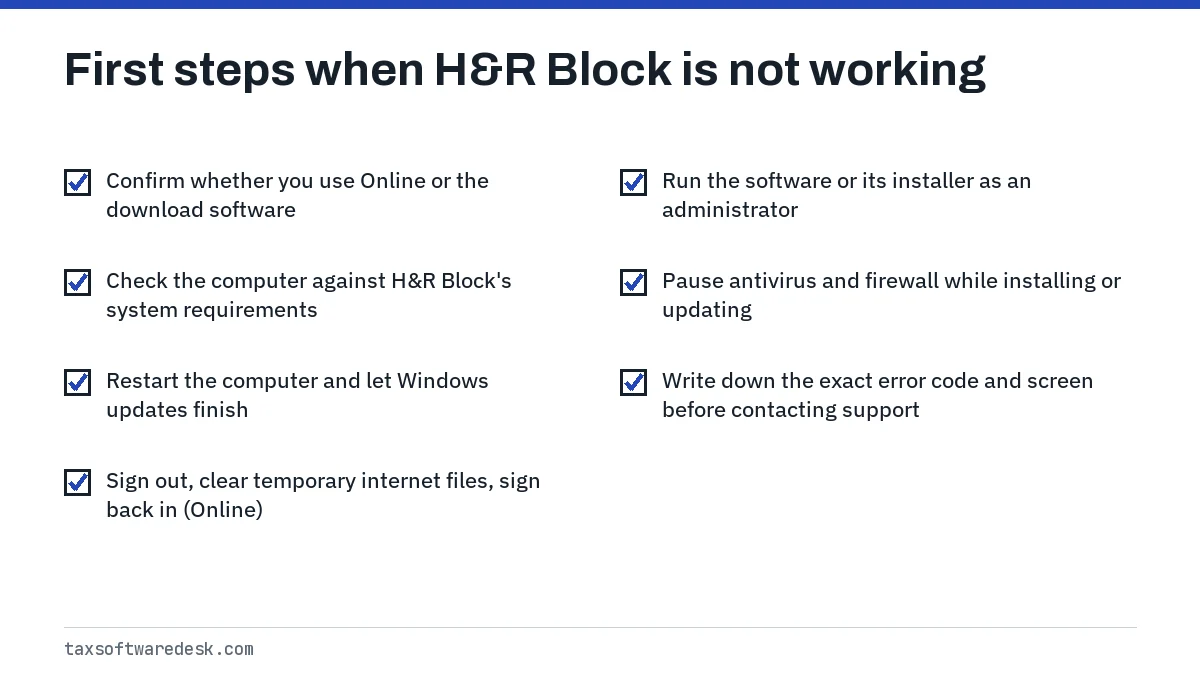
First steps that fix most H&R Block problems
Work through these before contacting support. Each one is drawn from H&R Block's own help articles, and together they cover most of the causes it lists.
If the software refuses to start after a Windows upgrade, or you are deciding whether to keep an older PC for next season, read H&R Block on Windows 10 before you buy the next edition.
When to contact H&R Block
Contact H&R Block through the support page on hrblock.com when a fix in its help center has not worked, when you see a code it has not documented, or when a Mac shows a DOS mode message, which H&R Block says means the Windows installer was downloaded to a Mac by mistake. Have the product name, tax year, the exact message and a screenshot ready.
For the 2027 filing season, H&R Block has not yet announced system requirements for its tax year 2026 software, and the IRS has not yet announced the opening day for e-file (it usually does so in early January). Recheck both before relying on an older computer.
Common questions
Why is H&R Block not working today?
Test from another device on another network. If the site works there, clear your browser cache after signing out, or try another browser. If it fails everywhere, the problem is likely on H&R Block's side, so wait and retry rather than resetting your password.
Is H&R Block Online down?
We have not found an official H&R Block status page. The practical check is to load the site on a phone using mobile data; if it loads there, the fault is with your computer, browser or connection.
How do I fix H&R Block software problems on Windows?
Confirm the PC meets the requirements, install to the default location with administrator rights, let pending Windows updates finish and restart, and pause antivirus while installing or updating. If updates still fail, download the update manually from H&R Block's Update Center.
Why does H&R Block keep freezing on the same screen?
H&R Block links this to stored browsing data. Sign out, clear temporary internet files, close the browser and sign in again. If it still freezes, switch browsers and make sure cookies and JavaScript are allowed.
Does H&R Block software work on a Mac?
Yes. H&R Block lists Mac OS X 10.15.7 or higher and Safari 15.6.1 or higher as the minimum for its tax software. The Business product is listed for Windows 11 only.
Will uninstalling H&R Block software delete my tax return?
Your return is saved as a separate file, and reinstalling the program is H&R Block's standard fix for a bad install. Copy your return files to another location first so a reinstall cannot put them at risk.
Sources
- H&R Block: Does my computer meet H&R Block software system requirements?
- H&R Block: Clearing temporary internet files
- H&R Block: Online help and browser compatibility
- H&R Block: Why can't I install my H&R Block tax software?
- H&R Block: If my H&R Block will not update on Windows, what should I do?
- IRS Publication 1345