
H&R Block activation code not working: what to check
Short answer
An H&R Block activation code not working is usually a typing problem, a code for a different product or year, or a fresh install on a second computer. The code has ten letters and numbers in the pattern XXXXX-XXXXX and turns on the software's five free federal e-files. Enter it on the Activate and Register screen, or later from the File tab.
- 01Code format
- 10 characters, XXXXX-XXXXX, capitals and numbers
- 02What it enables
- Registration and 5 free federal e-files
- 03Where to enter it
- Activate and Register screen, or File tab
- 04Second computer
- Must be activated again
Why an H&R Block activation code is not working
H&R Block describes the activation code as a unique code sent with the copy of the software you bought. It registers the program and turns on the five free federal e-files included with it. When the code is refused, the cause is almost always one of the following.
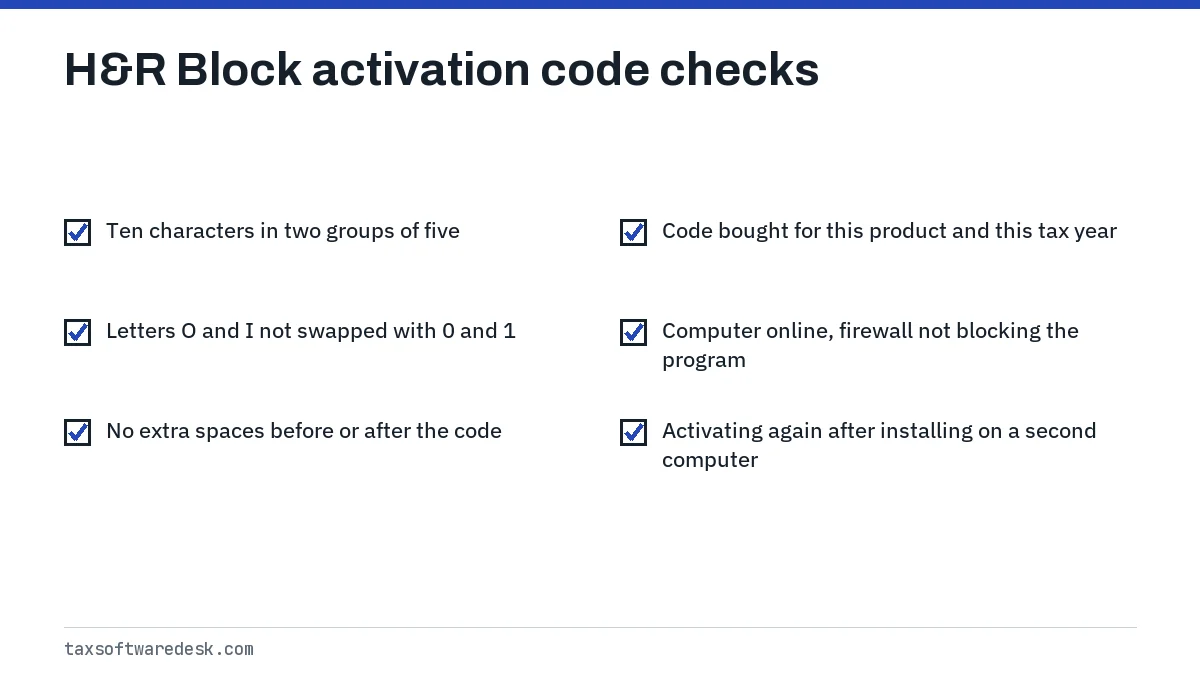
- A typing slip. The code uses capital letters and numbers, so the letter O and the number 0, or the letter I and the number 1, are easy to swap.
- The wrong product or year. A code from last season's box, or from a different H&R Block product, belongs to that copy. Match the year printed in the program's title bar to the year on your receipt.
- A new computer. H&R Block says a second installation must be activated again, so the program will ask even if you activated last week on another PC.
- A blocked connection. H&R Block lists an internet connection among its requirements for updates, state downloads and e-file. If a firewall or security program is blocking the software, activate with it paused before concluding the code is bad.
What an H&R Block activation code looks like
H&R Block's help article gives the format as ten characters split into two groups of five, written XXXXX-XXXXX. The same article later refers to an eight-character code in its step list, so if what you have does not match either length, check that you are not reading an order number or a gift card number from the same email.
A practical test: count the characters without the hyphen. Ten characters in two groups of five matches the format H&R Block shows. A long string of digits only is usually an order or transaction number.
How to find your H&R Block activation code
Where the code lives depends on where you bought the software. H&R Block lists these places:
| Where you bought it | Where the code is |
|---|---|
| Download from hrblock.com | The purchase confirmation email from H&R Block |
| Download from an online retailer such as Amazon | The retailer's purchase confirmation email, or the digital purchase history in your account on that retailer's site |
| Boxed copy from a store | With the copy you bought; check the packaging and any inserts before the receipt |
Search your inbox, including spam and promotions folders, for the retailer's name plus H&R Block. If you bought through a shared family email, check that account too.
Where to enter the code in H&R Block
H&R Block gives two entry points. The first appears when the program starts:
- Open the H&R Block Tax Software. If it is already open, save your return, close the program and open it again.
- Click Next until you reach the Activate and Register Your Software screen.
- Enter your personal information and the activation code.
- Select Activate Now.
No activation screen: use the File tab
If the Activate and Register screen does not appear, H&R Block's alternative runs through filing. Select the File tab, click Next until the Your Federal E-file Fee screen, choose E-file for free using my Activation Code, enter the code and continue.
That File tab screen is also where a mistyped code shows up as an e-file fee. If you see a charge you did not expect there, go back and re-enter the code rather than paying twice.
H&R Block activation code issues: step-by-step fixes
- Copy the code from the email and paste it, rather than typing it, to rule out O and 0 mix-ups.
- Remove any space before or after the code, and include or omit the hyphen the way the entry box shows.
- Confirm the year of the program on screen matches the year of the product you bought.
- Make sure the computer is online, then pause the firewall or antivirus while you activate.
- Close the program fully, reopen it and try again from the Activate and Register screen.
- If it still fails, try the File tab route described above.
If the program itself will not connect at all, the code is not the problem; see H&R Block cannot connect to server. If you have not installed yet, the code comes after installation, as covered in H&R Block software not installing.
H&R Block lost activation code: what you can do
If the email is gone, your first stop is the order history on the site where you paid. H&R Block notes that retailer accounts usually keep a record of digital software purchases along with the code. For an hrblock.com purchase, contact H&R Block through its support page with your order details and the email address you used.
Do not buy a second copy just to get a new code until support has confirmed the original cannot be recovered. A lost code does not affect a return you have already prepared; the code matters again when you e-file, and a return that later bounces back is fixed as explained in H&R Block rejected return.
For other software problems, such as crashes or update failures, start at H&R Block not working.
Step by step
Find the code
Open the purchase confirmation email or your order history on the retailer's site.
Open the program
Close and reopen H&R Block, then click Next to the Activate and Register Your Software screen.
Enter and activate
Paste the code, add your details and select Activate Now.
Use the File tab if needed
If the screen is missing, go to File, Your Federal E-file Fee, and choose E-file for free using my Activation Code.
Common questions
Why is my H&R Block activation code not working?
Common reasons are a mistyped character, a code for a different product or year, a new computer that needs activating again, or a firewall blocking the program while you activate. Paste the code instead of typing it and check the product year.
Where do I find my H&R Block activation code?
In the purchase confirmation email from H&R Block or the retailer, or in the digital purchase history of your account on the retailer's website. A boxed copy includes it with the product.
How many characters is an H&R Block activation code?
H&R Block shows the format as ten capital letters and numbers in two groups of five, XXXXX-XXXXX. A long all-digit number in the same email is usually the order number.
Do I need a new activation code on a new computer?
No new code is needed, but H&R Block says you must activate again on a second computer, so enter your existing code after installing there.
What does the H&R Block activation code do?
It registers the software and turns on the five free federal e-files that come with the product.
Can I enter my H&R Block activation code later?
Yes. Select the File tab, click Next to the Your Federal E-file Fee screen and choose E-file for free using my Activation Code.
Sources
- H&R Block: What's the H&R Block activation code? hrblock.com
- H&R Block: How can I install H&R Block software? hrblock.com
We check figures against these official pages. Rules change; confirm anything that affects a deadline or payment with the agency before you act.
Tell us what happened
Describe your situation and our editors will use it to improve this guide. If you leave your email, we may reply with a pointer to the right page or official contact. We never share your details.