
H&R Block software won't update: how to install updates manually
Short answer
When H&R Block software won't update, the cause is usually one of four things H&R Block lists: the program is not on the C: drive, you lack administrator rights, a Windows update is half-installed, or antivirus is blocking the download. Fix those, then retry. If it still fails, download the federal or state update file from the H&R Block Update Center and run it yourself.
- 01Internet needed to update
- Yes, for updates, state downloads and e-file
- 02Windows manual update file
- .exe, run as administrator
- 03Mac manual update file
- .dmg, double-click to install
- 04State not in the Update Center list
- No update released yet
Why H&R Block software won't update
H&R Block software won't update for a short list of reasons, and H&R Block names them on its Windows help page. Try the update again after each change rather than making them all at once, so you know which one mattered.
- Install location. Updates only work if the program is installed on the C: drive. A copy installed to D: or an external drive will not accept them.
- Administrator rights. Installing an update needs admin privileges. H&R Block specifically lists Windows 8, 8.1 and 10 as needing them, and workplace laptops often do not grant them.
- Pending Windows updates. A Windows update that has not finished can block other installers. Restart and try again.
- Antivirus or firewall. Security software can stop the download or the install. Close it, update, then turn it back on.
Updates are how forms reach you during the season. H&R Block's own update article notes that tax laws and forms can change after the software is released, and that a state update may update the federal program at the same time.
How in-program updates work
The normal route is inside the program. When you check for updates, the H&R Block Tax Software Manager window opens. Select Next, then Update if one is available, and follow the prompts. The computer must be online the whole time.
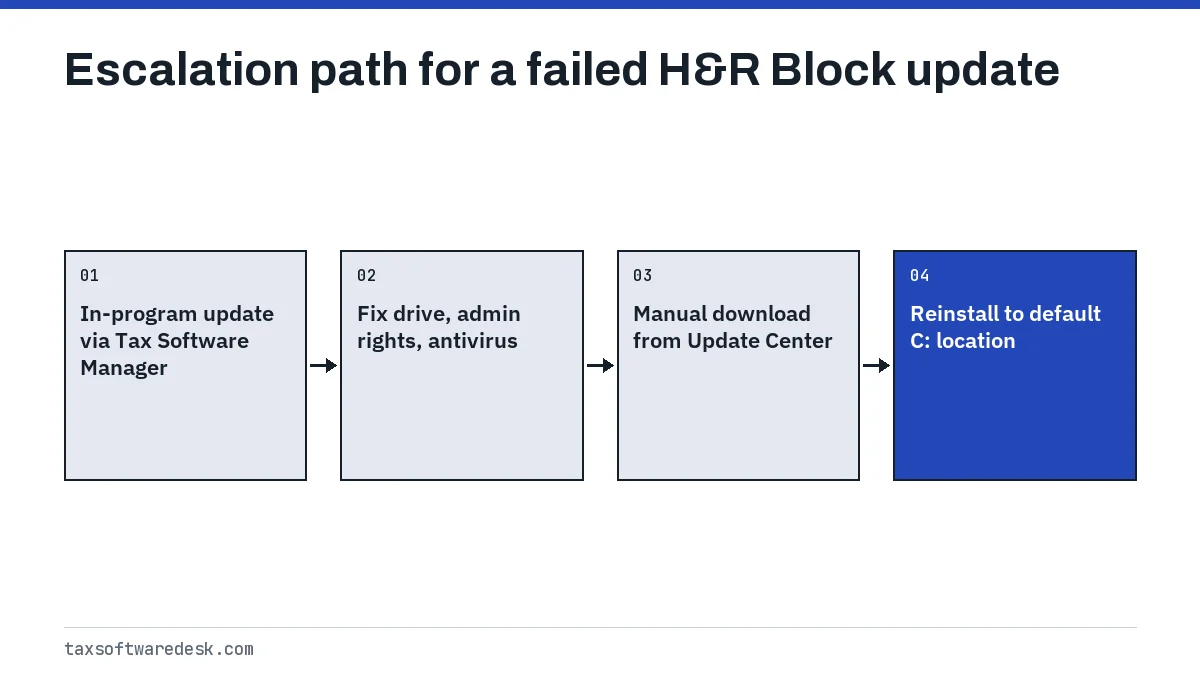
If the Tax Software Manager reports an update but never finishes, or says it cannot reach the server, the download itself is being blocked. That points to a connection problem rather than an install problem; our page on H&R Block software that cannot connect to the server covers proxy, date and firewall settings in detail.
Manual federal and state updates from the H&R Block Update Center
When the in-program updater keeps failing, H&R Block publishes each update as a standalone download on its Tax Software Update Center. This also helps if the computer with your return has no internet access: download the file elsewhere and carry it over on a USB drive.
Windows federal update
- Open the H&R Block Tax Software Update Center and, under Federal Updates, choose Windows Program Updates.
- Pick your product version from the drop-down list and select Download Update.
- Save the file to your desktop.
- Close H&R Block Tax Software completely.
- Right-click the downloaded .exe file and choose Run as Administrator.
- Follow the update program's prompts until it finishes, then reopen your return.
Windows state update
The steps are the same, but start under State Updates, then Windows Program Updates, and pick the state program. If your state is missing from the drop-down list, H&R Block says no update has been released for it yet, so there is nothing to fix on your side.
| Step | Windows | Mac |
|---|---|---|
| Update Center link | Windows Program Updates | Apple Program Updates |
| File type | .exe | .dmg |
| How to run it | Right-click, Run as Administrator | Double-click, follow prompts |
| Before running | Close H&R Block | Close H&R Block |
H&R Block update not working on Mac
On a Mac, H&R Block's first suggestion is a disk permissions check before you touch the update files.
- Open Applications, then Utilities, then Disk Utility.
- Select Macintosh HD and run First Aid (older macOS versions show Verify Disk Permissions instead).
- Repair anything it reports, close Disk Utility and try the update again.
- If it still fails, turn off antivirus or firewall software and retry.
- As a last step, download the Apple Program Updates .dmg from the Update Center, close the program, double-click the file and follow the prompts.
If the Mac app instead refuses to launch with a read-only volume message, the program was not copied into Applications correctly. H&R Block's fix is to drag the app to the Trash and drag the installer icon into the Applications folder again.
H&R Block software update problem checklist
Use this order to avoid repeating work. Each line is quick to test on its own.
- Restart the computer so any pending Windows or macOS update completes.
- Confirm the program is on the C: drive: right-click its desktop shortcut, choose Open file location and read the drive letter in the address bar. If it is anything other than C:, reinstall to the default location.
- Sign in with an administrator account, or right-click the program and choose Run as administrator.
- Pause antivirus and firewall software for the update only.
- Retry the in-program update.
- Download and run the manual file from the Update Center.
Update schedule and form availability
Desktop tax software ships before every form is final, so updates arrive in waves through the winter. A form marked as not ready usually means the update containing it has not been released, not that your copy is broken. Check the Update Center list for your state before troubleshooting further.
The release date of H&R Block's tax year 2026 software, used in the 2027 filing season, is not yet announced as of September 2026, and neither are its system requirements. Vendors usually release new editions in the late fall and keep updating forms into the new year. The IRS 2027 filing season start date is also not yet announced; the IRS normally announces it in early January.
If the update succeeds but activation then fails, see H&R Block activation code not working. For other symptoms, start from the H&R Block not working overview.
Tax Software Desk is independent and is not affiliated with Intuit, H&R Block, TaxAct, FreeTaxUSA, TaxSlayer, Block Inc. (Cash App Taxes), Wealthsimple, UFile or any other software company.
Step by step
Remove the four blockers
Restart, confirm the program is on C:, use an administrator account and pause antivirus.
Retry the in-program update
Open the Tax Software Manager, select Next, then Update.
Download the manual update
In the Update Center pick Windows or Apple Program Updates for federal or state and download your version.
Run it with H&R Block closed
On Windows right-click the .exe and Run as Administrator; on Mac double-click the .dmg.
Common questions
Why won't my H&R Block software update?
The most common causes H&R Block lists are an install outside the C: drive, missing administrator rights, an unfinished Windows update and antivirus or firewall software blocking the download. Fix one at a time and retry the update after each.
Where do I download H&R Block updates manually?
From the H&R Block Tax Software Update Center on hrblock.com. Choose Windows or Apple Program Updates under the federal or state section, select your product and download the file.
Why is my state missing from the H&R Block update list?
H&R Block says that if a state is not in the drop-down menu, an update for it has not been released yet. Check back later rather than reinstalling.
Can I update H&R Block without internet on that computer?
Yes. Download the manual update file on another computer, copy it to a USB drive, close H&R Block on the tax computer and run the file there.
Does updating H&R Block change my saved return?
An update changes the program and its forms, not your saved .tXX file. Reopen the return after updating so it recalculates with the latest forms, and review any flagged entries.
Sources
- H&R Block: If H&R Block will not update on Windows hrblock.com
- H&R Block: If H&R Block software will not update on Mac hrblock.com
- H&R Block: How do I update H&R Block software? hrblock.com
- H&R Block: Federal updates for Windows hrblock.com
- H&R Block: Tax software won't install, read-only volume hrblock.com
We check figures against these official pages. Rules change; confirm anything that affects a deadline or payment with the agency before you act.
Tell us what happened
Describe your situation and our editors will use it to improve this guide. If you leave your email, we may reply with a pointer to the right page or official contact. We never share your details.