
H&R Block software not installing: how to get it on your computer
Short answer
When H&R Block software is not installing, H&R Block points to four causes: installing somewhere other than the default location, no administrator rights, Windows updates that have not finished, and antivirus blocking the installer. Restart, sign in as an administrator, pause antivirus, and run the installer from the Download Program link in your purchase email, accepting the default folder.
- 01Windows minimum
- Windows 10 or higher
- 02Mac minimum
- Mac OS X 10.15.7 or higher
- 03Disk space needed
- 170 MB (Business edition: 15 GB)
- 04Installer file name contains
- HRB, ends in .exe on Windows
Why H&R Block software is not installing
H&R Block software not installing is usually a Windows permission or timing problem, not a damaged product. H&R Block's help center lists four causes, and most failed installs trace back to one of them:
- A different install folder. H&R Block asks you to let the installer use the location it picks automatically. Its update help adds that updates do not work if the program is not on the C: drive.
- No administrator rights. A work laptop or a standard Windows account may block the install without a clear message.
- Unfinished Windows updates. A pending update can hold files the installer needs. Restart, especially if Windows just updated, and try again.
- Antivirus running. Security software can quarantine part of the installer. Pause it for the install, then turn it back on.
Check the system requirements first
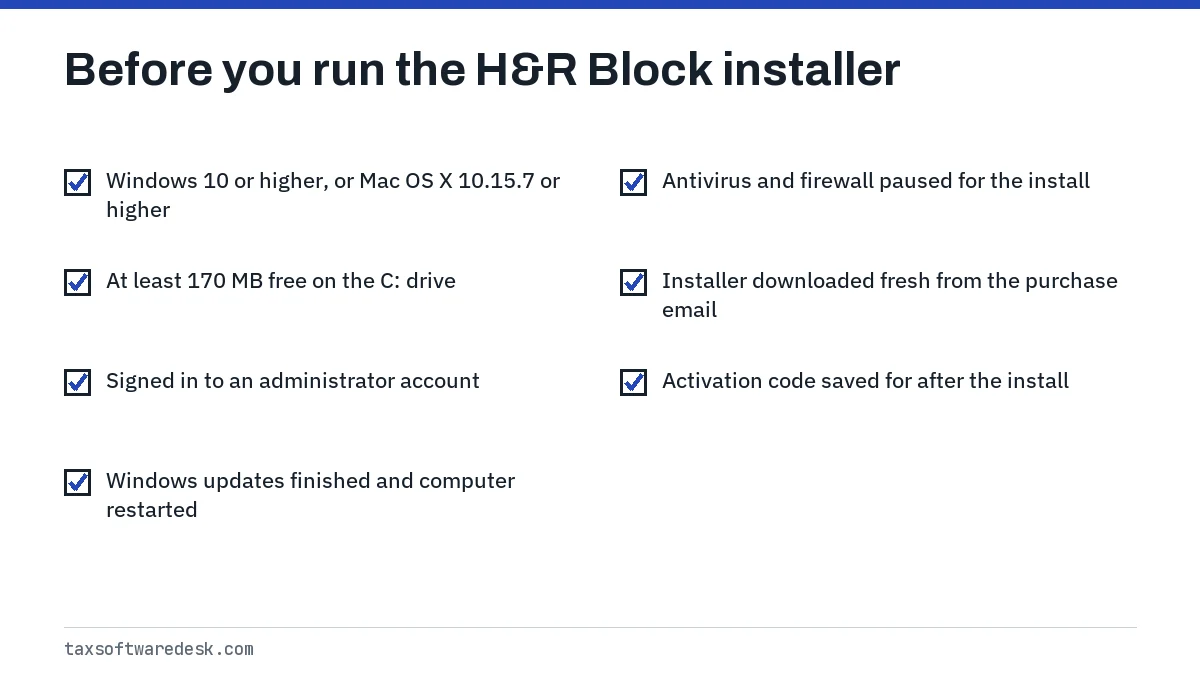
An installer can fail silently on a computer the software does not support. H&R Block's requirements page, checked on 18 September 2026, sets these minimums for the consumer tax software: Windows 10 or higher, or Mac OS X 10.15.7 or higher, 170 MB of free disk space and a 1024 x 768 display.
The H&R Block Business edition is far heavier: Windows 11, 8 GB of RAM, 15 GB of disk space and an Intel Core 10th generation i5 or newer. A Business install on a Windows 10 PC is outside what H&R Block supports. If you are unsure whether your PC will handle next season's edition, read H&R Block on Windows 10.
Download the H&R Block installer the right way
If you bought the download from hrblock.com, the installer comes from the Download Program link in your purchase confirmation email. H&R Block's steps for Windows:
- Open the purchase confirmation email and select Download Program.
- Close every other open program.
- Open the downloaded file.
- Follow the installation wizard and keep the default install location.
On a Mac, you open the downloaded file and drag the H&R Block app into the Applications folder. If you no longer have the email, H&R Block says you can request the download link again.
H&R Block installer not working: find the file you downloaded
A common snag is not being able to find the file after the download finishes. On Windows, press the Windows key and Q together, search for hrb and look for an .exe file with HRB in its name; that is the installer. On a Mac, open Finder, choose the Mac's hard drive in the sidebar and search for HRBlock.
If an old partial download is sitting in the Downloads folder, delete it and download again, so you are not rerunning a broken copy.
H&R Block software will not install: antivirus and admin rights
If the wizard starts but stops or rolls back, work through the permission side. Sign in to a Windows account that is an administrator, then right-click the installer and choose Run as administrator. On a company-managed laptop, you may simply not be allowed to install software; a personal computer is the easier route.
Pause antivirus and any third-party firewall just for the install. Restart first if Windows shows a pending update, because H&R Block specifically links incomplete Windows updates to failed installs. Turn your security software back on as soon as the install completes.
If the installer shows a numbered error
Codes such as 1152, 1500, 1721 and 1722 are Windows Installer messages with specific fixes, from clearing the Temp folder to re-registering the installer service. Look the number up in the H&R Block error codes list before reinstalling again.
Mac: read-only volume or DOS mode
If a Mac says H&R Block cannot run on a read-only volume, the app was opened from the installer window instead of from Applications. Drag it to the Trash, reopen the installer and drag the green H&R Block icon into Applications. A DOS mode message means you downloaded the Windows version; get the Mac installer instead.
How to install H&R Block software on a new computer
Moving to a new PC or Mac is a fresh install. Download the installer again from your purchase email or order history, install it, then copy your saved return files over from the old computer, for example with a USB drive.
H&R Block states that if you install the software on a second computer, you need to activate it again. Keep your activation code handy before you start.
Install H&R Block software with an activation code
The code is not entered during installation. After the program is installed, open it and click Next until the Activate and Register Your Software screen, enter your details and the code, then select Activate Now. If that screen never appears or the code is refused, see H&R Block activation code not working.
Once installed, run an update before you start your return so the forms are current. If the update step fails, go to H&R Block software won't update.
Still not installing
Uninstall any earlier partial copy from Windows Settings, restart, and install once more with nothing else running. If it still fails, write down the exact message and contact H&R Block through its support page. For problems after the program is installed, start at H&R Block not working.
Step by step
Check requirements
Confirm Windows 10 or higher or Mac OS X 10.15.7 or higher and at least 170 MB free.
Prepare the computer
Restart, let Windows updates finish, sign in as an administrator and pause antivirus.
Download
Use the Download Program link in your purchase email and close other programs.
Install
Run the installer, keep the default location and finish the wizard.
Activate and update
Open the program, enter the activation code, then check for updates.
Common questions
Why won't H&R Block software install?
H&R Block names four causes: a non-default install location, missing administrator rights, Windows updates that have not finished, and antivirus software blocking the installer. Restart, use an administrator account, pause antivirus and keep the default folder.
Can I install H&R Block software on more than one computer?
H&R Block says that if you install the software on a second computer, you must activate it again with your activation code. Copy your return files over from the first computer separately.
Where is the H&R Block installer after I download it?
On Windows, press Windows key + Q and search for hrb; the installer is an .exe file with HRB in its name. On a Mac, search Finder for HRBlock.
Do I enter the activation code when installing H&R Block?
No. You install first, then open the program and enter the code on the Activate and Register Your Software screen, or later from the File tab.
Can I install H&R Block software without the confirmation email?
Yes. H&R Block says you can request the download link again, and retailer purchases usually keep the link and code in your order history on that store's website.
Sources
- H&R Block: Why can't I install my H&R Block tax software? hrblock.com
- H&R Block: How can I install H&R Block software? hrblock.com
- H&R Block: Software system requirements hrblock.com
- H&R Block: What's the H&R Block activation code? hrblock.com
- H&R Block: Read-only volume error when installing hrblock.com
We check figures against these official pages. Rules change; confirm anything that affects a deadline or payment with the agency before you act.
Tell us what happened
Describe your situation and our editors will use it to improve this guide. If you leave your email, we may reply with a pointer to the right page or official contact. We never share your details.