
H&R Block failed to open database: protect your return, then repair
Short answer
H&R Block failed to open database is a start-up error in the desktop program, reported mostly with Premium and Business editions. H&R Block has not published an official explanation. Your return is stored in a separate .tXX file, so back that up first, then install the latest update, run the program as administrator with antivirus paused, and reinstall to the default C: location if it persists.
- 01Official H&R Block article on this error
- None published (checked September 2026)
- 02Where returns are saved
- Documents\HR Block, as .tXX files
- 03Tax year 2025 file extension
- .t25
- 04H&R Block Business minimum
- Windows 11, 8 GB RAM, 15 GB disk
What H&R Block failed to open database means
The H&R Block failed to open database message appears when the desktop program starts, or when it tries to load a return, and cannot read the internal data it relies on. That data belongs to the program itself: form definitions, calculations and program settings. It is not the same thing as your saved tax return.
H&R Block's help center has no article for this message as of September 2026, so there is no vendor-confirmed cause. Reports on public help forums tie it mostly to H&R Block Premium and H&R Block Business, and describe it after an interrupted update, after a Windows update, or when security software blocks the program's own files. The steps below are ordered from least to most disruptive so you do not reinstall when an update would have been enough.
Will I lose my return?
Very unlikely. H&R Block saves each return as its own data file, normally in the Documents folder in a subfolder called HR Block. The extension shows the tax year: .t25 for tax year 2025, .t24 for 2024, and so on. A database error inside the program does not touch those files, and uninstalling the program does not delete them.
If the file is not in Documents\HR Block, H&R Block's method for finding it is to open File Explorer with Windows key + E and search for *.t25 (or the year you need). On a Mac, open a Finder window with Command + N and search the same way.
Back up your tax files before any repair
Make the backup first, while nothing has been changed. It takes a couple of minutes and makes every later step safe to try.
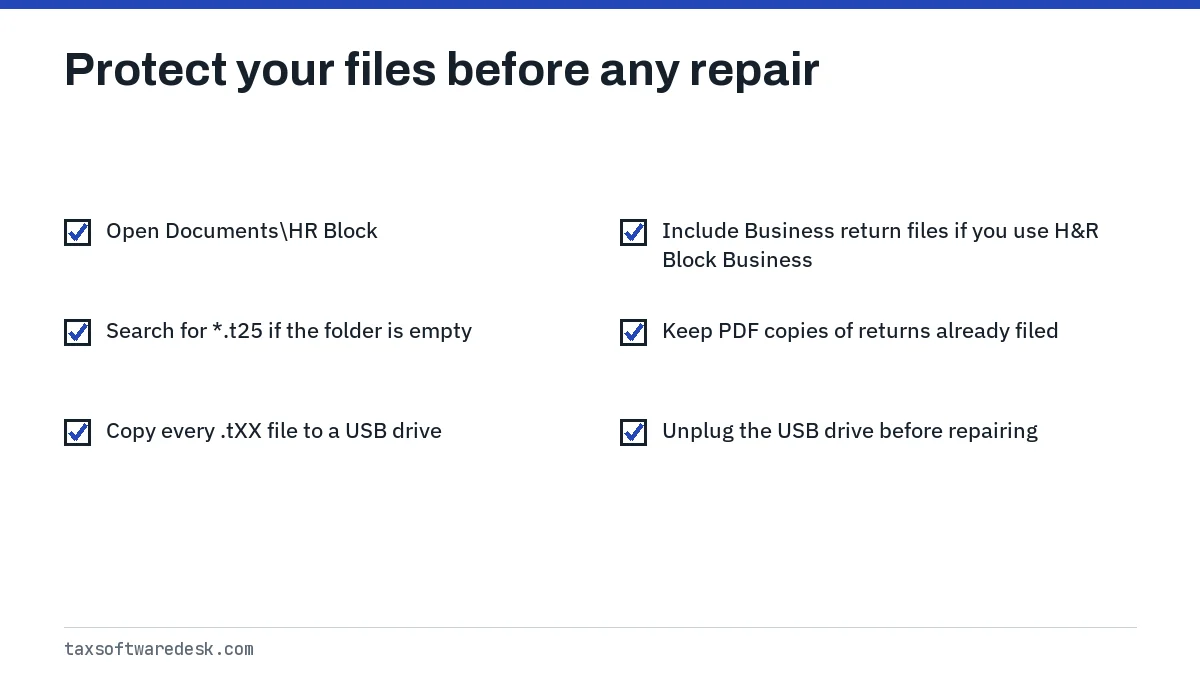
Keep the backup separate from the PC until the program opens your return normally. If you have already e-filed, also keep the PDF copy of the return you printed or saved, since that is what you need if the IRS or your state ever asks about it.
H&R Block software won't open: repair steps in order
Step 1: restart and finish Windows updates
H&R Block notes that Windows updates that are only partly installed cause install and update problems. Restart fully, let Windows finish any pending update, then try the program again.
Step 2: run the program as administrator
Right-click the H&R Block shortcut and choose Run as administrator. If the error disappears, the program was being denied access to its own files under your normal account. That fits a work laptop or a PC where another family member installed the software.
Step 3: install the latest update manually
Because the program cannot open, its built-in updater will not run. Download the federal update for your edition from the H&R Block Update Center, close the program, right-click the .exe and choose Run as Administrator. Full steps are on our H&R Block software won't update page.
Step 4: pause security software
Antivirus that quarantines or locks program files can produce a read failure at start-up. Pause it, open H&R Block, and if the program starts, add it to your antivirus allowed list before turning protection back on.
Step 5: uninstall and reinstall
- Confirm your .tXX backup is on the USB drive.
- Open Control Panel, choose Uninstall a program, and remove the H&R Block edition for that year plus any state programs.
- Restart.
- Download a fresh installer from your purchase email and install to the default location. H&R Block says updates only work when the program is on the C: drive.
- Apply the latest update, then open your return from Documents\HR Block.
If setup itself fails with a Windows Installer message, see H&R Block error 1722 before trying again.
H&R Block Business failed to open database
H&R Block Business has much heavier requirements than the personal editions, and falling short of them is worth ruling out before a reinstall. The figures below are from H&R Block's system requirements page, checked September 2026.
| Item | H&R Block Business | Personal editions (Windows) |
|---|---|---|
| Operating system | Windows 11 | Windows 10 or higher |
| Disk space | 15 GB | 170 MB |
| Memory | 8 GB RAM | Not listed |
| Processor | Intel Core 10th generation i5 or higher | Not listed |
| Internet | Required for updates, state downloads, e-file | Required for updates, state downloads, e-file |
Running Business on Windows 10, or on a drive with only a few gigabytes free, can leave the program unable to create or open its working files. Clear disk space and confirm the Windows version under Settings, System, About. Requirements for the tax year 2026 editions are not yet announced; expect them in the fall when new editions appear.
When to stop troubleshooting
If a clean reinstall on a supported system still shows the error, contact H&R Block support through its help center, since the fix may need a patched build. Near a deadline, a practical fallback is to install the same edition on another computer and open your backed-up .tXX file there.
For other start-up symptoms, see H&R Block not working, our list of H&R Block error codes, and H&R Block on Windows 10 if you are still on that system.
Tax Software Desk is independent and is not affiliated with Intuit, H&R Block, TaxAct, FreeTaxUSA, TaxSlayer, Block Inc. (Cash App Taxes), Wealthsimple, UFile or any other software company.
Step by step
Back up returns
Copy the .tXX files from Documents\HR Block to a USB drive.
Restart and run as administrator
Finish pending Windows updates, then right-click the program and choose Run as administrator.
Update manually
Download the federal update from the H&R Block Update Center and run it as administrator with the program closed.
Pause antivirus
Temporarily turn off security software and try opening the program.
Reinstall
Uninstall the edition and states, restart, reinstall to the default C: location, update and open your return.
Common questions
What does failed to open database mean in H&R Block?
The desktop program could not read its own internal data when starting or loading a return. H&R Block has not published an official cause, and the message is about the program's files, not your saved return.
Will reinstalling H&R Block delete my tax return?
No. Returns are separate .tXX files, normally in Documents\HR Block, and uninstalling the program leaves them in place. Copy them to a USB drive first anyway.
How do I find my H&R Block tax file?
Look in Documents\HR Block. If it is not there, search File Explorer for *.t25 for tax year 2025, changing the number for other years.
Does H&R Block Business run on Windows 10?
H&R Block's requirements page lists Windows 11 for H&R Block Business, along with 8 GB of RAM and 15 GB of disk space.
Can I open my H&R Block return on another computer?
Yes. Install the same year's H&R Block edition on the other computer, copy the .tXX file over on a USB drive and open it there.
Sources
- H&R Block: Where's the location of my H&R Block data file? hrblock.com
- H&R Block: Software system requirements hrblock.com
- H&R Block: How can I uninstall H&R Block software? hrblock.com
- H&R Block: If H&R Block will not update on Windows hrblock.com
- H&R Block: Why can't I install my H&R Block tax software? hrblock.com
We check figures against these official pages. Rules change; confirm anything that affects a deadline or payment with the agency before you act.
Tell us what happened
Describe your situation and our editors will use it to improve this guide. If you leave your email, we may reply with a pointer to the right page or official contact. We never share your details.