
Topic
NETFILE error codes: what the number in your tax software means
NETFILE error codes are numbers the Canada Revenue Agency (CRA) sends back to certified tax software when it refuses a return filed through NETFILE. Most point to one field, such as the access code, a name, an address or a bankruptcy flag, that you can correct and resend. A few come from CRA system problems and only clear when the CRA fixes them.
8 guides in this topic Updated September 19, 2026
- Auto-Fill My Return Not Working: Software Connection FixesWhen Auto-fill my return is not working, the cause is usually one of three things: you signed in with a provincial partner (Alberta.ca or BC Services…
- NETFILE Error Code 15: What It Means and How to Fix ItNETFILE error code 15 means your return is marked as a pre-bankruptcy return but still includes selected financial data statements, such as a rental…
- NETFILE Error Code 21: Fix an Access Code That Won't MatchNETFILE error code 21 means the NETFILE access code entered on your return does not match the one the CRA has on record, according to TurboTax Canada…
- NETFILE Error Code 31: Personal Information Mismatch FixNETFILE error code 31 means the personal information on your return does not match what the CRA has on record, which TurboTax Canada says comes from…
- NETFILE Error Code 84: Fix the Spouse Name Format ErrorNETFILE error code 84 means the name of your spouse or common-law partner, as entered on your return, contains at least one character the CRA will no…
- NETFILE Error N1: Authentication Failed and LockoutsNETFILE error N1 means authentication failed: the CRA could not match the identity details on your return, mainly your name, social insurance number…
- StudioTax NETFILE Not Working: How to Transmit Your ReturnWhen StudioTax NETFILE is not working, the cause is usually one of four things: the licence window has not been completed, a firewall, VPN or antivir…
- UFile NETFILE Error: Fix a Rejected or Blocked TransmissionA UFile NETFILE error falls into one of three groups: UFile will not send because the return is not eligible for NETFILE, the CRA rejected it with a…
What does a NETFILE error code mean?
A NETFILE error code is the reason the CRA gives for not accepting a personal income tax and benefit return sent from certified software. The return has not been filed when you see one: nothing reached the CRA's processing system, so you can fix the entry and send it again without it counting as a second return.
The code is not a verdict on your taxes. It usually flags a single field that failed a check, for example an access code that does not match, a partner's name with a character the CRA's system will not read, or a return marked as pre-bankruptcy that still carries business statements. Your software shows the number; the fix happens in the part of the return the number points to.
Read the video transcript
NETFILE error codes: what the number in your tax software means
NETFILE error codes are numbers the Canada Revenue Agency (CRA) sends back to certified tax software when it refuses a return filed through NETFILE.
2026 NETFILE window: February 23, 2026 (6:00 a.m. ET) to January 29, 2027.
Initial returns NETFILE accepts in 2026: Tax years 2018 to 2025.
Official CRA code list: RC4018, Chapter 2 EFILE error messages (2018 to 2025).
Two different published lists explain the numbers people see, and they do not use the same numbering.
The table below lists the codes people search for most, the field each one points to and the source that defines it.
A NETFILE return is refused for one of four reasons: identity, formatting, return content or eligibility.
What is a NETFILE confirmation number? It is the code your software shows after the CRA receives your return.
Where NETFILE error codes come from
Two different published lists explain the numbers people see, and they do not use the same numbering. Mixing them up is the most common reason a fix found online does not work.
- The CRA's EFILE list. Chapter 2 of the CRA's Electronic Filers Manual (RC4018) lists error messages for 2018 to 2025 returns, written for professional preparers who file through EFILE. It is the only official, numbered list the CRA publishes.
- Software vendors' NETFILE lists. Vendors such as TurboTax Canada publish their own pages describing codes their customers receive through NETFILE, including identity codes like 21 and N1 that do not appear in the EFILE chapter.
- Plain messages from the software. Some products show a generic line such as a NETFILE error detected, with the number underneath. The wording belongs to the product; the number is what matters.
Why the same NETFILE error code can mean two things
Code 31 is the clearest example. In the CRA's EFILE chapter, error 31 concerns an election under subsection 104(13.4) that applies only to deceased persons. On TurboTax Canada's NETFILE page, code 31 means your personal information does not match CRA records. Both are real, but they describe different checks, so always note which source defines the code before changing anything on your return.
NETFILE error codes list with fixes
The table below lists the codes people search for most, the field each one points to and the source that defines it. Codes marked RC4018 come from the CRA's EFILE chapter for tax years 2018 to 2025; codes marked TurboTax Canada are that vendor's published explanation of what it receives through NETFILE.
| Code | What it points to | Defined by | Where to fix it |
|---|---|---|---|
| 15 | Pre-bankruptcy return sent with selected financial data statements | CRA RC4018 | Error code 15 fix |
| 16 | First-time filer: full name must match CRA records | CRA RC4018 | Identification section |
| 21 | NETFILE access code does not match | TurboTax Canada | Error code 21 fix |
| 31 | Personal information does not match records | TurboTax Canada | Error code 31 fix |
| 32 | First-time filer indicator set incorrectly | TurboTax Canada | Identification section |
| 35 | Marked pre-bankruptcy, but CRA has no bankruptcy date | CRA RC4018 | Submit Form DC905, as the CRA instructs |
| 49, 50, 51, 53, 57 | Care-of line, street, ZIP, city or province problems | CRA RC4018 | Mailing address fields |
| 84 | Spouse or common-law partner name has an invalid character | CRA RC4018 | Error code 84 fix |
| 94 | Selected financial data record count does not match | CRA RC4018 | Paper file if entries are correct |
| 561 | Provincial tuition entries do not match federal Schedule 11 | CRA RC4018 | Provincial tuition schedule |
| N1 | Authentication failed; locks after five failed attempts | TurboTax Canada | Error N1 fix |
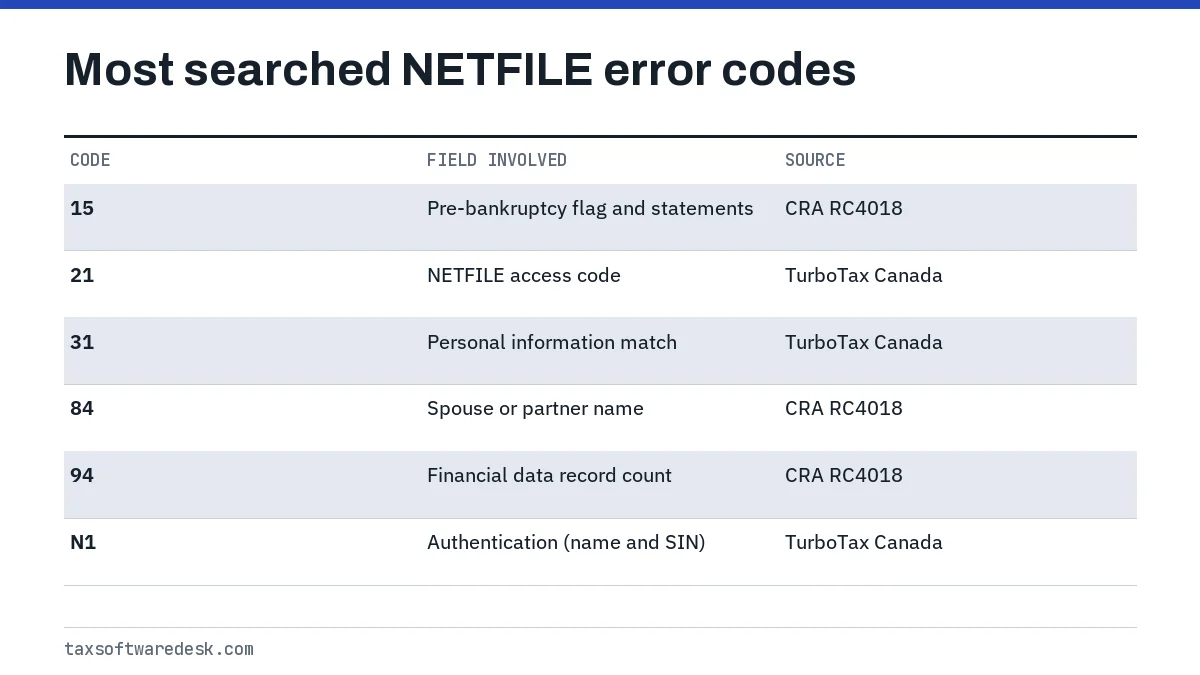
If your code is not in the table, look it up in RC4018 Chapter 2 first, then in your software's own help centre. When neither source explains it, the software company's support team is the right contact, because it can see the full response the CRA returned to its servers.
Why was my NETFILE return not accepted?
A NETFILE return is refused for one of four reasons: identity, formatting, return content or eligibility. Sorting your code into one of these groups tells you whether to edit a field, wait, or switch to paper.
- Identity checks. The CRA could not confirm who is filing. Codes 21, 31, 32, 16 and N1 sit here. The fix is in the identification section, not in your income or deductions.
- Formatting checks. A value is in the wrong shape, such as a postal code, a city name or a partner's name with a disallowed character. Codes 49 to 57 and 84 are formatting errors.
- Content checks. Two parts of the return disagree, such as provincial and federal tuition amounts (561) or a pre-bankruptcy flag that clashes with the statements attached (15 and 35).
- Eligibility and timing. Some returns cannot be filed electronically at all. In the 2026 season NETFILE accepts initial returns for tax years 2018 to 2025 only, and ReFILE accepts changes to 2022, 2023, 2024 and 2025 returns.
Timing also matters. The CRA opened NETFILE and ReFILE on Monday, February 23, 2026 at 6:00 a.m. Eastern time and keeps them open until Friday, January 29, 2027. A 2025 return sent after that closing date will not go through NETFILE, whatever software you use.
How to fix a NETFILE error code and resend
Fixing a NETFILE error takes five steps, and most people finish in one sitting because the CRA has not recorded anything yet.
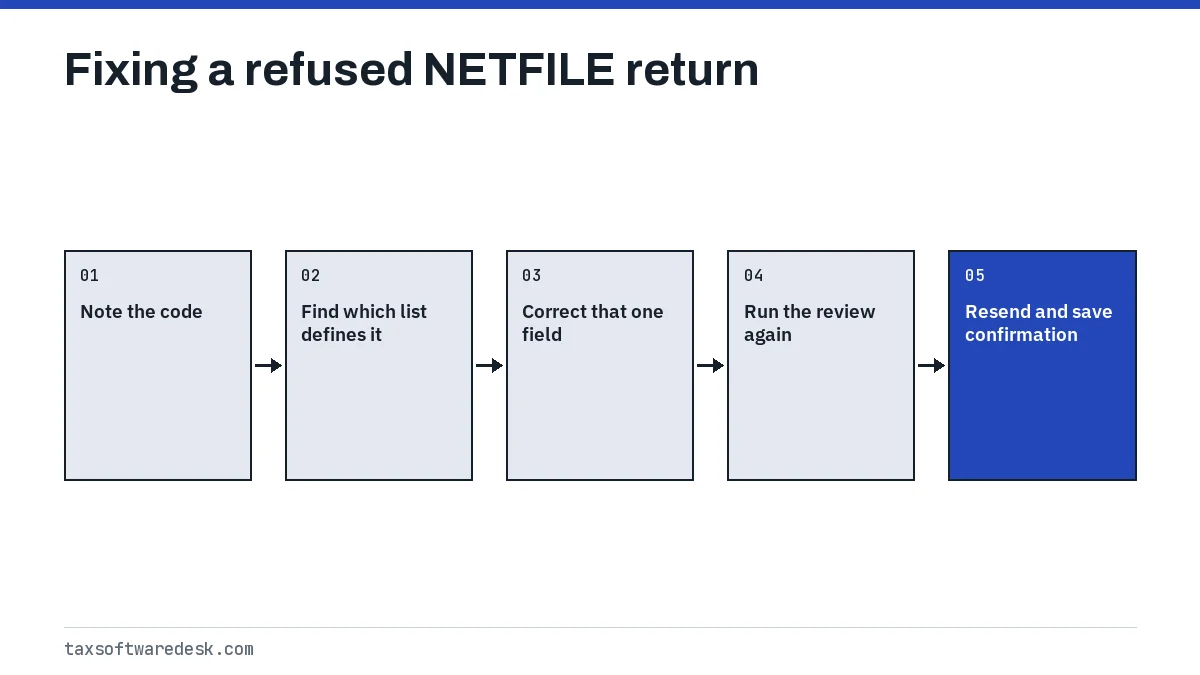
- Write down the exact code and any text next to it, including letters such as N1.
- Find which list defines it: RC4018 Chapter 2 for numbered EFILE codes, or your software's help page for vendor NETFILE codes.
- Open the section the code points to and correct only that field. Do not change income or deductions to make an identity error go away.
- Run the software's review or error check again so it catches anything that changed.
- Resend, then save or print the confirmation number the software displays. The CRA says this code confirms it received your completed return.
If the same code comes back twice with no change, stop resending. Repeated identity failures can lock you out: TurboTax Canada notes that code N1 locks the account after five failed attempts.
Can I paper file after a NETFILE error?
Yes. The CRA says that if you cannot use NETFILE, you can print your return and mail it. Paper is the right choice in three situations: the code says the return is not eligible for electronic filing, the entries are correct but the error keeps returning, or a CRA system problem has no fix in sight before your deadline.
The CRA's own error list names one case directly: for error 94, when the entries are correct, the instruction is to file on paper. Its Electronic Filers Manual also lists pre-bankruptcy returns with immigration or emigration dates, or with sections 116 or 250, as returns that must be sent on paper.
NETFILE error codes caused by CRA system issues
Some codes have nothing to do with your entries. During the 2025 season TurboTax Canada listed codes 45555, 45566, 90308 and 95031 as CRA system issues with no workaround and no time frame for a fix, while others, such as 2515 and 90228, were marked resolved by mid-April 2025.
These codes change every season, so a list from last year tells you little about this year. When a code has five digits and no match in RC4018, check your software company's status or known-issues page before editing your return. If the issue is marked as a CRA problem, wait for the fix or paper file if your deadline is close.
Product-specific NETFILE problems
A few problems are tied to a single product rather than to a CRA code, such as software that will not open the NETFILE screen at all. See our guides to StudioTax NETFILE problems and UFile NETFILE errors, and our page on Auto-fill my return connection problems when the error appears before you even reach the send step.
When does NETFILE open for 2026 returns?
The 2027 NETFILE opening date for 2026 tax returns has not been announced as of September 2026. The CRA usually announces it in January or February; in 2026 the service opened on February 23.
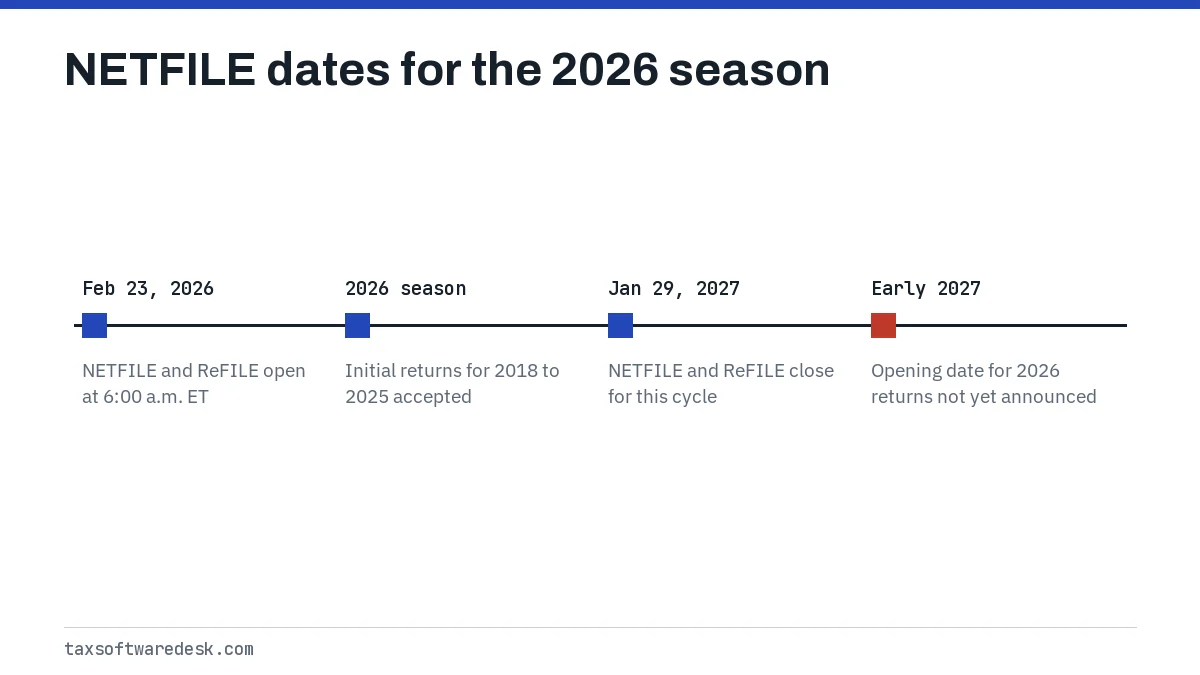
Returns sent before the service opens are not accepted, so an error on the first morning of the season can simply mean NETFILE is not live yet. Certified software also has to be on the CRA's list for the new tax year; the CRA publishes that list of certified products each year.
Common questions
What is a NETFILE confirmation number?
It is the code your software shows after the CRA receives your return. The CRA says it confirms that your completed return arrived. Save it; without one, assume the return was not filed.
Does a NETFILE error code mean the CRA has my return?
No. An error code means the return was refused before processing. You can correct the flagged field and send the same return again without creating a duplicate.
Why does my tax software say NETFILE error detected?
That kind of message is the software's general notice that the CRA refused the return. Look for the number or letter code beside it; that code tells you which field to fix.
Is there an official NETFILE error codes list?
The CRA's official numbered list is Chapter 2 of the Electronic Filers Manual (RC4018), covering 2018 to 2025 returns. Identity codes such as 21 and N1 are explained by software vendors instead.
Can I NETFILE a return from an earlier year?
In the 2026 season NETFILE accepts initial returns for tax years 2018 through 2025. Returns older than 2018 must be mailed.
Who should I contact about a NETFILE error code?
Contact your software company first for vendor codes and five-digit system codes, since it sees the CRA's response. For identity mismatches that persist after checking your details, the CRA is the one that holds the records.