
Topic
FreeTaxUSA not working: find the fix for your problem
When FreeTaxUSA is not working, the cause is usually the browser session rather than the site: FreeTaxUSA's own staff tell users to confirm they are on www.freetaxusa.com and clear the browser cache, and its error screen says to sign out and sign back in. Sign-in codes, W-2 uploads and IRS rejections each have their own fix, listed below.
11 guides in this topic Updated October 13, 2026
- Can't Log In to FreeTaxUSA: Sign-In and Code FixesIf you can't log in to FreeTaxUSA, use its account recovery tool: it asks for your email or phone number plus your Social Security number, then sends…
- Cash App Taxes Not Working: Loading and Sign-In FixesCash App Taxes not working most often traces to sign-in: Cash App Taxes says you need Cash App installed on your phone with an active account, even t…
- FreeTaxUSA Amended Return: How to Amend, Cost and E-FileTo file a FreeTaxUSA amended return, sign in to the FreeTaxUSA edition for that tax year, choose Amend Tax Return in the Account menu, enter the refu…
- FreeTaxUSA Rejected Return: How to Fix and ResubmitIf FreeTaxUSA rejected your return, sign in and open Final Steps > Check Status to read the IRS reason, correct the flagged entry, then click Send Ta…
- FreeTaxUSA Won't Upload W-2: Fix Upload and Camera ProblemsWhen FreeTaxUSA won't upload a W-2, check the file first: a FreeTaxUSA agent said uploads need to be a PDF under 30 MB. For photos, allow the browser…
- Jackson Hewitt Online Not Working: Sign-In and Filing FixesJackson Hewitt Online not working is often a login mix-up: Jackson Hewitt runs two separate accounts, and its FAQ says people who file themselves onl…
- TaxAct General RSS Error: What It Means and How to Fix ItThe TaxAct General RSS error is not explained anywhere in TaxAct's public help center as of September 2026. Users report it when starting a return, s…
- TaxAct Not Working: Fixes for Sign-In, Loading and ErrorsWhen TaxAct is not working, first identify whether you use TaxAct Online or the Windows desktop program. TaxAct says website problems usually come fr…
- TaxSlayer Error Code 0622: What It Means and Next StepsTaxSlayer error code 0622, shown as "Something doesn't look right," means TaxSlayer wants one more identity verification step to protect the account…
- TaxSlayer Not Working: Loading, Code and Payment FixesWhen TaxSlayer is not working, TaxSlayer's help center points first to the browser: update it (Internet Explorer is no longer supported and Chrome is…
- TaxSlayer Rejected Tax Return: Fix and Resubmit StepsTo fix a TaxSlayer rejected tax return, sign in, click Fix Return on the Tax Home page to read the reject code, correct the entry, then resubmit from…
Why is FreeTaxUSA not working?
FreeTaxUSA not working almost always means one of four things: the browser is holding a stale session, the sign-in step is failing, a document upload has stalled, or the IRS has rejected the e-file. You reach FreeTaxUSA through a web browser, so most loading faults sit on your side of the connection and clear once the session is reset.
In plain terms, a FreeTaxUSA problem is any point where the site stops moving you forward: a page that will not load, a screen that spins, a code that never arrives, or a status that reads rejected. Each has a different fix, and resetting your password will not help with an upload or a rejection.
Read the video transcript
FreeTaxUSA not working: find the fix for your problem
First fix FreeTaxUSA suggests for errors: Sign out, then sign back in.
FreeTaxUSA support channels: Email and the in-account message center.
Typical FreeTaxUSA support reply: About 30 minutes, per FreeTaxUSA.
We have not found an official FreeTaxUSA service-status page, so there is no single place to confirm an outage.
Match what you see on screen to the row below. Each linked page covers one problem in detail, with FreeTaxUSA's own menu paths.
TaxAct sells both an online product and a Windows desktop program, so the first step is knowing which one failed.
TaxSlayer runs in the browser, and its support site says Internet Explorer is no longer supported and recommends Google Chrome.
Why does FreeTaxUSA keep saying something went wrong? That generic message tells you to sign out and sign back in, which resets the session.
Is FreeTaxUSA down today?
We have not found an official FreeTaxUSA service-status page, so there is no single place to confirm an outage. When users in the FreeTaxUSA Community reported the site as down in February 2024, FreeTaxUSA staff replied that the site was running, told them to use the address www.freetaxusa.com, and suggested clearing the browser cache.
Staff in the same thread also said FreeTaxUSA does not redirect visitors to another site when it is down. If a search result or email link takes you to an unfamiliar security or verification page, close it and type the address yourself.
A two-minute test for FreeTaxUSA not working today
- Type www.freetaxusa.com directly into the address bar instead of using a bookmark or a search ad.
- Open the same address on a phone using mobile data, not your home Wi-Fi.
- If the phone loads the site, the fault is your computer, browser or network. Continue with the fixes below.
- If the phone also fails, wait 15 to 30 minutes and try again before changing any account settings.
FreeTaxUSA problems by symptom
Match what you see on screen to the row below. Each linked page covers one problem in detail, with FreeTaxUSA's own menu paths.
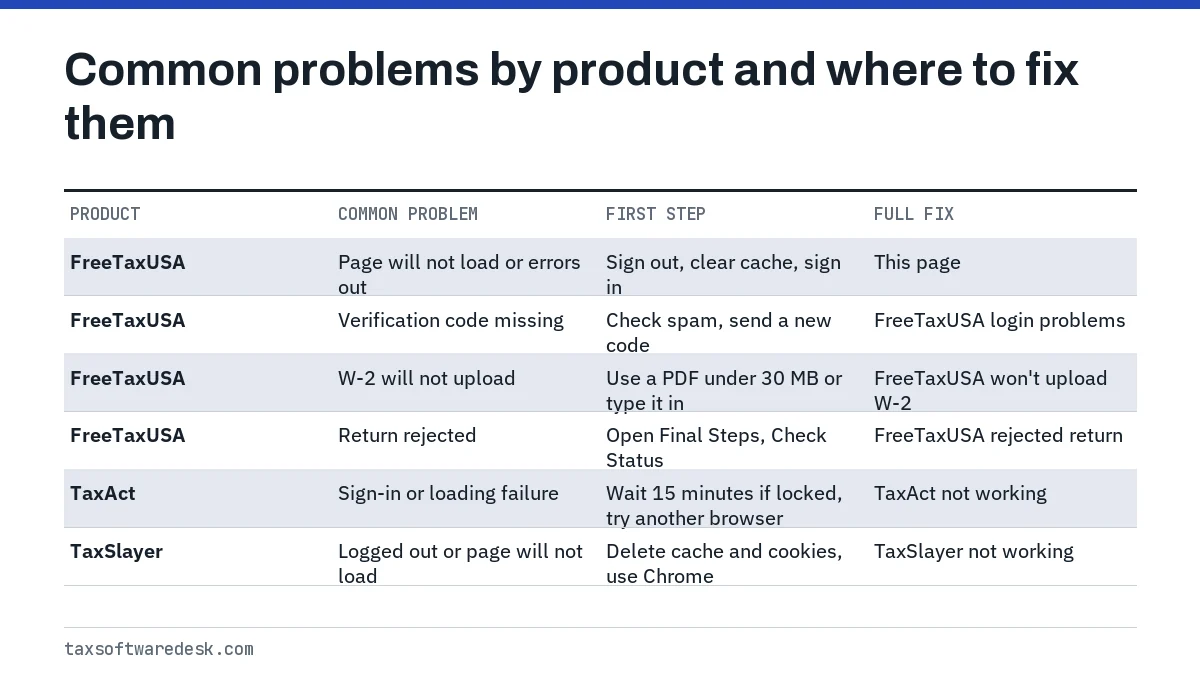
FreeTaxUSA not loading or showing a blank page
A page that never finishes loading is usually cached data from an earlier session. Clear the cache and cookies for the site, close every browser window, and sign in again. FreeTaxUSA's older help answers also recommend updating the browser to its most recent version or switching to Google Chrome or Mozilla Firefox when a page or PDF will not open.
FreeTaxUSA error message: Oops! Something went wrong
The generic FreeTaxUSA error message reads, in part, that if you continue to have trouble you should sign out of your account and then sign back in. Do exactly that first. If the same message returns on the same screen, send a message to support from inside your account, because an agent can then see which step failed.
Sign-in, uploads and rejections
- Code not arriving, forgotten username or locked out: see can't log in to FreeTaxUSA.
- W-2 photo or PDF will not upload, or the upload hangs: see FreeTaxUSA won't upload W-2.
- Email saying the IRS or your state rejected the return: see FreeTaxUSA rejected return.
How do you contact FreeTaxUSA support?
FreeTaxUSA support works through email and the message center inside your account, and FreeTaxUSA says it typically responds within half an hour (FreeTaxUSA support page, checked September 2026). Signing in first lets the agent see your return and e-file status, which saves a round of questions.
If you cannot sign in at all, the FreeTaxUSA support page offers a separate account-recovery path that verifies your identity with your email or phone number plus your Social Security number. FreeTaxUSA also runs a public Community forum where staff answer common questions.
TaxAct problems: sign-in, loading and errors
TaxAct sells both an online product and a Windows desktop program, so the first step is knowing which one failed. TaxAct says its online products need the latest version of Chrome, Firefox or Microsoft Edge, or Safari 13 or higher, and its desktop products need Windows 10 or higher. TaxAct says it has no plans for a Mac desktop version.
Sign-in trouble in TaxAct usually traces to its required 6-digit verification code or a temporary lock after repeated failed attempts. The full list of TaxAct symptoms and fixes is on TaxAct not working, and the undocumented connection message many users search for has its own page: TaxAct General RSS error.
TaxSlayer problems
TaxSlayer runs in the browser, and its support site says Internet Explorer is no longer supported and recommends Google Chrome. For pages that will not load or sessions that keep logging out, TaxSlayer's first advice is to delete the browser cache and cookies and make sure the browser is up to date.
TaxSlayer's help center says emailed support requests get a reply within 72 hours, typically within 24. For loading and log-out loops see TaxSlayer not working. Numbered messages have their own pages, starting with TaxSlayer error code 0622, and IRS rejections are covered in TaxSlayer rejected return.
Cash App Taxes problems
Cash App Taxes has its own help center at taxeshelp.cash.app, separate from the main Cash App help pages. It publishes an article on problems logging in or opening a support case, and a list of forms and situations the product does not support.
That second list matters: a return that includes an unsupported form cannot be finished in Cash App Taxes no matter how many times you reload. Check it before troubleshooting further. Symptom-by-symptom fixes are on Cash App Taxes not working.
Jackson Hewitt Online problems
Jackson Hewitt runs two separate sign-ins. Jackson Hewitt says people who file themselves with Jackson Hewitt Online do not need a MyJH account, which is meant for clients working with a Jackson Hewitt tax pro. Trying to reach a do-it-yourself return through MyJH is a common reason people think the product is broken.
For password resets, loading problems and e-file status in the online product, see Jackson Hewitt Online not working.
What if the software still fails close to the deadline?
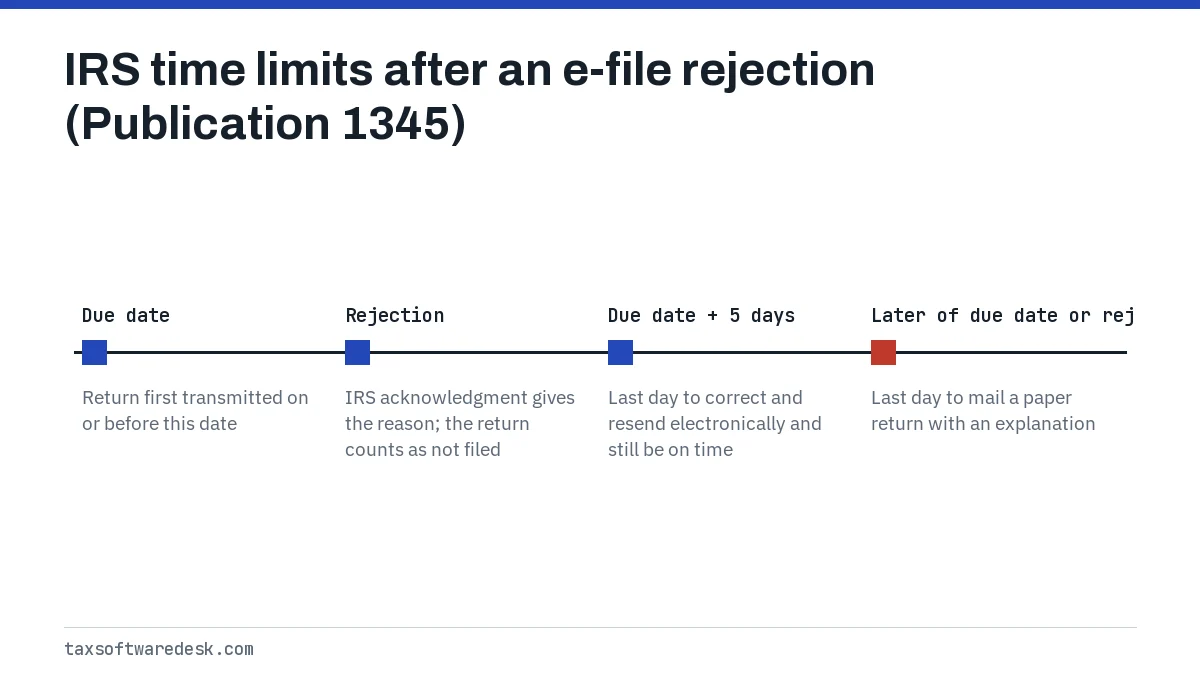
A software outage does not extend the IRS deadline, but IRS e-file rules give some room after a rejection. Under IRS Publication 1345, a return first transmitted on or before the due date and then rejected is treated as on time if it is corrected and resent electronically within five calendar days after the due date.
If it cannot be fixed and resent electronically, a paper return is on time if it is filed by the later of the due date or 10 calendar days after the IRS rejection notice, with a short explanation of why it is late. For the 2026 season the deadline was Wednesday, April 15, 2026. The 2027 season dates are not yet announced; the IRS usually confirms them in early January.
Your options also include switching products. The best tax software guide compares alternatives, and the IRS still accepts paper returns if every product fails you.
Common questions
Why does FreeTaxUSA keep saying something went wrong?
That generic message tells you to sign out and sign back in, which resets the session. If it repeats on the same screen after a fresh sign-in and a cleared cache, contact FreeTaxUSA support from inside your account so the agent can see the failing step.
Does FreeTaxUSA have a status page?
We have not found an official FreeTaxUSA status page as of September 2026. The quickest check is to load www.freetaxusa.com on a phone using mobile data; if it works there, the problem is on your computer or network.
Which browser works best with FreeTaxUSA?
FreeTaxUSA has not published a current browser list that we could find. Its older help answers recommend updating to the latest browser version or using Google Chrome or Mozilla Firefox when pages or PDFs fail to open.
Is FreeTaxUSA really free for federal returns?
FreeTaxUSA's pricing page says federal returns are free and state returns cost $15.99, as checked in September 2026. Prices for the 2027 season, covering tax year 2026 returns, may change and are confirmed when the season opens.
Can I call FreeTaxUSA for technical help?
FreeTaxUSA's support page describes help by email and through the message center in your account. Signing in before you ask lets the agent see your return, which usually speeds up the answer.
Will I lose my return if FreeTaxUSA stops working?
Unlikely. FreeTaxUSA keeps your return in your online account, not on your computer, so a browser crash does not delete it. Sign back in and recheck the screen you were on when it failed, since entries on that last screen may not have saved.