
Can't log in to FreeTaxUSA? Fix your username, password and code
Short answer
If you can't log in to FreeTaxUSA, use its account recovery tool: it asks for your email or phone number plus your Social Security number, then sends a verification code so you can see your username and set a new password. If the sign-in code never arrives, choose a different delivery method on the How should we send your code? screen.
- 01What account recovery asks for
- Email or phone number, plus your SSN
- 02Ways FreeTaxUSA sends sign-in codes
- Email, text, phone call or authenticator app
- 03Normal code delay, per FreeTaxUSA
- A minute or two
- 04Support address if you cannot sign in
- [email protected]
- 05Lost phone, no other method set up
- Account cannot be recovered; a new account is needed
Why can't I log in to FreeTaxUSA?
When you can't log in to FreeTaxUSA, the block is almost always at one of three gates: the username, the password, or the two-step verification code. FreeTaxUSA uses two-step verification, meaning that after your password is accepted it sends a one-time code by email, text, phone call or authenticator app, and you cannot reach your return until that code is entered.
Pinpoint the gate before you act. Resetting a password does nothing for a code that never arrives, and requesting ten codes in a row does nothing for a wrong username. If you signed in fine but the site itself is failing, start at FreeTaxUSA not working instead.
Forgot your FreeTaxUSA username or password?
FreeTaxUSA's account recovery tool handles a forgotten username and a forgotten password in one flow. Reach it from the FreeTaxUSA home page: Support in the top menu, then Forgot username or password.
- Enter the email address or phone number on the account, plus your Social Security number.
- FreeTaxUSA sends a verification code; enter it on the next screen.
- Read your username on screen and set a new password.
- If no recovery email appears within a few minutes, check the spam and junk folders.
FreeTaxUSA won't let me log in, but I know my password
You may have more than one FreeTaxUSA account, for example one opened years ago under an old email. FreeTaxUSA staff suggest running the recovery tool again and selecting try something else at the bottom of the screen to find other accounts. Returns do not move between accounts on their own, so the prior-year return you need may sit in the older one.
FreeTaxUSA not sending verification code: what to try
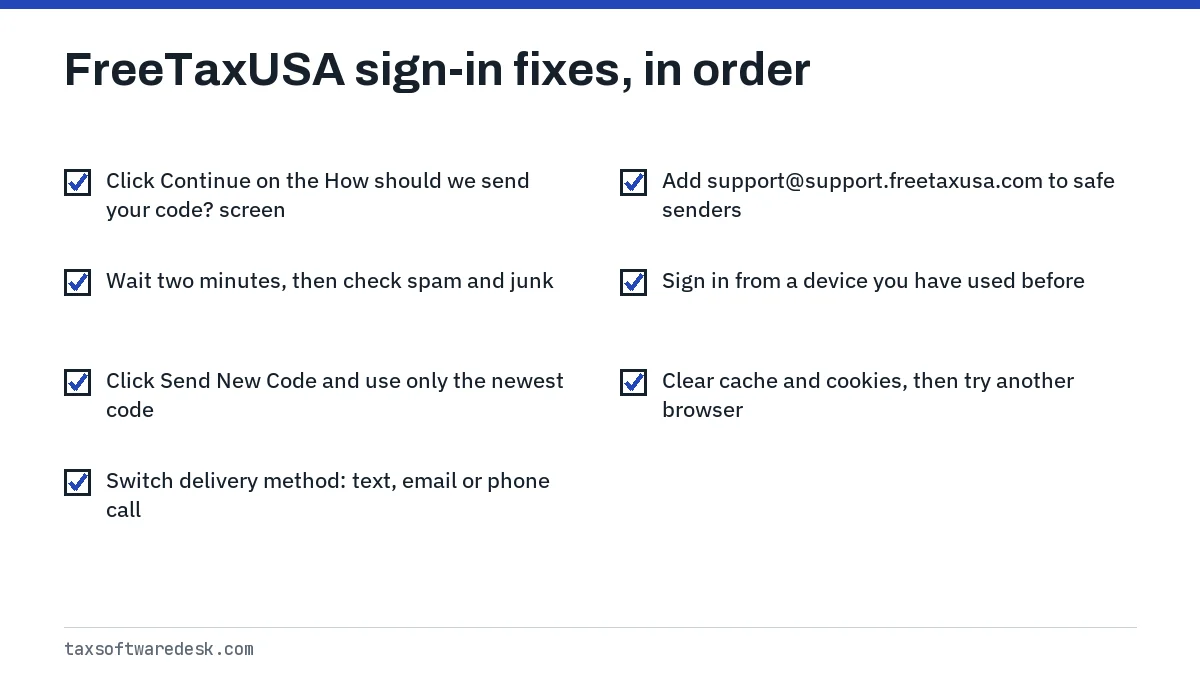
FreeTaxUSA says codes can take a minute or two to arrive by email, text or phone call. A FreeTaxUSA agent answering a community question in April 2025 said a missing code usually means the user did not click Continue on the How should we send your code? screen, so no code was actually sent.
Codes stuck in email
In April 2024 FreeTaxUSA staff said some Comcast email users were not receiving codes, and recommended adding [email protected] to the address book or safe-sender list so the provider trusts it. The same step helps with any mail service that filters aggressively. Also confirm you are checking the inbox for the email address on the account, not a different one.
Authenticator app codes rejected
If you set up an authenticator app, open it and find the entry that shows your FreeTaxUSA username with a 6-digit number. FreeTaxUSA notes that these codes expire quickly, so wait for a fresh code if the current one is about to roll over. A phone clock that is out of sync can also produce wrong codes; set the time to automatic.
What if you no longer have the phone on your account?
Ask for the code by email or another method you set up, or try signing in from a device you have used before, which FreeTaxUSA says may let you skip the code. You must be fully signed in before you can change the phone number, under the Account menu.
A new account starts empty, so you would re-enter this year's return. Last year's figures matter for e-file: you will need your prior-year AGI, which prior-year AGI or PIN explains how to find if your old FreeTaxUSA copy is locked away.
FreeTaxUSA keeps signing me out
Repeated sign-outs are a session problem, not a password problem. In a December 2025 reply about users being logged out when opening a past-year return, a FreeTaxUSA agent gave a specific sequence of fixes.
- Clear the browser history, cache and cookies, close every browser window, then reopen the browser.
- Open prior years the intended way: Account at the top of the FreeTaxUSA page, then Prior Returns, then Continue or Start Now for the year you need, and sign in as a returning user.
- Do not switch between tax years while signed in; FreeTaxUSA says that can log you out.
- If you are on a public or work network, try a home connection, since those networks can cause timeouts.
- Try a different browser.
Enter data in shorter sessions and click Save and Continue on each screen, so a sign-out never costs more than one page of entries.
FreeTaxUSA login problems on Safari and iPhone
We did not find FreeTaxUSA guidance specific to Safari as of September 2026. Sign-in loops on Safari commonly come from blocked cookies or content blockers, since the site cannot remember that you passed the code screen.
- On iPhone or iPad, open Settings > Safari (Settings > Apps > Safari on iOS 18 and later) and make sure Block All Cookies is off.
- Turn off any content blocker for the session, then try again.
- Close all FreeTaxUSA tabs before starting a fresh sign-in.
- If Safari still fails, sign in with Chrome or Firefox on the same device.
How do you contact FreeTaxUSA if you cannot sign in?
FreeTaxUSA staff say people who cannot sign in can still email [email protected]. Once you are in, the message center inside your account is faster, and FreeTaxUSA says it typically replies within about half an hour. Never put your full Social Security number or bank details in an ordinary email.
After you are back in, check your return status. A return rejected while you were locked out needs attention quickly; see FreeTaxUSA rejected return. If a W-2 import stalled during the last session, see FreeTaxUSA won't upload W-2. TaxAct users with similar code trouble can compare TaxAct not working.
Step by step
Identify the gate
Decide whether the username, password or verification code is failing.
Recover the account
Use Support > Forgot username or password with your email or phone plus SSN.
Change the code method
On How should we send your code?, pick another method and click Continue.
Fix the browser
Clear cache and cookies, allow cookies, and try another browser.
Contact support
Email [email protected] if you still cannot sign in.
Common questions
Why is FreeTaxUSA not sending my verification code?
Most often the Continue button on the How should we send your code? screen was not clicked, or the email landed in spam. Choose a different method, such as text instead of email, and add [email protected] to your safe senders.
Can I skip two-step verification on FreeTaxUSA?
No, FreeTaxUSA requires it for your security. Signing in from a device you have used before may skip the code on that device, according to FreeTaxUSA.
What if I changed my phone number and can't get the code?
Request the code by email instead, sign in, then update the number under the Account menu. FreeTaxUSA only lets you change the phone number after you are fully signed in.
Does FreeTaxUSA need my Social Security number to recover my account?
Yes. FreeTaxUSA's recovery tool verifies your identity with your email or phone number plus your Social Security number, then sends a code before showing your username.
Why does FreeTaxUSA log me out when I open last year's return?
Switching tax years in one session can end the session. Go to Account > Prior Returns, open the year you need, and sign in to that year as a returning user after clearing your cache.
Sources
- FreeTaxUSA Customer Support and account recovery freetaxusa.com
- FreeTaxUSA: How do I find my verification code? freetaxusa.com
- FreeTaxUSA: What if I don't have access to my phone? freetaxusa.com
- FreeTaxUSA: How do I get the authenticator app verification code? freetaxusa.com
- FreeTaxUSA Community: Need help signing in? Try these out community.freetaxusa.com
- FreeTaxUSA Community: Software keeps kicking me out community.freetaxusa.com
We check figures against these official pages. Rules change; confirm anything that affects a deadline or payment with the agency before you act.
Tell us what happened
Describe your situation and our editors will use it to improve this guide. If you leave your email, we may reply with a pointer to the right page or official contact. We never share your details.