
FreeTaxUSA rejected your return: how to fix it and send it again
Short answer
If FreeTaxUSA rejected your return, sign in and open Final Steps > Check Status to read the IRS reason, correct the flagged entry, then click Send Tax Return on the Let's send in your tax return screen. FreeTaxUSA says there is no extra fee to resubmit. A rejected return counts as not filed until the IRS accepts a corrected version.
- 01Where FreeTaxUSA shows the rejection reason
- Final Steps > Check Status
- 02Fee to resubmit in FreeTaxUSA
- None, per FreeTaxUSA
- 03Most common rejection, per FreeTaxUSA staff
- Prior-year AGI or PIN mismatch
- 04Grace period to resend electronically
- 5 calendar days after the due date (IRS Pub 1345)
- 05Paper filing window after a rejection
- Later of the due date or 10 days after the rejection notice
What does it mean when FreeTaxUSA says your return was rejected?
A FreeTaxUSA rejected status means the IRS (or your state) refused the electronic return before processing it, and FreeTaxUSA is passing that decision on to you. An e-file rejection is an automated refusal based on a numbered business rule, such as a prior-year AGI that does not match IRS records. It is not an audit and not a judgment about your taxes.
IRS Publication 1345 says a rejected return is treated as not filed. Until a corrected version is accepted, you have not met your filing obligation, so fix it the same day if you can. A FreeTaxUSA federal return rejected by the IRS also stops any state return linked to it, because a state submission tied to a federal one is denied when there is no accepted federal return.
Where do you find the rejection reason in FreeTaxUSA?
Sign in to your FreeTaxUSA account. FreeTaxUSA says you should land directly on a screen that explains why the return was rejected and how to fix it. If you do not, choose Final Steps in the top menu and then Check Status.
FreeTaxUSA suggests signing in within 24 hours of filing to check the e-file status. Rejections usually arrive as an email as well, but the explanation inside your account is the one to follow, since it names the exact field the IRS objected to. If you cannot get into the account to read it, work through FreeTaxUSA login problems first.
How to fix a FreeTaxUSA rejected AGI or PIN
A FreeTaxUSA rejected AGI or PIN message means the prior-year adjusted gross income (AGI) or last year's five-digit Self-Select PIN you typed does not match what the IRS has on file. The IRS only needs one of the two to match. FreeTaxUSA staff describe this as the most common e-file rejection they see.
- Find last year's AGI on your prior-year Form 1040 or 1040-SR, line 11. Use the return as filed, not a draft or a figure from a pay stub.
- In FreeTaxUSA, go to Final Steps > Prior Year AGI or PIN and replace the number.
- If last year's return was filed late, mailed, amended or is still being processed, the IRS e-file database may not hold the figure you expect. The IRS has told filers in that position to enter $0 as the prior-year AGI.
- In FreeTaxUSA, marking that you did not file a return last year makes the software send zero as your prior-year AGI.
- On a joint return where only one spouse's AGI failed, FreeTaxUSA staff suggest choosing the option that says only one spouse filed, which sets the other spouse's figure to zero.
- Save and continue to the Electronic Signature (E-file PIN) screen, then send the return again.
First-time filers over 16 also enter zero, according to the IRS. The step-by-step logic for every combination is on prior-year AGI or PIN.
FreeTaxUSA rejected PIN versus IP PIN
Two different PINs cause two different rejections. The five-digit Self-Select PIN is your electronic signature and can be any five digits you choose. The six-digit Identity Protection PIN (IP PIN) is issued by the IRS each year, and anyone who has one must enter it. A missing or outdated IP PIN rejects the return every time until the current one is entered.
Other FreeTaxUSA rejections and how to clear them
| Rejection | Usual cause | Where to fix it in FreeTaxUSA |
|---|---|---|
| Prior-year AGI or PIN does not match | Wrong line, amended or late prior-year return | Final Steps > Prior Year AGI or PIN |
| IP PIN missing or incorrect | IP PIN not entered, or last year's IP PIN reused | Misc > Identity Protection PIN; get the current PIN from the IRS |
| Form 8962 required | Marketplace coverage on Form 1095-A not reported | Deductions/Credits > Marketplace Health Insurance (1095-A) |
| State return rejected | Federal return not yet accepted, or a state-only field | Fix the federal return first, then the state screen named in the notice |
The Form 8962 rejection applies when someone on the return had marketplace health coverage. Entering the Form 1095-A figures makes FreeTaxUSA build Form 8962 for you. If your 1095-A never arrived, you can usually download it from your HealthCare.gov or state marketplace account.
For a rejection involving a wage entry typed from a photo import, recheck the W-2 boxes against the paper form. Our FreeTaxUSA W-2 upload guide explains which boxes the import can miss.
How do you resubmit a rejected return in FreeTaxUSA?
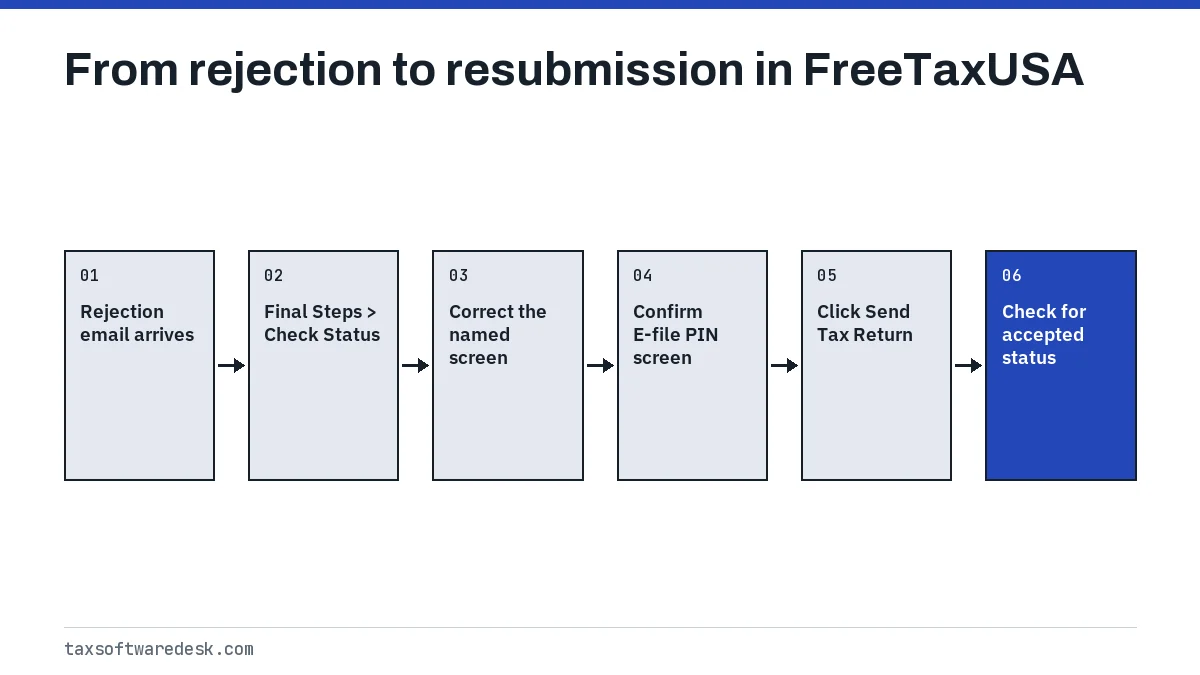
You resubmit from the same account; you do not start a new return. Use the top menu (Personal, Income, Deductions, Misc, Summary) to reach the screen named in the rejection, correct it, then return to Final Steps.
- Click Continue on the rejection explanation screen, or open Final Steps > Check Status.
- Go to the section the notice names and correct the entry.
- Open Final Steps and follow the screens to Step 3, Submit Tax Return.
- Review the Electronic Signature (E-file PIN) screen and click Save and Continue.
- On the Let's send in your tax return screen, click Send Tax Return.
- Sign back in within a day and confirm the new status reads accepted.
Does FreeTaxUSA charge to resubmit?
No. FreeTaxUSA's help answer on e-filing again says there is no additional fee to re-submit a tax return (checked September 2026). You pay once for any paid add-ons or the state return, not per transmission.
When a correction changes your numbers
Under IRS Publication 1345, rejected data can be corrected and sent again without new signatures if total income or AGI moves by $50 or less and total tax, withholding, refund or balance due moves by $14 or less. For example, fixing a typo that raises AGI from $48,200 to $48,240 stays inside the $50 limit. A larger change means you re-sign on the E-file PIN screen, which FreeTaxUSA walks you through.
What if the return is rejected again near the deadline?
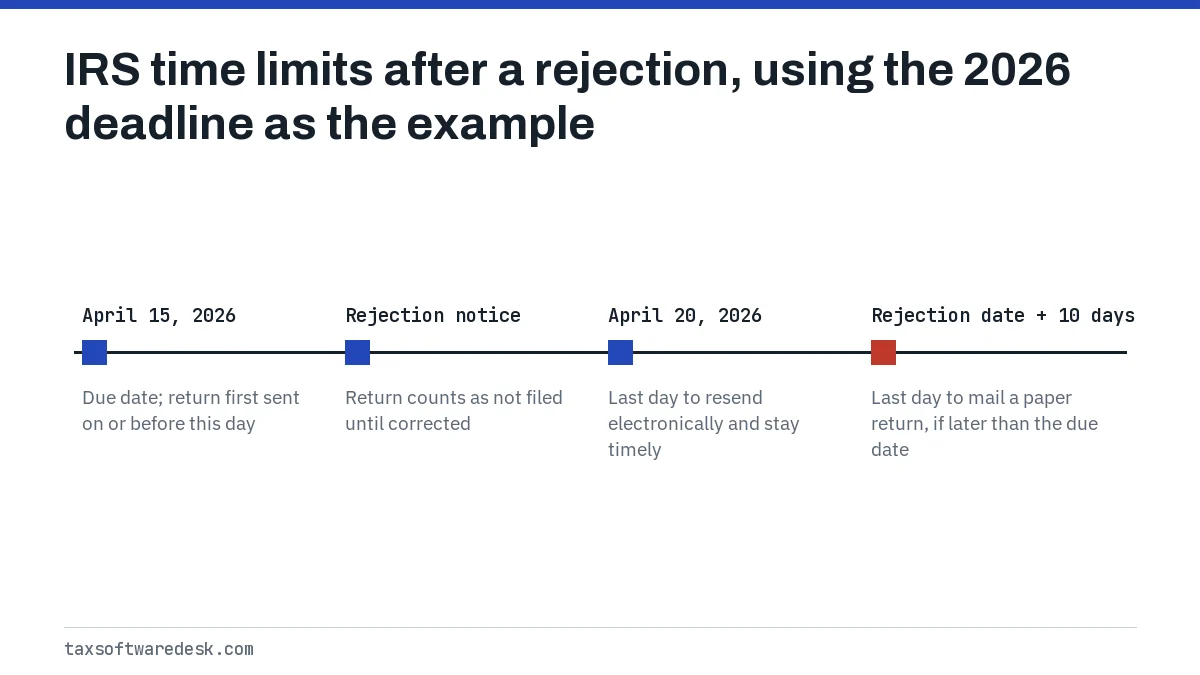
IRS Publication 1345 gives a short grace period. If you first transmitted on or before the due date and the return was rejected, it still counts as timely if you correct and resend it electronically within five calendar days after the due date. With the 2026 deadline of Wednesday, April 15, 2026, that window ran through Monday, April 20, 2026.
The 2027 filing season dates, for tax year 2026 returns, are not yet announced; the IRS usually confirms them in early January. The general sequence for any product is on how to resubmit a rejected tax return.
Mailing instead: when to stop re-sending
Stop re-sending when the same rejection returns after you have entered a verified AGI, tried zero, and confirmed any IP PIN. FreeTaxUSA offers a paper option at Final Steps > Step 3 - Submit Tax Return > Filing Method, where you can switch to mailing.
A paper return is timely if it is filed by the later of the due date or 10 calendar days after the IRS rejection notice, with a short explanation of why it is late. Example: a return rejected on April 18 could be mailed as late as April 28. Mail state returns separately if the state also requires it, and keep copies of both. If you are still stuck, message support from inside your account so an agent can see the rejection; the FreeTaxUSA troubleshooting hub lists the contact options.
Step by step
Read the rejection
Sign in and open Final Steps > Check Status to see the IRS reason.
Correct the entry
Use the top menu to reach the named screen, or Final Steps > Prior Year AGI or PIN for AGI rejections.
Re-sign if needed
Confirm the Electronic Signature (E-file PIN) screen and click Save and Continue.
Send again
Click Send Tax Return on the Let's send in your tax return screen.
Confirm acceptance
Sign back in within a day and check that the status is accepted.
Common questions
How long does FreeTaxUSA take to tell me my return was rejected?
FreeTaxUSA suggests signing in within 24 hours after you file to check the e-file status. IRS Publication 1345 says filers can start checking status within 24 hours after the IRS receives an e-filed return.
Why does FreeTaxUSA keep rejecting my AGI when I used the right number?
The IRS may have a different figure on file, for example if last year's return was amended, filed late or still processing. Try entering 0 as the prior-year AGI, which the IRS has advised for returns still being processed, or use last year's Self-Select PIN instead.
Can I switch to a different tax software after FreeTaxUSA rejects my return?
Yes, but it rarely helps, because the IRS rejection is about the data, not the software. The same wrong AGI or missing IP PIN will be rejected by any product. Fix the named field first.
Will a rejected return delay my refund?
Yes. The IRS does not process a rejected return, so the refund clock starts only after a corrected return is accepted. Resubmitting quickly keeps the delay short.
Do I need to fix my state return separately in FreeTaxUSA?
Often not. If the state was rejected only because the federal return was rejected, it can go again once the federal return is accepted. If the state notice names its own field, correct that on the state screens before resending.
Sources
- FreeTaxUSA: How do I make corrections to my rejected return and resubmit it? freetaxusa.com
- FreeTaxUSA: My tax return was rejected and I made the correction. How do I e-file again? freetaxusa.com
- FreeTaxUSA: Prior Year AGI or PIN does not match IRS records freetaxusa.com
- FreeTaxUSA Community: What do I do if my e-file return is rejected? community.freetaxusa.com
- IRS Publication 1345, Handbook for Authorized IRS e-file Providers irs.gov
- IRS: Validating your electronically filed tax return irs.gov
We check figures against these official pages. Rules change; confirm anything that affects a deadline or payment with the agency before you act.
Tell us what happened
Describe your situation and our editors will use it to improve this guide. If you leave your email, we may reply with a pointer to the right page or official contact. We never share your details.