
TaxSlayer rejected tax return: how to fix it and send it again
Short answer
To fix a TaxSlayer rejected tax return, sign in, click Fix Return on the Tax Home page to read the reject code, correct the entry, then resubmit from the E-File menu. TaxSlayer charges nothing to resend. Under IRS rules, a return first sent by the due date stays on time if the corrected version is e-filed within five calendar days after the due date.
- 01Where the reject code is
- Tax Home, Fix Return, then Show Details
- 02TaxSlayer fee to resubmit
- None
- 03E-file correction window
- 5 calendar days after the due date (IRS Pub 1345)
- 04Paper fallback window
- Later of the due date or 10 days after the rejection notice
- 05State return after federal reject
- Not transmitted; resubmit both
What does a TaxSlayer rejected tax return mean?
A TaxSlayer rejected tax return is one the IRS or your state refused to accept electronically. IRS Publication 1345 says a rejected return is treated as not filed, so nothing has been processed and no refund is on the way until a corrected version is accepted.
The rejection always comes with a reason, called a reject code or business rule. Most are fixable in minutes: a mistyped Social Security number, a name that does not match Social Security records, a missing Identity Protection PIN, or a prior-year AGI that does not match IRS records.
Where do you find the reject code in TaxSlayer?
Sign in and look at the Tax Home page. TaxSlayer lists each return, federal and each state, with one of five statuses: Created, E-filed/Sent, Rejected, Accepted or Resubmit. A rejected return has a Fix Return link; select it, then Show Details, to see the code and TaxSlayer's explanation.
TaxSlayer also sends an automated email to the address on the account. It tells users to check status over the 24 hours after any submission, so a second rejection is not missed.
| Status on Tax Home | What it means | Your next step |
|---|---|---|
| Created | Return started but not sent | Finish and file through E-File |
| E-filed/Sent | Transmitted, waiting for acknowledgment | Check back within 24 hours |
| Rejected | IRS or state refused it | Fix Return, then Show Details |
| Resubmit | Ready to send again | Complete the E-File steps |
| Accepted | Received and accepted | Nothing to fix |
How do I fix a rejected TaxSlayer return?
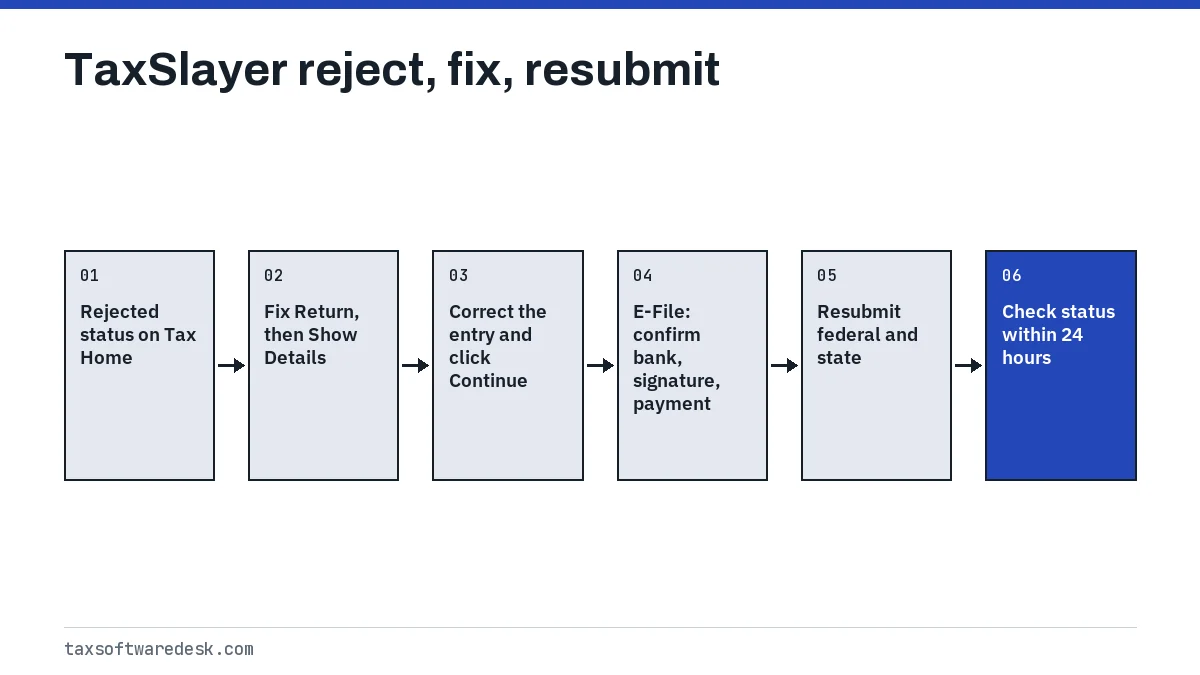
Read TaxSlayer's explanation of the code first, then go back into the return and change the entry it names. TaxSlayer says to click Continue after changing any form or entry, because an edit that is not continued past may not save. Its help center has separate articles for common federal codes, including IND-031 and IND-032, IND-180-01, IND-515, IND-516, IND-517 and Form 8962 rejects.
Fixing a prior-year AGI rejection
Codes IND-031 and IND-032 mean the prior-year AGI or Self-Select PIN used to sign the return did not match IRS records. TaxSlayer's path is: select Fix Return twice, choose E-File, answer that you are done and ready to file, then press the blue Edit button under Sign and File Your Return. Continue to the screen that asks for last year's AGI.
- Choose the first option to type last year's AGI from your prior return (line 11 or 11a of Form 1040).
- Choose the second option to use last year's Self-Select PIN instead.
- Choose the third option if you did not file last year, which enters $0. TaxSlayer also advises $0 if last year's return was mailed rather than e-filed.
The IRS separately says first-time filers over 16 enter zero, and anyone holding an Identity Protection PIN must enter it when asked. More detail is on prior-year AGI or PIN.
How do you resubmit a TaxSlayer federal return that was rejected?
Resubmit from the E-File tab in the left navigation bar. TaxSlayer walks through the federal return and then any state, and lets you change bank details, the electronic signature or card information before sending. Keep going until you see the confirmation that you have successfully e-filed.
Resend the state return too
When a federal return filed together with a state return is rejected, TaxSlayer holds the state return and does not transmit it, because many states rely on the federal figures. TaxSlayer says to resubmit both. IRS Publication 1345 likewise says a linked state return is denied when no accepted federal return exists under that submission.
Update the payment if the balance went up
If the fix raises the amount you owe, TaxSlayer says you must revisit the payment entry in the e-file section; otherwise the original amount is still sent. Example: the first return showed $1,200 owed with a scheduled bank withdrawal. After adding a missed 1099, the balance is $1,450. Unless you edit the payment, only $1,200 is withdrawn, and the $250 gap can draw IRS penalties and interest. If the balance goes down, TaxSlayer prompts you to correct the payment.
How long do you have to fix a rejected return?
IRS Publication 1345 sets two windows for a return first transmitted on or before the due date. Missing both means the return is late, even though you tried to file on time.
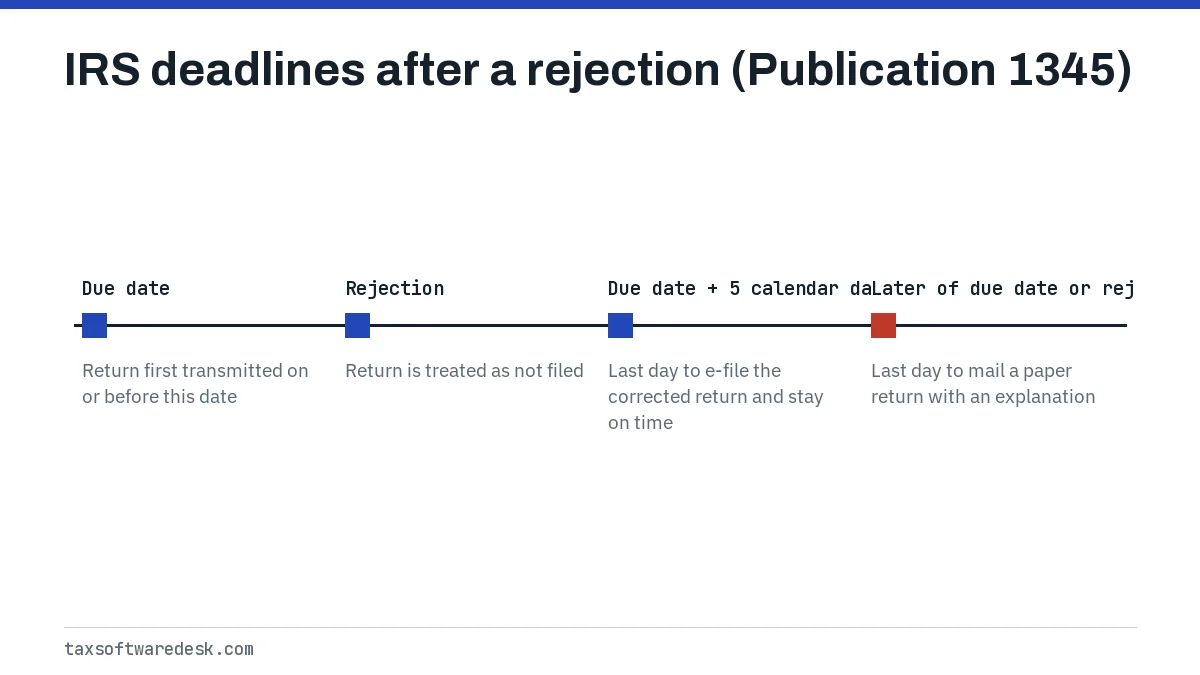
For the 2026 season the due date was April 15, 2026, so an on-time e-file rejected that day had to be corrected and resent by April 20, 2026. The 2027 due date for tax year 2026 returns is not yet announced; the IRS usually confirms season dates in early January.
When should you mail the return instead?
TaxSlayer says a return that keeps getting rejected may need to be printed and mailed. Examples include a prior-year AGI that is rejected no matter what you enter, or a rejection because someone else already filed with your Social Security number.
- Open the tax year, then Review and Summary/Print. On the Tax Return Summary page, select Print to download the PDF.
- If Print is missing, the return has not been paid for yet. Go to Review, then Print Results, and finish the purchase.
- Mail every printed page except Form 8879, which only authorizes e-filing.
- Sign and date the return, and attach copies of Forms W-2 and any Forms 1099 showing federal withholding.
- Use the IRS mailing address for your state and for whether a payment is enclosed, and add a short note explaining why a rejected e-file is being mailed after the due date.
Paper returns do not ask for prior-year AGI or a Self-Select PIN, so an AGI mismatch cannot block a mailed return. If TaxSlayer shows code 0622 instead of a rejection, that is an account check, covered on TaxSlayer error code 0622. General loading and sign-in faults are on TaxSlayer not working, and the same fix-and-resend process in other products is compared on the FreeTaxUSA, TaxAct and other software hub, Cash App Taxes not working and Jackson Hewitt Online not working.
Step by step
Open Fix Return
Sign in, find the Rejected status on Tax Home and select Fix Return, then Show Details.
Correct the entry
Go back into the return, change the item the reject code names and click Continue so it saves.
Check the payment
If the balance due changed, update the payment amount in the e-file section.
Resubmit
Select E-File, confirm bank and signature details, and resubmit federal and state returns.
Confirm
Look for the successfully e-filed confirmation and recheck status within 24 hours.
Common questions
Do I have to pay TaxSlayer again to resubmit a rejected return?
No. TaxSlayer says there is no additional fee to resubmit a rejected return electronically.
Why was my TaxSlayer state return not sent?
When the federal return is rejected, TaxSlayer does not transmit a state return filed with it. Fix the federal return and resubmit both together.
How do I see why TaxSlayer rejected my return?
Sign in, find the return marked Rejected on Tax Home, click Fix Return and then Show Details. The code and TaxSlayer's explanation appear there, and the same reason is emailed to you.
Is a rejected TaxSlayer return considered filed?
No. IRS Publication 1345 treats a rejected return as not filed. If it was first sent by the due date, correcting and resending it within five calendar days after the due date keeps it on time.
Can I make changes after TaxSlayer accepts my return?
Not by resubmitting. Once a return is accepted, changes are made by filing an amended return on Form 1040-X rather than through Fix Return.
What if TaxSlayer keeps rejecting my prior-year AGI?
Try the Self-Select PIN option or $0 if last year's return was mailed or not filed. If it is still rejected, TaxSlayer says to print and mail the return, which does not require the AGI.
Sources
- TaxSlayer: How Do I Fix a Reject Code? support.taxslayer.com
- TaxSlayer: How do I resubmit my rejected return electronically? support.taxslayer.com
- TaxSlayer: How do I check the status of my return? support.taxslayer.com
- TaxSlayer: How Do I Fix Federal Reject Code IND-031 and IND-032? support.taxslayer.com
- TaxSlayer: How to Paper File Your Tax Return support.taxslayer.com
- IRS Publication 1345, Handbook for Authorized IRS e-file Providers irs.gov
We check figures against these official pages. Rules change; confirm anything that affects a deadline or payment with the agency before you act.
Tell us what happened
Describe your situation and our editors will use it to improve this guide. If you leave your email, we may reply with a pointer to the right page or official contact. We never share your details.