
Topic
Professional tax software error codes: where to look them up and how to fix them, product by product
To look up a professional tax software error code, search the vendor's own knowledge base with the exact message: Drake for Drake Tax, Intuit for ProSeries and Lacerte, Thomson Reuters for UltraTax CS and CCH for TaxWise, while IRS reject codes such as IND-183-01 mean the same thing in every product. Knowing which kind of error you have tells you where to look and how fast you can resend the return.
7 guides in this topic Updated October 13, 2026
- AI Tax Software for Preparers: What Firms Are UsingProfessional AI tax tools split into three jobs: research assistants that answer with citations, preparation assistants that read documents into a re…
- Drake Software Error Codes: Fix Error 70, DRKPARSE, EF 5299Drake software error codes come in two families: program errors such as Error 70: Permission Denied, which Drake says means a user lacks read and mod…
- Lacerte Error Codes: Error 10, 54, 601ERRV and Sign-In FixesA Lacerte error code on an e-filed return is either a validation failure, such as error 10, error 54 or 601ERRV:8, found by Lacerte's diagnostics or…
- ProSeries Error Codes: Common Errors and How to Fix ThemThe most searched ProSeries error codes each point to a different part of the program: error 54 means the e-file server found your software out of da…
- ProSeries Won't Open: Fix Startup and Update ProblemsWhen ProSeries won't open, Intuit's first fix is to repair the updates, because damaged files in the Updates folder are the most common cause of a fr…
- TaxWise Error Codes: Login, Authentication and E-File FixesThe TaxWise error codes people hit most are error 631, which CCH says means TaxWise was open on a workstation while an update installed, and rejected…
- UltraTax Error Codes: FW2-012, IND-183-01 and E-File FixesUltraTax error codes for e-file follow the IRS rule format: FW2-012 means a W-2 Box 12 line has a code without an amount or an amount without a code,…

What tax software do professionals use?
Paid preparers mostly work in desktop or hosted programs built for volume, multi-user networks and business returns. This section of Tax Software Desk covers five of them: Drake Tax from Drake Software, ProSeries and Lacerte from Intuit, UltraTax CS from Thomson Reuters, and TaxWise from Wolters Kluwer (CCH). Each has its own error numbering, update method and network setup.
Professional tax software differs from consumer products in three ways that shape the errors you see. It runs on shared network drives, so file permissions and mapped drives cause many failures. It transmits under the firm's Electronic Filing Identification Number (EFIN), so account and password checks can block e-file. And it checks returns against IRS schemas before sending, so validation errors appear inside the program before the IRS ever sees the return.
Tax Software Desk is independent and is not affiliated with Intuit, Drake Software, Thomson Reuters, Wolters Kluwer or any other software company. We summarize what each vendor publishes and link to the original article so you can check it yourself.
Read the video transcript
Tax software for professionals: error lookups and fixes by product
The five desktop tax software for professionals programs covered here, Drake Tax, ProSeries, Lacerte, UltraTax CS and TaxWise, each document their own error codes in a vendor knowledge base, while IRS reject codes are the same in every product.
Products covered: Drake Tax, ProSeries, Lacerte, UltraTax CS, TaxWise.
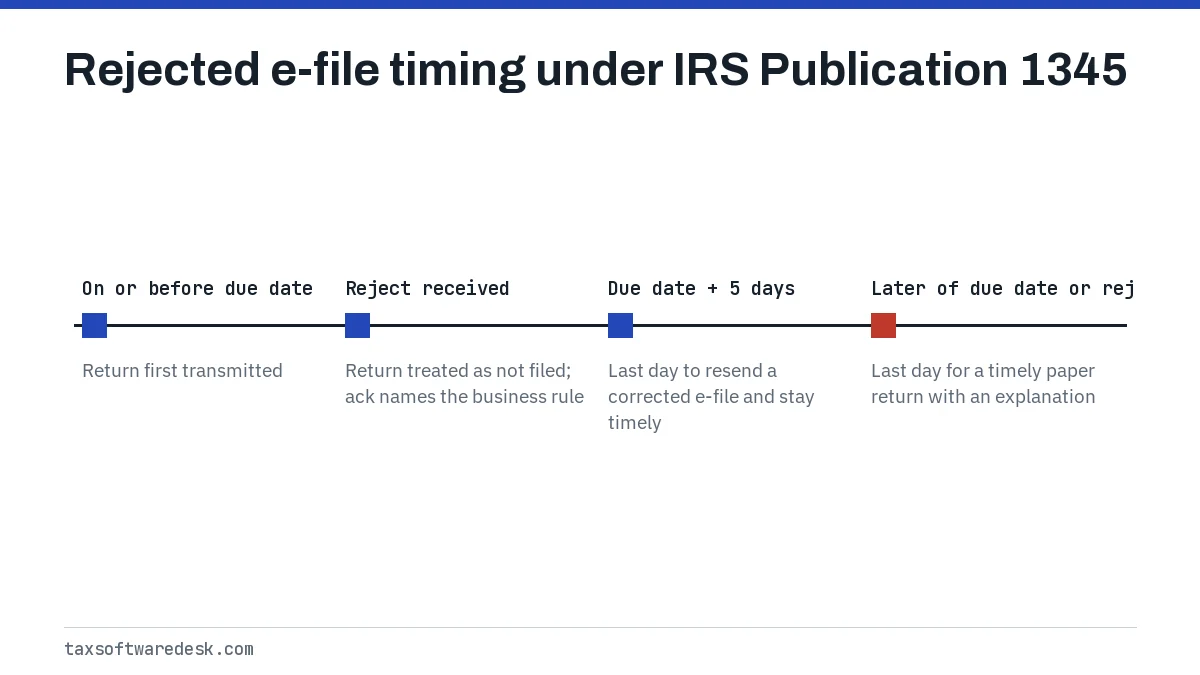
Rejected e-file resend window: 5 calendar days after the due date (IRS Pub 1345).
Paper fallback window: Later of the due date or 10 calendar days after the rejection.
Each vendor keeps a public help site where error articles are titled by the error number or the exact message text.
Professional tax software errors fall into three groups, and the group decides who can fix it.
Most startup and update failures in professional tax software trace back to four causes: user permissions, network drive mapping, blocked downloads and damaged Microsoft components.
Where do pros look up software error codes?
Each vendor keeps a public help site where error articles are titled by the error number or the exact message text. Searching the vendor's own site with the full message, in quotation marks, finds the right article faster than a general web search, because many codes are reused with different meanings across products.
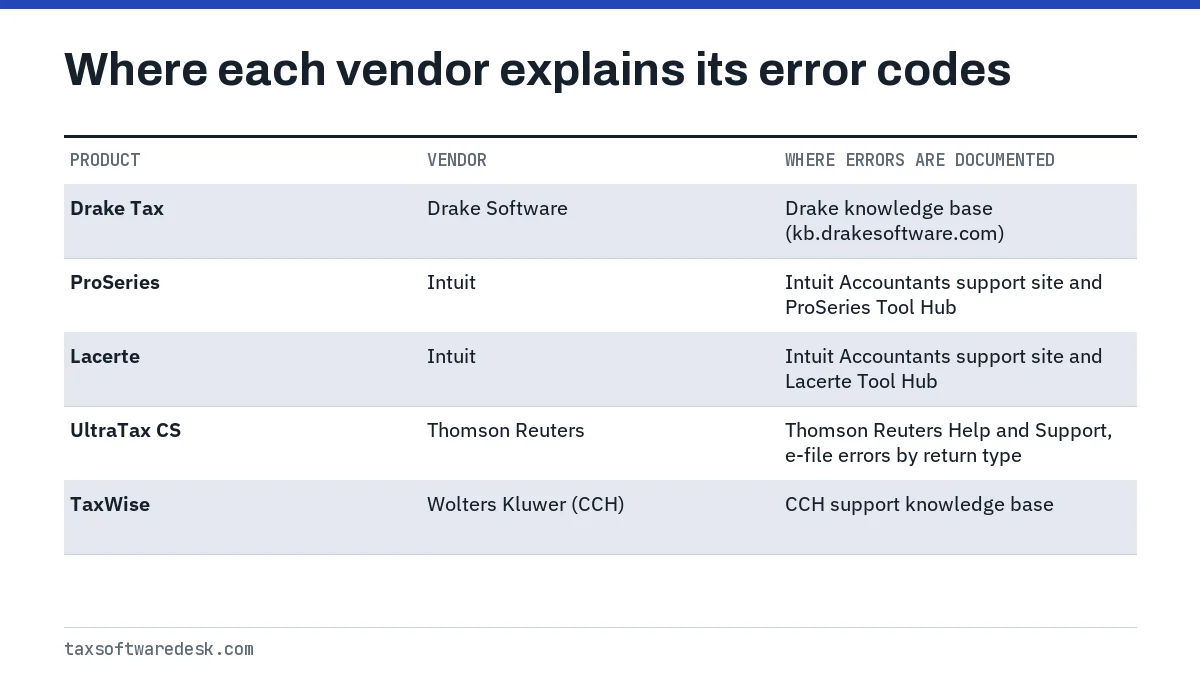
Some programs also carry a lookup inside the software. In Drake Tax, the EF > Search EF Database screen has an F4 Reject Code Lookup tab, and pressing F10 on that screen opens Drake's online reject database. Intuit ships a separate repair program, the ProSeries Tool Hub and the Lacerte Tool Hub, that bundles its most common fixes into buttons.
Product guides in this section
- Drake Software error codes: error 70, authentication failures, update errors, EF messages and DRKPARSE acknowledgments.
- ProSeries error codes: error 54, 604, 1603 and Error Building Cache.
- ProSeries won't open: startup crashes, Repair Updates and a clean reinstall.
- Lacerte error codes: validation failures, transmission failures and startup after an update.
- UltraTax error codes: e-file errors such as FW2-012, database validation errors and startup problems.
- TaxWise error codes: error 631, sign-in codes and MeF validation errors.
Which kind of professional tax software error do you have?
Professional tax software errors fall into three groups, and the group decides who can fix it. A program error comes from the software or Windows. A validation error comes from the software's own pre-transmission check. A reject comes back from the IRS or a state after transmission.
| Kind | Example | Who defines it | Typical fix |
|---|---|---|---|
| Program or install error | Drake error 70, ProSeries Error Building Cache, TaxWise 631 | The software vendor | Permissions, updates, repair tool or reinstall |
| Validation or diagnostic error | Lacerte validation failure, UltraTax E-File Error Report items | The vendor, based on IRS schemas | Correct the input screen, recreate the e-file |
| IRS or state reject | IND-183-01, FW2-012, FPYMT-072-01 | The IRS business rules (MeF) | Correct the data and resend, or file on paper |
The third group is the only one that is the same in every product. An IRS business rule such as IND-183-01 (missing or invalid spouse Identity Protection PIN) means the same thing in UltraTax CS as in Drake Tax; only the screen where you fix it changes. That is why a reject explanation from one vendor can help a user of another.
Install, update and network setup problems
Most startup and update failures in professional tax software trace back to four causes: user permissions, network drive mapping, blocked downloads and damaged Microsoft components. The vendors describe the same patterns in different words.
- Permissions. Drake says every user needs full read and modify rights to all folders inside the DrakeYY folder; without them you get Error 70: Permission Denied.
- Mapped drives. Drake requires network drives mapped with a letter from A to Z rather than opened through Network Places, and ProSeries workstations fail with Unable to locate Common files folder when the network path in ProWinYY.ini does not match.
- Blocked updates. Drake's update errors and 0-byte downloads are usually a firewall blocking rtppatch.drakesoftware.com. Lacerte notes that updates can exceed 1 GB, so slow connections time out.
- Windows components. Intuit links installer error 1603 to a corrupt Windows user profile or a missing or damaged .NET Framework, and Thomson Reuters ties the UltraTax CS has stopped working message on networks to User Account Control settings.
E-file rejections in professional tax software
A rejected e-file is treated as not filed, according to IRS Publication 1345. The acknowledgment names the business rule that failed, and the program shows it in its acknowledgment or e-file status screen once you retrieve acks.
IRS Publication 1345 gives two timing rules that matter during the last week of a deadline. A return first transmitted on or before the due date and rejected is still timely if it is corrected and resent electronically by the fifth calendar day after the due date. If it cannot be fixed for e-file, a paper return is timely if filed by the later of the due date or 10 calendar days after the rejection notice, with an explanation attached.
Small corrections do not always need new signatures. Publication 1345 allows a rejected return to be corrected and resent without new signatures if total income or AGI changes by no more than $50, and total tax, withholding, refund or amount owed changes by no more than $14. Larger changes need new signatures on the e-file authorization.
For consumer-software walkthroughs of the same process, see how to fix and resubmit a rejected return.
What is the best tax software for tax preparers?
There is no single best tax software for tax preparers; the right one depends on the return types you file, how many people share the data and how you want to be supported. Tax Software Desk does not rank professional products or take payment from vendors. The checklist below lists the questions that separate the options.
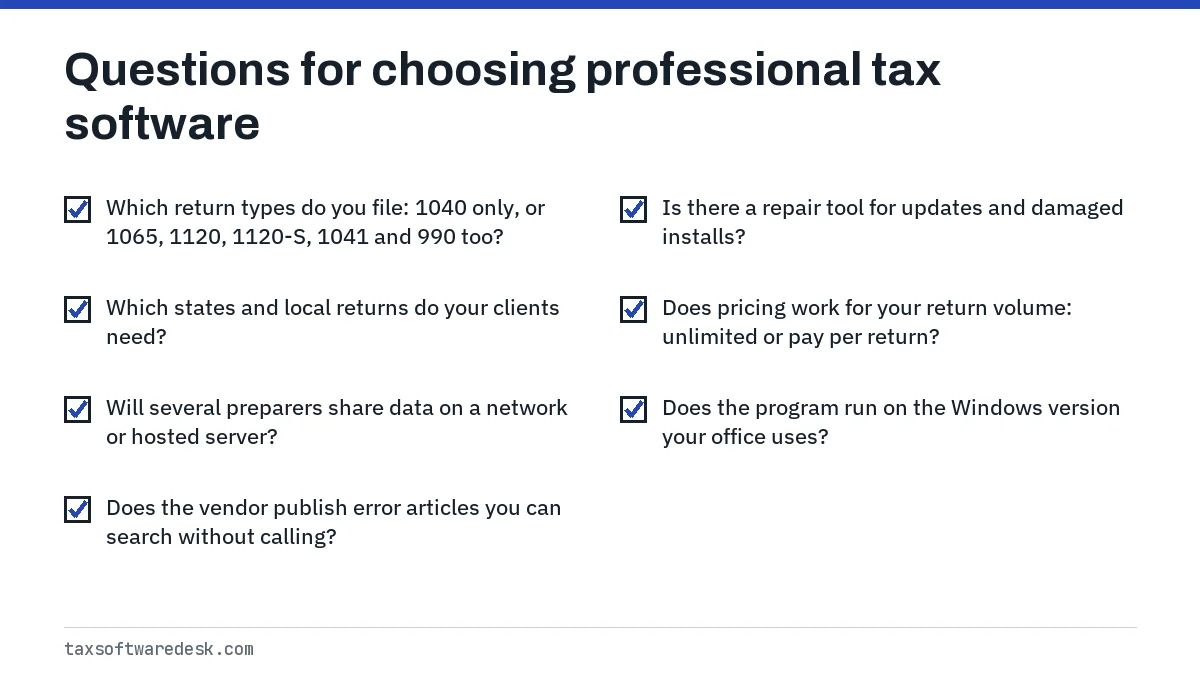
Two IRS rules apply whichever program you choose. A firm that reasonably expects to file 11 or more covered returns (individual, trust and estate income tax returns) in a calendar year must e-file them, and every member of that firm is covered; paper exceptions are explained on Form 8948, Preparer Explanation for Not Filing Electronically. To e-file for clients at all, you need an EFIN from the IRS e-file application, which the IRS says can take up to 45 days to approve.
Consumer products are compared separately in our best tax software guide. If you file only your own return, a consumer program is the right category.
Before you call vendor support
Support lines are busiest from late January to April 15, so a few minutes of preparation shortens the call. Gather the details below before contacting the vendor through the support page linked in each product guide.
- Write down the exact error text and number, or take a screenshot.
- Note the tax year of the program, the return type (1040, 1065, 1120-S) and whether the program is standalone or networked.
- Record what you were doing: opening the program, opening a client, updating, printing or transmitting.
- Check whether the error happens on another workstation or under another Windows user.
- List anything that changed recently: a Windows update, new antivirus, a moved data folder or a new server.
AI research and review tools now sit alongside these packages rather than replacing them. AI tax software for tax professionals covers what each type does and the citation test worth running before you buy.
Common questions
What software do most tax preparers use?
Common professional programs include Drake Tax, Intuit ProSeries and Lacerte, Thomson Reuters UltraTax CS and Wolters Kluwer TaxWise. The IRS does not publish market share figures by product, so any ranking you see is a vendor or survey claim.
Are IRS reject codes the same in every professional tax program?
Yes. Reject codes such as IND-183-01 are IRS Modernized e-File business rules, so the meaning does not change between programs. Only the input screen where you correct the data is product-specific.
Do I need an EFIN to use professional tax software?
You can prepare returns without one, but to e-file for clients you need an Electronic Filing Identification Number from the IRS e-file application. The IRS says approval can take up to 45 days, so apply well before the season starts.
Who must e-file client returns?
A preparer or firm that reasonably expects to file 11 or more individual, trust or estate income tax returns in a calendar year is a specified tax return preparer and must e-file them. Paper returns in allowed cases are explained on Form 8948.
Why does professional tax software fail on only one workstation?
Usually the cause is local: a Windows profile problem, a disconnected mapped drive, missing folder permissions or antivirus on that computer. If every workstation fails, check the server share and the most recent update instead.