
UltraTax error codes: e-file, database validation and startup fixes
Short answer
UltraTax error codes for e-file use the IRS rule format, such as FW2-012 or IND-183-01, and Thomson Reuters documents each one on its Help and Support site under the return type. UltraTax CS will not create the electronic file until every error on its E-File Error Report is fixed, so start there before looking at IRS rejects.
- 01Where codes are documented
- Thomson Reuters Help and Support, e-file errors by return type
- 02FW2-012
- W-2 Box 12 code and amount must both be present
- 03IND-183-01
- Spouse IP PIN missing or invalid
- 04Database validation error
- Return data does not match IRS master file
- 05Network crash fix
- Adjust Windows User Account Control, reinstall desktop setup
Where do I look up UltraTax errors?
Look up UltraTax errors on the Thomson Reuters Help and Support site, where e-file errors are filed by return type (1040, 1120, 990 and others) and titled with the code, for example FW2-012 e-file error. Program errors such as UltraTax CS has stopped working sit in a separate Errors section. Tax Software Desk is independent and is not affiliated with Thomson Reuters.
Before searching, decide whether UltraTax CS found the problem or the taxing authority rejected the return. Thomson Reuters treats these separately: program-detected errors appear on the E-File Error Report, which you print with Print Report, while rejects arrive with the acknowledgment and its reject code.
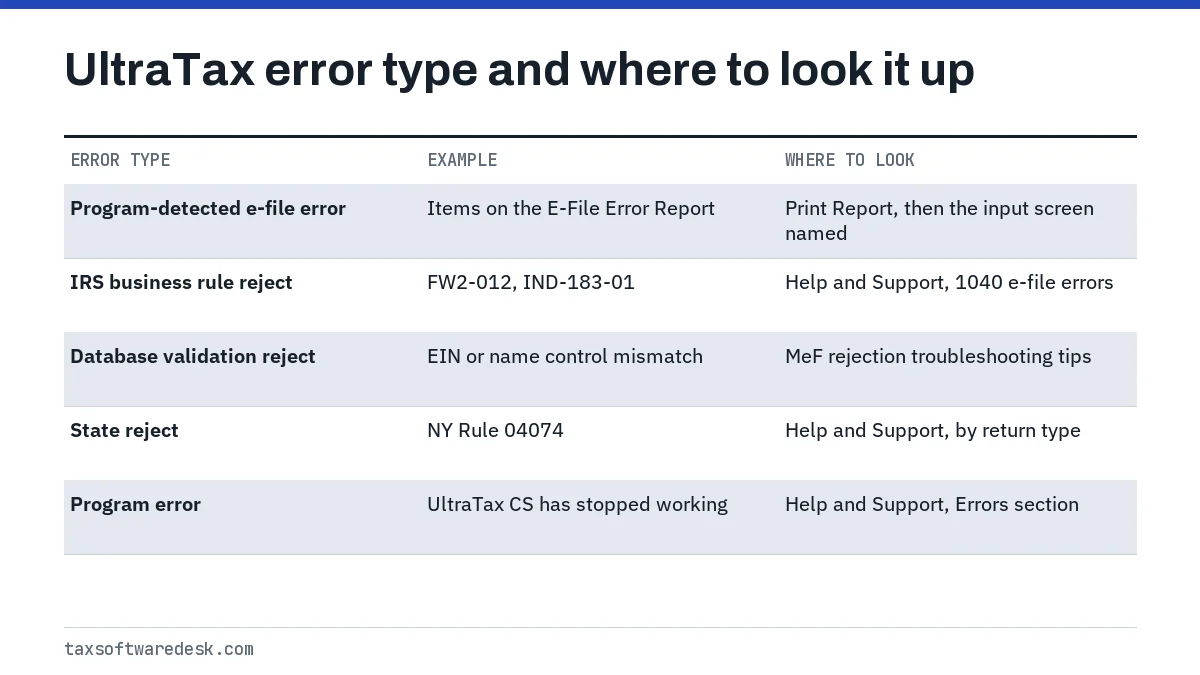
UltraTax efile error codes: how to clear them
UltraTax efile error codes are cleared the same way whatever the code: correct the data on the input screen, recreate the electronic file and send it again. Thomson Reuters is explicit that UltraTax CS will not create the electronic file until every error is fixed.
- Print the E-File Error Report and note each code and the form it names.
- Open the input screen for that form and correct or complete the field.
- Recalculate, then recreate the electronic file.
- Transmit again and watch for the new acknowledgment.
What is UltraTax error FW2-012?
UltraTax error code FW2-012 means a W-2 Box 12 line has a code without an amount, or an amount without a code. The IRS rule says that if EmployersUseCd or EmployersUseAmt has a value, the other must too. Check every Box 12 letter and number against the paper W-2, delete any line that has a code but no amount, and paper-file if the entries are correct and the error persists.
IND-183-01: spouse IP PIN
IND-183-01 means the IRS shows the spouse has an Identity Protection PIN and the one on the return is missing or wrong. Enter the six-digit spouse IP PIN in the Electronic Filing folder, IDAuth tab, IP PIN section, then recreate and resend. If the client cannot find it, they can retrieve it through the IRS Get an IP PIN tool; our IP PIN in TurboTax page explains the same rule from the consumer side.
What is an UltraTax database validation error?
An UltraTax database validation error is an IRS Master File rejection: the identifying data on the return does not match what the IRS has on record. Thomson Reuters lists EIN, name control, tax year end and entity type as the fields to check first.
- Name control: UltraTax CS calculates it automatically, but for partnerships, trusts and corporations the IRS record may use a different name. Verify the name on the input screen and override the name control if the IRS record differs.
- Tax year end: a calendar-year return rejects if the IRS has the entity on a fiscal year, such as June 30.
- EIN and entity type: confirm against the IRS assignment letter, not a prior return that may itself be wrong.
Schema errors are a different category: the file does not match the IRS format. Thomson Reuters groups them as shown below.
| Message type | What it means | Fix |
|---|---|---|
| Unexpected child element / Expected | An entry is missing or out of sequence | Review diagnostics for the missing item |
| Incomplete content | A required field is blank | Enter data, including zero where allowed |
| MinInclusive constraint | Negative number where only positive is allowed | Enter a positive number or zero |
| Enumeration constraint | Value not on the approved list | Use a valid value, such as IN rather than IK |
| Parsing error | Wrong data type, such as text in a number field | Match the field's data type |
State rules follow the same pattern. New York Rule 04074 schema validation failure, for example, is often caused by a missing firm EIN at Setup > System Configuration > Firm tab, partner addresses over 30 characters or containing special characters, or the word Various used as a date on Forms IT-398 or IT-399.
Why won't UltraTax open?
UltraTax won't open for reasons that split cleanly by scope, so Thomson Reuters starts with four tests: open it from another workstation, under another Windows profile, in a prior-year version, and note any error text. If it fails everywhere, the cause is on the server; if it fails for one user, it is that user's profile or preferences.
- Close all CS Professional Suite and Microsoft Office programs and confirm CS Connect Background Services are not running.
- On the server, open Computer Management, Shared Folders, Open Files, close files that reference CS Professional Suite, and reboot the server if they will not close.
- Rename the homepage files utYYhome.con, UTYYHome.HST and UTYYHome.MHT in X:\WinCSI\UTYYSys.
- For a single user, rename that user's preference file (_yUSUMSC.[user]) in X:\WinCSI\UTyySys and clear their %temp% folder.
- Run setup.exe as administrator from X:\WinCSI\UTyy\Desktop, with antivirus exclusions for CS programs in place.
Common questions
Why won't UltraTax CS create my electronic file?
UltraTax CS will not create the e-file while any error remains on the E-File Error Report. Print the report, fix each item on its input screen, and recreate the file.
How do I fix FW2-012 in UltraTax?
Make sure every W-2 Box 12 line has both a code and an amount that match the paper W-2. Delete lines with a code but no amount, and paper-file if correct data still rejects.
What causes a name control mismatch in UltraTax?
The name control UltraTax CS calculates from the input differs from the IRS record, which is common for partnerships, trusts and corporations. Verify the name and override the name control to match the IRS record.
Where do I enter an IP PIN in UltraTax CS?
Use the Electronic Filing folder, IDAuth tab, IP PIN section. Enter the six-digit number for the taxpayer or spouse, then recreate and retransmit the e-file.
Why does UltraTax crash when opening client files on the network?
Thomson Reuters links the UltraTax CS has stopped working message on networks to Windows User Account Control. Its fix is adjusting UAC, restarting and rerunning the desktop setup.
Sources
- FW2-012 e-file error thomsonreuters.com
- IND-183-01 e-file error thomsonreuters.com
- Fix electronic file errors thomsonreuters.com
- Tips for troubleshooting modernized e-file (MeF) rejections thomsonreuters.com
- Application doesn't open or start thomsonreuters.com
- Error: UltraTax CS has stopped working thomsonreuters.com
We check figures against these official pages. Rules change; confirm anything that affects a deadline or payment with the agency before you act.
Tell us what happened
Describe your situation and our editors will use it to improve this guide. If you leave your email, we may reply with a pointer to the right page or official contact. We never share your details.
Related guides
 Tax Software for Professionals: Errors and Fixes by Product
The five desktop tax software for professionals programs covered here, Drake Tax, ProSeries, Lacerte, UltraTax CS and TaxWise, ea…
TaxWise Error Codes: Login, Authentication and E-File Fixes
The TaxWise error codes people hit most are error 631, which CCH says means TaxWise was open on a workstation while an update ins…
Drake Software Error Codes: Common Errors and Fixes
Drake software error codes come in two families: program errors such as Error 70: Permission Denied, which Drake says means a use…
Lacerte Error Codes: Validation and Calculation Fixes
A Lacerte error code on an e-filed return is either a validation failure, meaning Lacerte's diagnostics or the Lacerte Electronic…
Tax Software for Professionals: Errors and Fixes by Product
The five desktop tax software for professionals programs covered here, Drake Tax, ProSeries, Lacerte, UltraTax CS and TaxWise, ea…
TaxWise Error Codes: Login, Authentication and E-File Fixes
The TaxWise error codes people hit most are error 631, which CCH says means TaxWise was open on a workstation while an update ins…
Drake Software Error Codes: Common Errors and Fixes
Drake software error codes come in two families: program errors such as Error 70: Permission Denied, which Drake says means a use…
Lacerte Error Codes: Validation and Calculation Fixes
A Lacerte error code on an e-filed return is either a validation failure, meaning Lacerte's diagnostics or the Lacerte Electronic…