
ProSeries won't open: startup, crash and update fixes
Short answer
When ProSeries won't open, Intuit's first fix is to repair the updates, because damaged files in the Updates folder are the most common cause of a freeze or crash at startup. If that fails, work through the print driver, HomeBase, the shared forms file and .NET Framework before a clean install, which keeps your client data in a renamed folder.
- 01First fix
- Repair Updates (Tool Hub or Windows Start menu)
- 02Crash message in ProSeries 2020 and later
- A problem was encountered that has caused your program to crash
- 03Printer to set as default while testing
- Microsoft XPS Document Writer
- 04Clean install folder rename
- ProWinYY to ProWinYYOLD
Why won't ProSeries open?
ProSeries won't open most often because files in its Updates folder were damaged during a download, and Intuit lists that first among five components that can freeze the program at startup. The other four are an incompatible default printer driver, damaged HomeBase records, a corrupt shared forms file (SHRFRM) and a damaged Microsoft .NET Framework.
What you see on screen narrows it down. In ProSeries 2020 and later a crash reads A problem was encountered that has caused your program to crash; older years say ProSeries has stopped working. A program that shows a splash screen and then hangs points to updates or the printer. A crash right after you click Sign In points to HomeBase.
| What happens | Likely cause | Start with |
|---|---|---|
| Freezes on the splash screen | Damaged update files or print driver | Repair Updates, then XPS printer |
| Crashes before the Sign In button | Updates or the embedded browser cache | Repair Updates, rename CefSharpBrowserCaches |
| Crashes after clicking Sign In | Damaged HomeBase | Rebuild HomeBase |
| Updater has stopped working | Corrupt files in the Updates folder | Clear Updates, run ProSeriesUpdate.exe as administrator |
| Fails on one workstation only | That workstation's install or Windows profile | Reinstall the workstation from the network drive |
Tax Software Desk is independent and is not affiliated with Intuit. The steps below summarize Intuit's own help articles, which are linked at the end.
How do I repair ProSeries updates?
Repairing updates deletes the downloaded update files and fetches them again from Intuit, which clears the damage behind most startup freezes and the proseries won't update problem. There are two ways to run it.
- Tool Hub: open the ProSeries Tool Hub, choose Update Issues on the left, select the tax year and click Repair Updates.
- Start menu: close ProSeries, open the Windows Start menu, open the ProSeries folder for that tax year and choose Repair Updates, then apply updates when the download finishes.
If ProSeries opens but still reports No Updates Found or update errors 18, 23 or 34, use Update > Refresh Updates inside the program and then check for updates a second time. Intuit warns that skipping the second check can leave some forms on an old version.
When the ProSeries updater has stopped working
If the updater itself crashes, clear the contents of the Updates folder inside your ProSeries install folder, such as C:\ProWinYY\Updates for a standalone Professional install. Then right-click ProSeriesUpdate.exe and choose Run as administrator so it can write the new files.
ProSeries keeps crashing or freezing after updates
If ProSeries keeps crashing after the updates are repaired, work through the remaining components in the order Intuit gives. Test after each step so you know which one fixed it.
- Print driver: open Windows Settings, Printers and scanners, and set Microsoft XPS Document Writer as the default printer. If ProSeries now opens, update or replace your real printer's driver.
- Embedded browser cache: if the crash happens before Sign In, rename the CefSharpBrowserCaches folder so ProSeries builds a new one.
- HomeBase: if the crash comes after Sign In, rebuild the ProSeries HomeBase. Intuit calls damaged HomeBase records the main cause of that pattern.
- Shared forms file: rename SHRFRMYY in the Common folder to SHRFRMYYold, then re-enter firm and billing details through the Option Setup Wizard.
- .NET Framework and Windows: install all Windows updates, then repair Microsoft .NET Framework. The Component Repair Tool on the Tool Hub Program tab automates this.
ProSeries not opening on a network workstation
On a network install, ProSeries not opening on a single workstation usually means that workstation's copy is damaged or cannot reach the shared drive. Confirm the mapped drive opens in File Explorer before changing anything.
- One workstation affected: uninstall ProSeries on that computer, rename its ProWinYY folder to ProWinYYOLD and reinstall from the network drive using X:\ProNetYY\Wkstn\Setup.exe, where X is the network drive letter.
- Every workstation affected: fix the main computer first. Uninstall and rename the folders there, including X:\ProNetYY to ProNetYYOLD, reinstall from your Intuit account, then reinstall each workstation from the network location.
- Unable to locate Common files folder: see the path check in our ProSeries error codes guide.
How to do a clean install of ProSeries
A clean install replaces every program file while keeping your client data, because the old folder is renamed rather than deleted. Use it when the repairs above have not worked. If you are on a pay-per-return license, first print the audit report from Tools > Pay Per Return > Print Audit Report.
- Close all Intuit programs.
- Open Control Panel, Uninstall a program, right-click ProSeries, choose Uninstall and Select All.
- In File Explorer, rename C:\ProWinYY to ProWinYYOLD (Basic users rename BasWinYY to BasWinYYOLD).
- Sign in to your Intuit account, download the installer for that tax year and run it.
- Open ProSeries to confirm it starts. The client list will be empty.
- Copy client files back from the YYData folder inside the OLD folder.
Before deleting the OLD folder, Intuit suggests carrying over settings files such as Prodsel.lyt, OLAC.ini, BankProd.ini, EFILE.ini, Passwd.ini, SHRFRMYY, the EIN database files and custom letters and invoices (.rtf, .ltr, .inv).
If ProSeries still won't open
Intuit notes that startup crashes are often caused by conflicts elsewhere on the computer that may need an IT professional, and its support team does not repair Microsoft components. Antivirus that quarantines ProSeries files, a pending Windows restart and a full system drive are worth ruling out before you call.
Lacerte and UltraTax CS have their own startup fixes; see Lacerte error codes and UltraTax error codes. The professional tax software hub lists every product we cover.
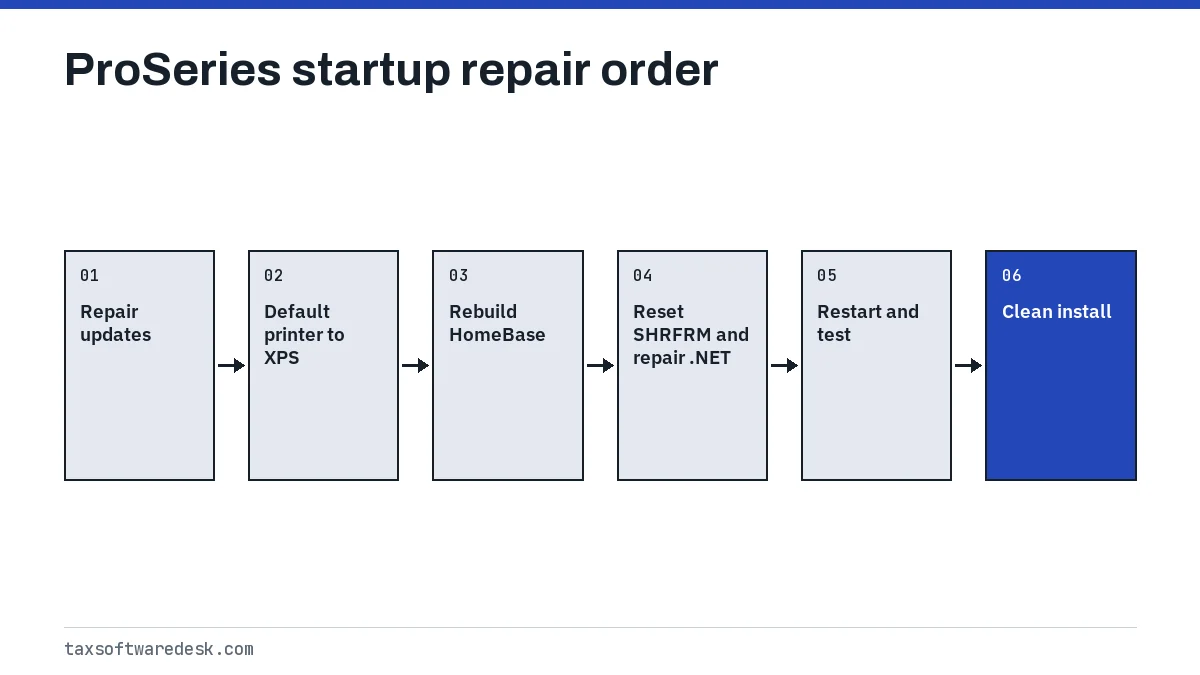
Step by step
Repair updates
Run Repair Updates from the ProSeries Tool Hub or the ProSeries Start menu folder, then apply updates.
Test the print driver
Set Microsoft XPS Document Writer as the default printer and reopen ProSeries.
Rebuild HomeBase
If it crashes after Sign In, rebuild the ProSeries HomeBase.
Reset the shared forms file
Rename SHRFRMYY in the Common folder and re-enter firm details in the Option Setup Wizard.
Repair Windows components
Install Windows updates and run the Component Repair Tool for .NET Framework.
Clean install
Uninstall, rename ProWinYY to ProWinYYOLD, reinstall and copy client files back.
Common questions
Why won't my ProSeries open after an update?
Damaged files in the Updates folder are the most common cause. Run Repair Updates from the ProSeries Tool Hub or the ProSeries folder in the Windows Start menu, then apply the updates again.
How do I fix ProSeries has stopped working at sign-in?
If it crashes before the Sign In button, repair updates and rename the CefSharpBrowserCaches folder. If it crashes after you click Sign In, rebuild HomeBase, which Intuit identifies as the usual cause.
Will a clean install of ProSeries delete my client files?
No, if you follow Intuit's method. You rename the old ProWinYY folder to ProWinYYOLD instead of deleting it, then copy client files back from its YYData folder after reinstalling.
Can a printer stop ProSeries from opening?
Yes. Intuit lists an incompatible default print driver as one cause of startup freezes. Set Microsoft XPS Document Writer as the default printer and try again.
What is the ProSeries Component Repair Tool?
It is a tool on the Program tab of the ProSeries Tool Hub that repairs the Microsoft components ProSeries needs, such as .NET Framework. Intuit recommends it before manual repairs.
Sources
- ProSeries freezes when opening accountants.intuit.com
- ProSeries crashes during sign in accountants.intuit.com
- Resolving the ProSeries error: A problem was encountered that has caused your program to crash accountants.intuit.com
- How to refresh ProSeries updates accountants.intuit.com
- Performing a clean install of ProSeries accountants.intuit.com
We check figures against these official pages. Rules change; confirm anything that affects a deadline or payment with the agency before you act.
Tell us what happened
Describe your situation and our editors will use it to improve this guide. If you leave your email, we may reply with a pointer to the right page or official contact. We never share your details.
Related guides
 Tax Software for Professionals: Errors and Fixes by Product
The five desktop tax software for professionals programs covered here, Drake Tax, ProSeries, Lacerte, UltraTax CS and TaxWise, ea…
ProSeries Error Codes: Common Errors and How to Fix Them
The most searched ProSeries error codes each point to a different part of the program: error 54 means the e-file server found you…
Lacerte Error Codes: Validation and Calculation Fixes
A Lacerte error code on an e-filed return is either a validation failure, meaning Lacerte's diagnostics or the Lacerte Electronic…
UltraTax Error Codes: E-File and Database Error Fixes
UltraTax error codes for e-file use the IRS rule format, such as FW2-012 or IND-183-01, and Thomson Reuters documents each one on…
Tax Software for Professionals: Errors and Fixes by Product
The five desktop tax software for professionals programs covered here, Drake Tax, ProSeries, Lacerte, UltraTax CS and TaxWise, ea…
ProSeries Error Codes: Common Errors and How to Fix Them
The most searched ProSeries error codes each point to a different part of the program: error 54 means the e-file server found you…
Lacerte Error Codes: Validation and Calculation Fixes
A Lacerte error code on an e-filed return is either a validation failure, meaning Lacerte's diagnostics or the Lacerte Electronic…
UltraTax Error Codes: E-File and Database Error Fixes
UltraTax error codes for e-file use the IRS rule format, such as FW2-012 or IND-183-01, and Thomson Reuters documents each one on…