
Lacerte error codes: validation failures, calculation errors and startup
Short answer
A Lacerte error code on an e-filed return is either a validation failure, meaning Lacerte's diagnostics or the Lacerte Electronic Filing Center found a problem before the return was sent, or a transmission failure, meaning the return passed validation but was not delivered. Most update-related failures clear with WebSetup /force, which Intuit runs from the Lacerte Tool Hub.
- 01Validation failure
- E-file critical issue found before sending
- 02Transmission failure
- Passed validation but not delivered
- 03601ERRV:8 fix
- Batch Mode (Ctrl+W), remove odd characters
- 04Update size
- Can exceed 1 GB, per Intuit
- 05Window missing at startup
- Tool Hub > Program > Reset Display
What does a Lacerte error code on an e-file mean?
A Lacerte error code on an e-file tells you which stage stopped the return. Intuit separates a validation failure, where the program found e-file critical issues that must be fixed before submission, from a transmission failure, where the return passed the diagnostic check but did not send. The e-file status then shows Received at Lacerte, Accepted or Rejected.
Intuit lists three common transmission failure causes: a return with the same federal ID was already sent, the taxing agency already accepted a return with that ID, or a newer Lacerte version is available. Tax Software Desk is independent and is not affiliated with Intuit.
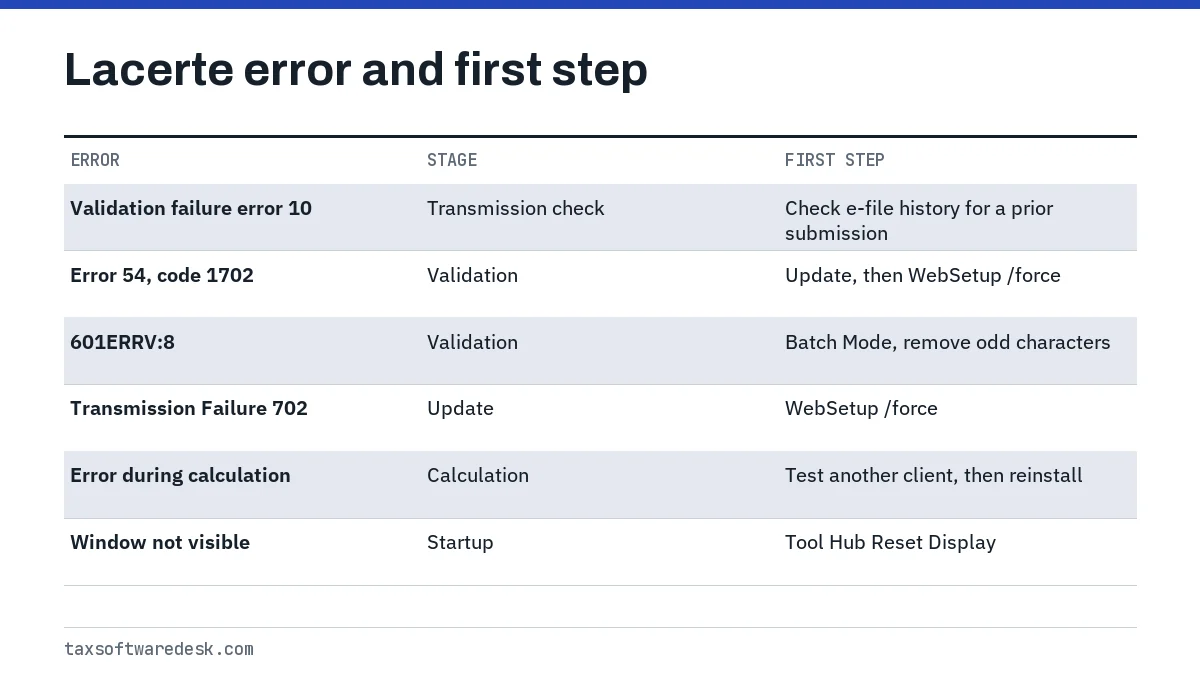
Lacerte validation failures: error 10, error 54 and 601ERRV:8
Lacerte validation failure error 10
Lacerte validation failure error 10 is reported by users with the text The submission is a duplicate of one that was previously received. It matches Intuit's duplicate-transmission cause: the same return, often a state return, was already sent. Check the e-file history for that client before resending, and if the earlier submission was accepted, do not transmit again.
Lacerte error 54 (validation failure code 1702)
Lacerte error 54 usually appears as Validation Failure: Error 54 with code 1702, and Intuit community answers tie 1702 codes to update problems. Intuit has not published a dedicated article for this pairing that we could find, so the fix below is the community-reported one: bring Lacerte fully up to date, and force a reinstall with WebSetup /force from the Tool Hub if a normal update does not clear it.
Validation failure 601ERRV:8 (malformed data)
Intuit says 601ERRV:8 means the Lacerte Electronic Filing Center could not read the data because of corruption that only shows in Batch Mode. The fix is manual:
- Open an input screen that holds return data.
- Press Ctrl+W to switch to Batch Mode.
- Look for odd characters or Wingdings symbols and delete them.
- Repeat for every data entry screen, then press Ctrl+W to leave Batch Mode.
- Resubmit the return.
Lacerte error during calculation
Lacerte error during calculation is a generic message from the calculation engine, and Intuit has no single numbered article for it. The number of clients affected is the best clue, so check a second client before changing anything.
- One client only: look for an unusual or damaged input on that return and review diagnostics. Batch Mode (Ctrl+W) makes stray characters visible.
- All clients, all return types: the install is the likely cause. Restart the computer, then run WebSetup /force.
- Very large clients only: community answers note Lacerte uses Java for calculations and can run out of engine memory on very large returns; search Intuit's support site for its calculation memory article before editing any settings.
- Started right after an update and cleared later the same day: some users report the message went away without action, which suggests a temporary server-side issue. Retry before reinstalling.
Why won't Lacerte open after an update?
Lacerte won't open after an update most often because the update did not finish or a file was locked while it installed. A separate case is a program that runs but is invisible: Intuit says Lacerte can appear on the taskbar without a window, mostly on multi-monitor setups, and the fix is Tool Hub > Program > Reset Display.
Intuit's update troubleshooting covers Transmission Failure 702, Program update required, error 12002 (a timeout), Error downloading File (filename).zip and Shared File Path is being Updated. Its main fix for all of them is WebSetup with the /force switch, which ignores existing setup files and downloads fresh ones.
- Close Lacerte on every computer that uses the same program path.
- Run WebSetup /force from the Lacerte Tool Hub, or run "C:\Program Files (x86)\Common Files\Lacerte Shared\WebSetupYY.exe" /force with YY as the tax year.
- If it fails, rename the SetupYY folder (typically C:\Lacerte\YYTax\SetupYY) and try again.
- Restart the computer to release locked URN files, then update again.
- Try updating a different tax year to see whether a firewall or permission block is year-specific.
- As a last step, uninstall Lacerte, rename the YYTax folder and run WebSetup fresh.
Using the Lacerte Tool Hub
The Lacerte Tool Hub is Intuit's free repair app for Lacerte. Close Lacerte completely before installing it. Its eight tabs are Install, Program, Network, Data, Print, DMS, ITA and Account.
| Tab | Use it for |
|---|---|
| Install | Prior-year installs and update problems, including WebSetup /force |
| Program | Performance, display and login window problems; Component Repair Tool; Reset Display |
| Network | Network drive and file access errors |
| Data | Client database errors (CLPack) and the Lacerte Backup tool |
| PDF and DMS printing problems |
Installer error 1603 affects Lacerte the same way it affects ProSeries; the steps are in our ProSeries error codes guide. For other vendors, see UltraTax error codes, TaxWise error codes or the professional tax software hub.
Common questions
What is the difference between a validation failure and a transmission failure in Lacerte?
A validation failure means Lacerte found e-file critical problems before the return could be submitted. A transmission failure means the return passed validation but was not delivered, for example because it duplicates one already sent or accepted.
How do I force a Lacerte update?
Run WebSetup with the /force switch, either from the Install tab of the Lacerte Tool Hub or from the WebSetupYY.exe file in the Lacerte Shared folder. It downloads fresh setup files instead of reusing the old ones.
Lacerte is on the taskbar but I can't see the window. What do I do?
Open the Lacerte Tool Hub, choose Program and run Reset Display. Intuit says this happens most often on computers with more than one monitor.
Should I resend a return that got Lacerte validation failure error 10?
Not before checking. Error 10 indicates a duplicate submission, so confirm in the e-file history whether the earlier return was accepted. Resending an accepted return will only fail again.
Is Lacerte error during calculation a problem with my client data?
Sometimes. If only one client is affected, review that return's inputs. If every client fails, the program install is the more likely cause and a forced reinstall usually helps.
Sources
- Understanding e-file transmission failure errors in Lacerte accountants.intuit.com
- How to resolve validation failure during Lacerte e-file (601ERRV) accountants.intuit.com
- Troubleshooting update issues in Lacerte accountants.intuit.com
- Lacerte shows on taskbar but program window is not visible accountants.intuit.com
- Using Lacerte Tool Hub to fix common problems and errors accountants.intuit.com
- Intuit Accountants Community: Validation Failure Error 54, code 1702 accountants.intuit.com
We check figures against these official pages. Rules change; confirm anything that affects a deadline or payment with the agency before you act.
Tell us what happened
Describe your situation and our editors will use it to improve this guide. If you leave your email, we may reply with a pointer to the right page or official contact. We never share your details.
Related guides
 Tax Software for Professionals: Errors and Fixes by Product
The five desktop tax software for professionals programs covered here, Drake Tax, ProSeries, Lacerte, UltraTax CS and TaxWise, ea…
ProSeries Error Codes: Common Errors and How to Fix Them
The most searched ProSeries error codes each point to a different part of the program: error 54 means the e-file server found you…
UltraTax Error Codes: E-File and Database Error Fixes
UltraTax error codes for e-file use the IRS rule format, such as FW2-012 or IND-183-01, and Thomson Reuters documents each one on…
TaxWise Error Codes: Login, Authentication and E-File Fixes
The TaxWise error codes people hit most are error 631, which CCH says means TaxWise was open on a workstation while an update ins…
Tax Software for Professionals: Errors and Fixes by Product
The five desktop tax software for professionals programs covered here, Drake Tax, ProSeries, Lacerte, UltraTax CS and TaxWise, ea…
ProSeries Error Codes: Common Errors and How to Fix Them
The most searched ProSeries error codes each point to a different part of the program: error 54 means the e-file server found you…
UltraTax Error Codes: E-File and Database Error Fixes
UltraTax error codes for e-file use the IRS rule format, such as FW2-012 or IND-183-01, and Thomson Reuters documents each one on…
TaxWise Error Codes: Login, Authentication and E-File Fixes
The TaxWise error codes people hit most are error 631, which CCH says means TaxWise was open on a workstation while an update ins…