
How to file a FreeTaxUSA amended return, what it costs and when it must be mailed
Short answer
To file a FreeTaxUSA amended return, sign in to the FreeTaxUSA edition for that tax year, choose Amend Tax Return in the Account menu, enter the refund or payment from your last filing, make your changes and finish in Final Steps. FreeTaxUSA says amendments are free if you bought Deluxe and $16.98 for unlimited amendments otherwise. A 2025 amendment can usually be e-filed; most older ones go by mail.
- 01Where to start in 2023 and later editions
- Account menu > Amend Tax Return
- 02Price if you filed with Deluxe
- Amended returns free (FreeTaxUSA)
- 03Price with the regular service
- $16.98 for unlimited amended returns
- 042022 to 2024 amendments
- E-file only with an IRS-issued IP PIN
- 052019 to 2021 amendments
- Print and mail only
How do I amend a return in FreeTaxUSA?
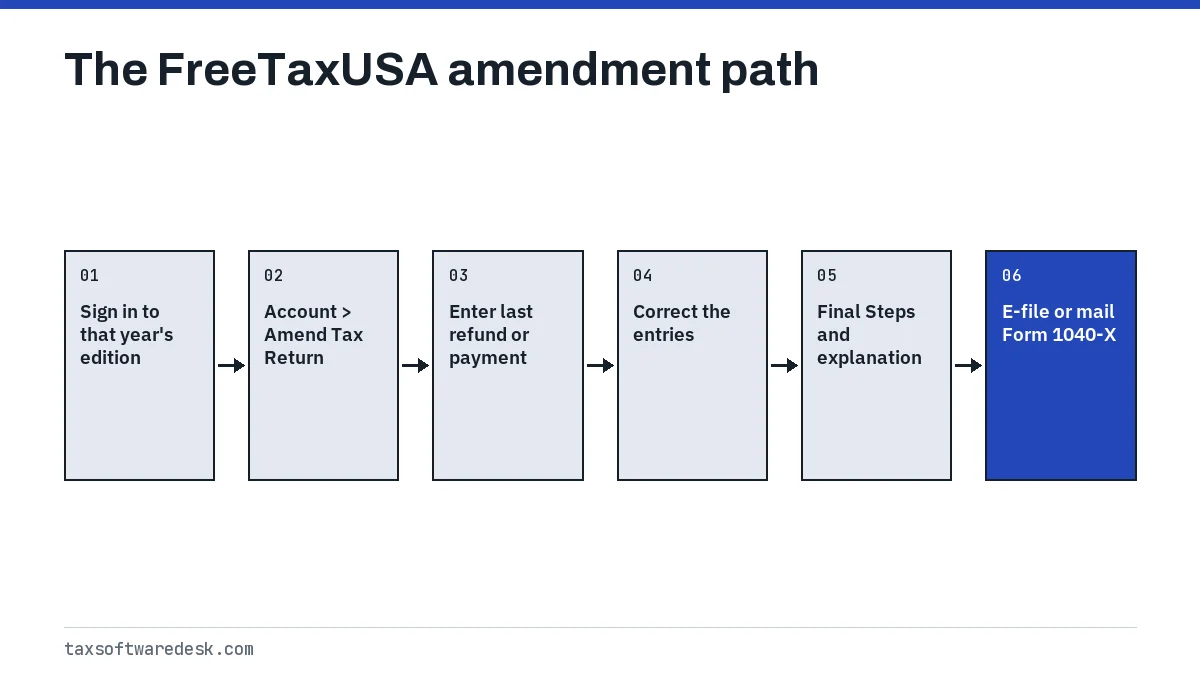
You amend inside the same FreeTaxUSA account that filed the original return, in the edition for that tax year. FreeTaxUSA describes three stages: report the amendment information, make the changes, and submit the amendment on Form 1040-X. It recommends waiting until the IRS has fully processed the original return when possible, and if you are expecting a refund from the original, waiting until you receive it.
- Sign in to the FreeTaxUSA edition for the year you are amending. For a past year, choose Prior Year on FreeTaxUSA's site and pick the year first.
- Choose Amend Tax Return. In 2023 and later editions it is in the Account menu; in 2022 and earlier editions the link is in the sidebar menu.
- In Amendment Information, enter the refund (overpayment) you actually received, or the tax you actually paid, from your last filing.
- Use the top menus to change, add or delete the entries that were wrong, and save every page you update.
- Open Final Steps, pay for the amendment if you did not buy Deluxe or Pro Support, and type a short explanation of the change.
- Review the 1040 (As Amended) and the Form 1040-X, then e-file or print and mail as FreeTaxUSA offers.
What do I enter as the overpayment or tax paid?
This screen sets the starting point, so the amendment begins at $0 and shows only the effect of your changes. FreeTaxUSA's guidance is to enter what actually happened, not what the old return predicted. Most amendments need only one of the two fields.
| Your last filing | What to enter |
|---|---|
| Refund received | The exact refund received as overpayment, minus any IRS interest |
| Refund changed by the IRS | The amount you actually received, not the return's figure |
| Refund shown, not yet processed | The refund on the return as overpayment |
| Balance due | Tax paid with the filing plus any later payments, as tax paid |
If you are amending a state return as well, enter the overpayment or tax paid for each state. FreeTaxUSA suggests checking your IRS online account to confirm the last refund or payments before you type them.
How much does a FreeTaxUSA amended return cost?
FreeTaxUSA's help page says amended returns are free if you filed with the Deluxe service. If you used the regular service, unlimited amended returns cost $16.98 (checked October 2026). You pay for amendment preparation in Final Steps, so you see the charge before you submit.
Deluxe also adds live chat and priority support, which the FreeTaxUSA vs TurboTax comparison covers. Prices for the 2027 filing season, for tax year 2026 returns, are not published yet, so check the price on screen before you pay.
Can I e-file a FreeTaxUSA amended return?
Sometimes. FreeTaxUSA says you can usually e-file an amended return if you e-filed the original during the same calendar year. For earlier years its prior-year help sets these limits:
| Tax year amended | How it can be filed |
|---|---|
| 2025 | E-file usually available |
| 2022 to 2024 | E-file only if you have an IRS-issued IP PIN; otherwise mail |
| 2019 to 2021 | Print and mail only |
FreeTaxUSA also says the amendment has to be mailed in these cases:
- You filed the original return on paper.
- You have already e-filed three amended returns this year.
- Documents must be mailed in with the amended return.
- You mailed a prior-year return during the current filing season.
- The IRS has no record of your original return.
- You are amending only the state return, not the federal one.
FreeTaxUSA's help pages do not all describe prior years the same way, so the Final Steps menu is the final word on which option your return has. An IP PIN is a six-digit number the IRS issues each year; the IP PIN guide explains where it goes in tax software. If you mail, sign both the Form 1040-X and the new Form 1040, and FreeTaxUSA suggests certified mail or a tracking number.
What if I filed the original with other software?
FreeTaxUSA can amend a return you filed elsewhere, but it needs the original in its system first. Its help answer gives these steps:
- Create a FreeTaxUSA account and recreate the original return exactly as it was filed, even the entries that were wrong.
- In Final Steps, choose to mail the recreated return. You do not actually mail it; this only puts the return in a finalized state.
- Once the return shows a mailed status, click Amend Tax Return in the Account menu and make your changes.
- E-file or mail the amendment, whichever FreeTaxUSA offers for your situation.
If the original was filed in TurboTax, you can also amend it there; see TurboTax amended return for those steps.
How do I check the status of a FreeTaxUSA amendment?
If you e-filed, FreeTaxUSA says to check your account or watch for an email or text message about status changes. Once the amendment is accepted, the IRS or your state processes it and contacts you if it needs more.
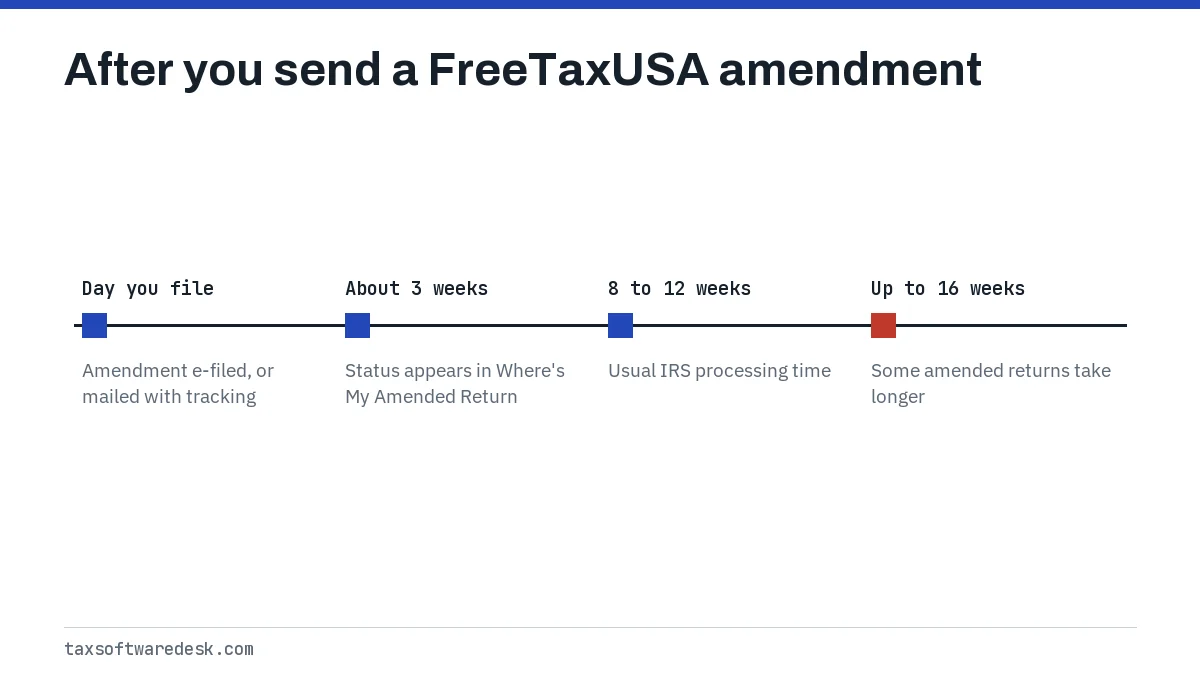
Processing is tracked in the IRS Where's My Amended Return tool, where the status appears about 3 weeks after you file. The IRS says most amended returns take 8 to 12 weeks and some take up to 16 weeks. You need your Social Security number, date of birth and ZIP code, or you can call 866-464-2050. If you cannot get into FreeTaxUSA to see your status, start with FreeTaxUSA login problems.
Step by step
Open the right year
Sign in to the FreeTaxUSA edition for the tax year you are amending.
Start the amendment
Choose Account > Amend Tax Return, or the sidebar link in 2022 and earlier editions.
Enter the starting figures
Enter the refund actually received or the tax actually paid from your last filing.
Make the changes
Use the menus to correct the entries and save every page.
Submit in Final Steps
Pay if needed, explain the change, review the Form 1040-X, then e-file or mail it.
Common questions
Is a FreeTaxUSA amended return free?
It is free if you filed the original with FreeTaxUSA Deluxe. With the regular service, FreeTaxUSA charges $16.98 for unlimited amended returns.
Can I e-file a 2024 amended return with FreeTaxUSA?
FreeTaxUSA's prior-year help says 2022 to 2024 amendments can be e-filed only if you have an IRS-issued Identity Protection PIN. Otherwise, print, sign and mail the amendment.
Can I amend only my state return in FreeTaxUSA?
Yes, but FreeTaxUSA says a state-only amendment, with no federal amendment, has to be mailed rather than e-filed.
Should I wait for my original refund before amending?
FreeTaxUSA says yes if you are expecting a refund from the original return. You can cash or use that refund while the amendment is processed. If you owe more tax, file the amendment and pay as soon as possible to limit interest and penalties.
How long does a FreeTaxUSA amended return take to process?
The IRS processes it, not FreeTaxUSA. The IRS says to allow 8 to 12 weeks, up to 16 weeks in some cases, and the status shows in Where's My Amended Return about 3 weeks after you file.
Sources
- FreeTaxUSA: How do I make corrections or file amended tax returns (Form 1040-X)? freetaxusa.com
- FreeTaxUSA: How do I amend a prior year return? freetaxusa.com
- FreeTaxUSA: What if I filed my 2025 return with another software and want to amend with FreeTaxUSA? freetaxusa.com
- FreeTaxUSA Community: How do I amend a previous tax return? community.freetaxusa.com
- FreeTaxUSA Community: How do I correct a tax return mistake? community.freetaxusa.com
- IRS: Where's My Amended Return? irs.gov
We check figures against these official pages. Rules change; confirm anything that affects a deadline or payment with the agency before you act.
Tell us what happened
Describe your situation and our editors will use it to improve this guide. If you leave your email, we may reply with a pointer to the right page or official contact. We never share your details.