
How to file a TurboTax amended return in TurboTax Online or Desktop
Short answer
To file a TurboTax amended return, wait until the IRS has accepted your original return, sign in to the same account and choose Amend (change) return for that year in TurboTax Online, or Amend a Filed Return in that year's TurboTax Desktop. TurboTax prepares Form 1040-X and shows at the file step whether it can be e-filed or must be mailed. The IRS says most amended returns take 8 to 12 weeks to process.
- 01When you can start an amendment
- After the IRS accepts the original return (Intuit)
- 02Years the IRS accepts an e-filed Form 1040-X
- Current tax year and the two prior tax periods
- 03Amended returns you can e-file for one tax year
- Up to 3 (IRS)
- 04IRS processing time
- 8 to 12 weeks, up to 16 weeks in some cases
- 05Status appears in Where's My Amended Return
- About 3 weeks after you file
When do you need a TurboTax amended return?
You need an amended return when the IRS has already accepted your return and you then find something that changes it. The IRS lists the usual reasons: a change to your filing status, income, deductions, credits, dependents or tax liability. In TurboTax, an amendment produces Form 1040-X, which reports only what changed, together with the corrected forms.
| Your situation | What to do |
|---|---|
| The IRS rejected the e-file | Fix and resend the same return; no amendment |
| Accepted, then a corrected W-2 or 1099 arrives | Amend with Form 1040-X |
| Accepted, but you missed a dependent, credit or deduction | Amend with Form 1040-X |
| An IRS letter says it corrected an error | No amendment needed |
| The IRS asks you to send a missing form | Send the form as the letter asks |
A rejected return was never filed, so there is nothing to amend; the steps for that case are on how to resubmit a rejected tax return. The IRS also says you do not need to amend when it has already corrected errors on your return, or when it accepted the return without certain forms and asked you to send them separately.
When can you start an amendment in TurboTax?
Intuit says to wait until the original return has been accepted by the IRS, or mailed if you filed on paper, before you amend. In TurboTax Desktop the Amend a Filed Return option only appears once the IRS has accepted the original. Use the same TurboTax account, or the same Desktop file, that you used for the original return, because the amendment starts from what was filed.
If the change means you owe more tax, the IRS says to file the amended return and pay by the April due date to avoid penalties and interest. When you amend after that date, do not add interest or penalties yourself; the IRS figures them and adjusts the amount. To claim a refund, the IRS generally gives you 3 years from the date you filed the original return or 2 years from the date you paid the tax, whichever is later. A return filed early counts as filed on the April due date.
How do I amend a return in TurboTax Online?
- Sign in to the TurboTax account you used for the original return.
- On the Tax Home screen, scroll to Your tax returns & documents and select the year you want to amend.
- Open the Amend (change) return menu and choose Amend using TurboTax Online.
- Go only to the sections that need correcting and change those entries. The refund meter starts at $0 and shows just the change in your refund or tax due.
- Answer the remaining questions, review the Form 1040-X and continue to the file step.
Seeing $0 at the start is normal and does not mean your original refund was cancelled. If TurboTax Online tells you to amend that year in TurboTax Desktop instead, use the Desktop steps below. If you cannot get into the account that holds the original, sort out the sign-in first with TurboTax login problems.
How do I amend a return in TurboTax Desktop?
TurboTax Desktop amends a return in the program for that tax year: a 2025 return is amended in the 2025 software, not in a newer edition. Intuit's steps work the same way on Windows and Mac, with one difference in how you save a copy.
- Open the TurboTax Desktop edition for the year you are amending, then open the return you filed.
- Save a copy of the original first: File > Save As on Windows, or Duplicate on Mac, with a name that marks it as the original.
- In the File menu, select Amend a Filed Return near the bottom of the list.
- Select Amend next to the return, and answer Yes when TurboTax asks whether you already filed it.
- On the What do you need to change screen, select Update next to each item you need to change.
- Finish the remaining screens, then save the amended return under a different name, for example one that includes the tax year and the word amended.
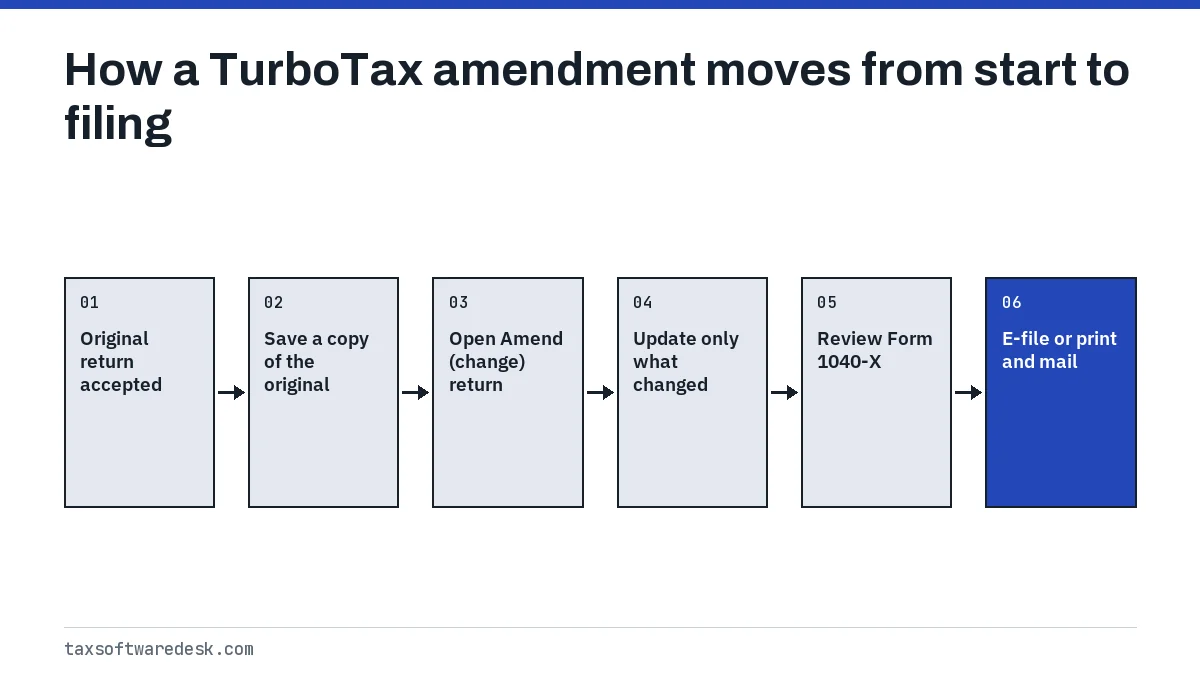
Keeping the original file untouched matters: if the IRS questions the amendment, you can show exactly what was first filed. If the old Desktop program or its .tax file is no longer on your computer, the prior-year return guide covers getting your earlier return back.
Can TurboTax e-file an amended return?
Often, yes. The IRS accepts Form 1040-X filed electronically through tax software for the current tax year and the two prior tax periods. Intuit's tax guide adds the condition that the original return must also have been e-filed, and the IRS says an amendment to a prior-year return that was filed on paper must also go on paper.
| Your situation | How the amendment goes |
|---|---|
| Original e-filed, year inside the IRS window | E-file is usually offered |
| Prior-year original filed on paper | Paper only |
| Year older than the IRS window | Paper only |
| Three amended returns already accepted for that year | No further e-filed amendments |
Even inside the window, some amended returns cannot be e-filed because of the forms involved. TurboTax then gives you print-and-mail instructions at the file step. Print the Form 1040-X with the forms and schedules that changed, sign and date it, and mail it as the instructions say. For other reasons TurboTax blocks e-file, see TurboTax won't let me e-file.
Direct deposit of an amended refund
For tax years 2021 and later, the IRS lets you request direct deposit by entering bank details on an e-filed Form 1040-X. A refund from a paper Form 1040-X arrives as a paper check.
How do I amend a state return in TurboTax?
Intuit says changes you make on the federal return carry over automatically to the state return, so amend the federal side first and then review the state screens. States use their own amended forms or an amended-return box on the regular form. Intuit's tax guide notes that some states accept e-filed amendments while others require paper.
- Do not attach your state return to the federal Form 1040-X; the IRS says to deal with the state tax agency separately.
- Intuit's tax guide says to attach a copy of the amended federal Form 1040-X to an amended state return.
- If your state rejects the amended return after it is sent, the fixes on TurboTax state return rejected apply.
How do I check a TurboTax amended return status?
An accepted e-file only means the IRS received your amendment; it says nothing yet about the result. Processing is tracked on the IRS side, in the Where's My Amended Return tool, which covers the current tax year and the 3 prior years.
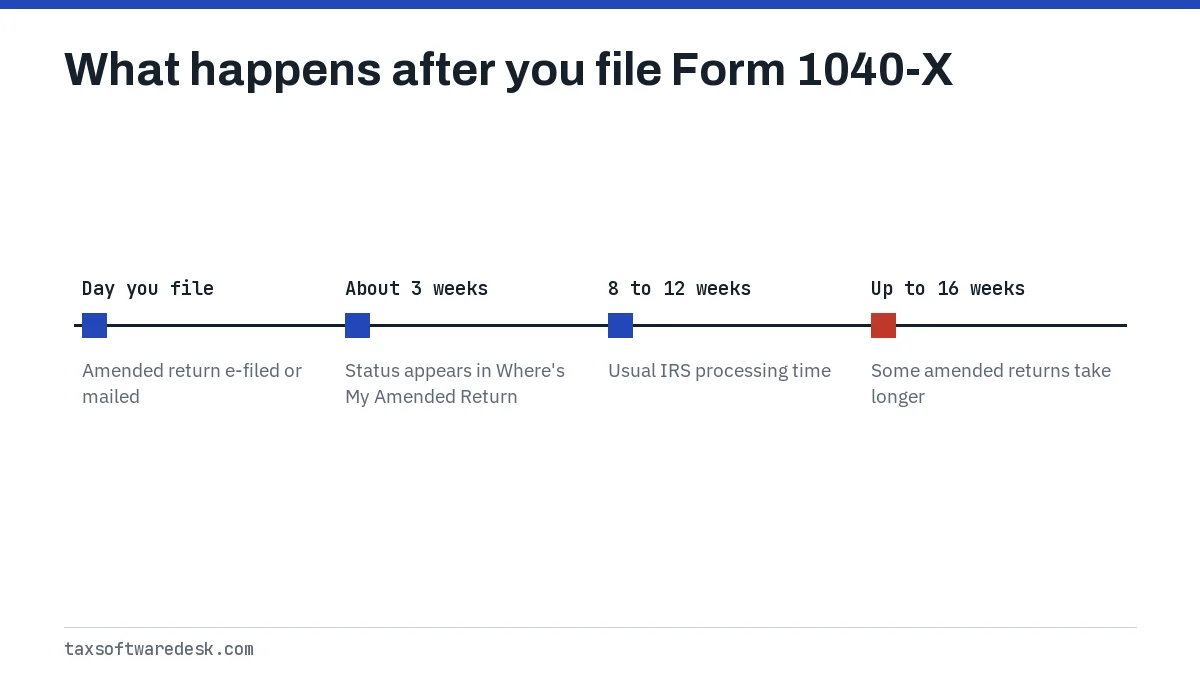
The IRS says the status appears about 3 weeks after you submit Form 1040-X, and that most amended returns take 8 to 12 weeks to process, with some taking up to 16 weeks. You need your Social Security number, date of birth and ZIP code to check, or you can sign in to your IRS Individual Online Account. The same status is available by phone at 866-464-2050.
Step by step
Wait for acceptance
Start the amendment only after the IRS has accepted the original return, or after you mailed it.
Open the amendment
In Online choose Amend (change) return for the year; in Desktop save a copy, then choose File > Amend a Filed Return.
Change only what was wrong
Update the affected entries; the refund meter starts at $0 and shows only the change.
File the Form 1040-X
E-file it if TurboTax offers that, or print, sign and mail it as instructed.
Track it with the IRS
Check Where's My Amended Return about 3 weeks after filing.
Common questions
Can TurboTax file an amended return?
Yes. TurboTax Online and TurboTax Desktop both prepare Form 1040-X once the IRS has accepted the original return. Whether it can be e-filed depends on the tax year and on how the original was filed, and TurboTax tells you at the file step.
Does TurboTax charge for amended returns?
Intuit's amendment help articles do not list a separate price for an amendment, so check what TurboTax shows on screen before you pay or file.
Why does my refund show $0 when I start an amendment in TurboTax?
Intuit says the refund meter starts at $0 on an amendment and shows only the change in your refund or tax due. It does not mean the original refund was cancelled.
How long does a TurboTax amended return take?
The IRS says to allow 8 to 12 weeks, and up to 16 weeks in some cases. The status appears in Where's My Amended Return about 3 weeks after you file.
How many times can I amend the same return?
The IRS says you can file up to 3 amended returns for the same tax year. Once a third e-filed amendment is accepted, later e-filed attempts for that year are rejected.
Do I need to amend if TurboTax says my return was rejected?
No. A rejected return was never filed, so you fix the error and resend the same return. Form 1040-X is only for a return the IRS has accepted.
Sources
- Intuit: How do I amend my federal tax return for this year? ttlc.intuit.com
- TurboTax tax guide: Amending your income tax return (Intuit) turbotax.intuit.com
- IRS: File an amended return irs.gov
- IRS: Amended return frequently asked questions irs.gov
- IRS: Where's My Amended Return? irs.gov
We check figures against these official pages. Rules change; confirm anything that affects a deadline or payment with the agency before you act.
Tell us what happened
Describe your situation and our editors will use it to improve this guide. If you leave your email, we may reply with a pointer to the right page or official contact. We never share your details.