
NETFILE error code 31: when your personal information does not match
Short answer
NETFILE error code 31 means the personal information on your return does not match what the CRA has on record, which TurboTax Canada says comes from Service Canada. The usual culprits are the spelling of your name, your SIN and your date of birth. Correct the field, resend once, and file on paper if the mismatch sits in the CRA's record rather than your return.
- 01Code 31 in NETFILE software
- Personal information does not match CRA records (TurboTax Canada)
- 02Code 31 in the CRA EFILE list
- Subsection 104(13.4) election on a deceased person's return
- 03Where CRA identity data comes from
- Service Canada's Social Insurance Register
- 04Failed attempts before lockout
- Five (TurboTax Canada)
- 05Name change by mail
- 4 to 6 weeks to process (CRA)
What is NETFILE error code 31?
NETFILE error code 31 is a personal information mismatch. When you send a return with certified software, the CRA compares your identifying details with the record it holds, and code 31 means at least one of them disagreed. TurboTax Canada, which publishes the most widely read explanation, says the record in question is the information Service Canada provided.
A CRA personal information mismatch is not a judgment on your income or claims. The return was stopped at the door, before any tax calculation was looked at. Nothing is on file yet, so correcting and resending costs you nothing except time.
What the CRA's EFILE list says about code 31
Search for netfile error 31 and you may land on the CRA's Electronic Filers Manual (RC4018, Chapter 2), where error 31 means something unrelated. That list is written for tax preparers who use EFILE, and there error 31 flags an election under subsection 104(13.4) of the Income Tax Act, which the CRA says is valid only on a deceased person's return.
| Source | Who sees it | What 31 means |
|---|---|---|
| TurboTax Canada NETFILE codes | People filing their own return with NETFILE | Personal information does not match CRA records |
| CRA RC4018 Chapter 2 (2018 to 2025) | Tax preparers filing through EFILE | Subsection 104(13.4) election entered on a return that is not a deceased person's |
If you filed your own return and the message mentions your personal information, the NETFILE meaning applies. If a preparer tells you about error 31 on a return for someone who died, the EFILE meaning is the relevant one and the fix is on the trust election line, not in the identification section.
Name and SIN matching
The EFILE chapter shows which identity comparisons the CRA runs, even though it numbers them differently. Error 40 is a date of birth that disagrees with CRA records, error 43 is a name that disagrees, and error 44 is a name containing invalid characters. Those three checks are the practical checklist for a NETFILE code 31.
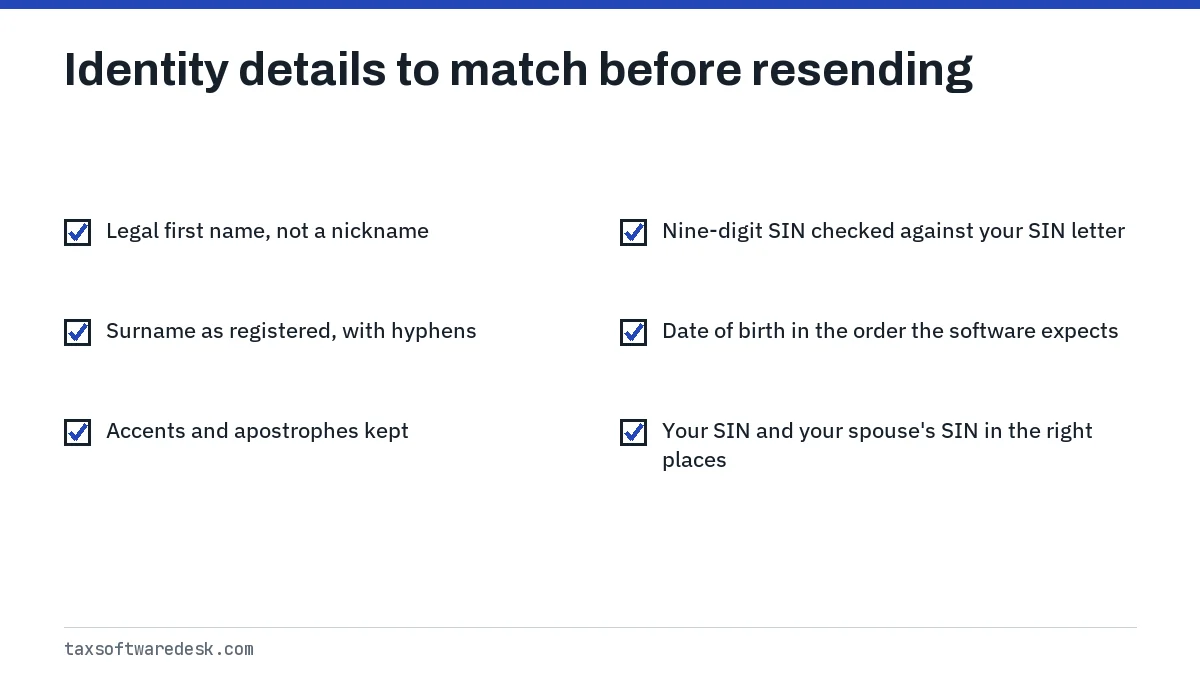
Names that often fail
- A surname taken at marriage, or dropped after separation, that the CRA was never told about.
- Two surnames entered as one, or one entered without the hyphen your SIN record uses.
- A preferred or anglicized first name in place of the legal one.
- Accented letters or punctuation that the software stripped or changed on import.
SIN checks
TurboTax Canada suggests checking your SIN against your SIN card or the Service Canada letter confirming it. Also check that you have not swapped your SIN with a spouse's in a coupled return, which puts one person's number beside the other person's name.
Date of birth
The CRA states that the date of birth in its database should match the one in Service Canada's Social Insurance Register, because Service Canada sends that information to the CRA. If Service Canada has your birth date wrong, the CRA has it wrong too, and no edit on your return will clear code 31.
Before you conclude the record is wrong, rule out an entry slip. Some programs take the date as three drop-downs and others as one numeric field. A birthday of 3 August entered where the software expects month first becomes 8 March, which looks plausible on screen and fails the match.
How to fix a CRA personal information mismatch
Work from the most likely cause to the least, and resend only after you have changed something. TurboTax Canada says repeated failures lock the account after five attempts.
- Open your notice of assessment or SIN confirmation letter and compare name, SIN and date of birth character by character with the identification section.
- Correct any difference, including hyphens and accents, then run the software's review.
- Send the return once. If it is accepted, save the confirmation number.
- If code 31 returns and every field matches your documents, the mismatch is in the government record. Update your SIN record with Service Canada, or your name with the CRA, as needed.
- If the deadline is near, print and mail the return instead. TurboTax Canada's own advice for a persistent code 31 is to file on paper.
Updating a name the CRA does not have
The CRA does not accept name changes online. It accepts a change by phone if you have not changed either of your names before, and the update takes effect right away. Otherwise you mail or fax a certified copy of the name change certificate or court order with your SIN and signature, which the CRA says takes 4 to 6 weeks. The CRA also says it does not pass a name change on to other departments, so Service Canada needs its own update.
For the next code in this family, see NETFILE error N1, which fails on the same fields but is worded as an authentication failure. A spouse's name with invalid characters produces a different number, covered in NETFILE error code 84.
When a paper return is the better route
Paper is the practical choice when the mismatch is in the government's record and the fix will take weeks. A paper return is not matched against the Service Canada record at the moment of sending, so it will not bounce for code 31. The CRA says anyone who cannot use NETFILE can print the return and mail it.
Mail one copy only, and only if no attempt produced a NETFILE confirmation number. For every other code and the source that defines it, see the NETFILE error codes list.
Step by step
Compare your documents
Check name, SIN and date of birth on the return against your SIN letter or notice of assessment.
Correct and resend once
Fix any difference, including hyphens and accents, run the review and send one time.
Update the record
If every field matches but code 31 persists, update your SIN record with Service Canada or your name with the CRA.
Paper file if needed
If the update will take too long, print and mail the return, provided no NETFILE confirmation number was issued.
Common questions
Why does NETFILE say my information does not match when it is correct?
Your return is being compared with the record Service Canada gave the CRA. If that record has an old name or a wrong birth date, a correct return still fails until the record is updated.
Does NETFILE error code 31 mean I am being audited?
No. Code 31 happens before the return is accepted. The CRA has not assessed anything; it could not match your identity.
Is error 31 the same in UFile, StudioTax and Wealthsimple Tax?
The number comes from the CRA's response, so the check is the same. Each product words the message differently and puts the name and birth date fields in its own identification screen.
Can I NETFILE under my old name while my name change is processed?
The CRA's guidance is to tell it about a name change as soon as possible. If you cannot wait for the update, a paper return avoids the electronic match.
Will fixing code 31 change my refund?
No. Name, SIN and birth date do not enter the tax calculation, so correcting them leaves the refund or balance owing the same.
Sources
- TurboTax Canada, NETFILE error codes turbotax.intuit.ca
- CRA, RC4018 Chapter 2, EFILE error codes canada.ca
- CRA, Change your name canada.ca
- Service Canada, Update your SIN record canada.ca
- CRA, Process to change name or date of birth information canada.ca
- CRA, Sending a tax return with certified software canada.ca
We check figures against these official pages. Rules change; confirm anything that affects a deadline or payment with the agency before you act.
Tell us what happened
Describe your situation and our editors will use it to improve this guide. If you leave your email, we may reply with a pointer to the right page or official contact. We never share your details.