
UFile NETFILE error: rejected, blocked or not eligible
Short answer
A UFile NETFILE error falls into one of three groups: UFile will not send because the return is not eligible for NETFILE, the CRA rejected it with a numbered result, or the service was closed. Eligibility blocks mean paper filing; rejections can be fixed and resent. UFile warns that five rejections get your NETFILE access blocked by the CRA.
- 01Where to send in UFile for Windows
- Tab 5, NETFILE, after reviewing in step 4
- 02Daily NETFILE maintenance
- 3 a.m. to 6 a.m. Eastern (CRA)
- 03Current season closes
- January 29, 2027
- 042027 opening date
- Not yet announced; usually published in January or February
- 05Rejections before a block
- Five (UFile)
Why can't UFile NETFILE my return?
When UFile cannot NETFILE a return, the reason is one of three things: the return falls outside what the CRA accepts through NETFILE, the CRA received it and rejected it, or NETFILE was not open when you tried. Each group has a different fix, so the first job with any ufile netfile error is to work out which one you are looking at.
| What you see | What happened | Fix |
|---|---|---|
| UFile will not show the send option or lists a restriction | The return is not eligible for NETFILE | Print and mail the return |
| Rejected, with a result number | The CRA received the return and refused it | Correct the field and resend once |
| Connection fails or times out | Service closed, in maintenance, or a local network problem | Try again outside 3 a.m. to 6 a.m. Eastern |
What if UFile says my return is not eligible for NETFILE?
A not-eligible message means the CRA does not accept that kind of return electronically, and no setting in UFile changes that. UFile's help says you must meet the CRA's eligibility requirements before using its NETFILE tab. The CRA lists the exclusions on its NETFILE page.
- Returns for a person who has died, and bankruptcy returns.
- Deemed residents of Canada, and emigrants or non-residents, apart from the section 116 exception the CRA allows for recent years.
- Tax years outside 2018 to 2025 for original returns in the current season.
- Returns reporting items such as Lloyd's of London income, income from an international organization, or more than 12 sets of financial statements.
- Claims such as foreign tax credits for more than three countries or scientific research and experimental development deductions.
UFile also documents its own restriction messages, for example a business statement sent without the main product or service filled in. Those are fixable: complete the missing field and the send option returns. If the restriction names one of the CRA exclusions above, print the return from step 4 and mail it.
UFile rejected: reading the result code
A UFile rejected message with a number, such as Result 21, means the CRA received the transmission and refused it for one specific reason. The return is not on file. Fix the field the number points to, review again, and send once.
| Result | Area of the return | Where to read more |
|---|---|---|
| 15 | Account locked on NETFILE, or a pre-bankruptcy flag in the EFILE list | NETFILE error code 15 |
| 21 | NETFILE access code does not match | NETFILE error code 21 |
| 31 or N1 | Name, SIN or date of birth does not match | NETFILE error N1 |
| 49 to 57 | Address fields | UFile error codes |
| 84 | Spouse or partner's name | NETFILE error code 84 |
Rejected after you already had a confirmation number
Occasionally a return shows a confirmation number and a rejection later. UFile's advice in that case is to check the return's status in CRA My Account or contact the CRA, because only the CRA can say which result is final. Do not resend or mail a copy until you know.
UFile NETFILE not working outside service hours or season
UFile NETFILE not working at 4 a.m., or in early February, is usually the CRA's schedule rather than a fault. The CRA runs NETFILE daily except 3 a.m. to 6 a.m. Eastern for maintenance, and it closes the service each year for tax year updates. In 2026 that closure ran from February 1 to 22.
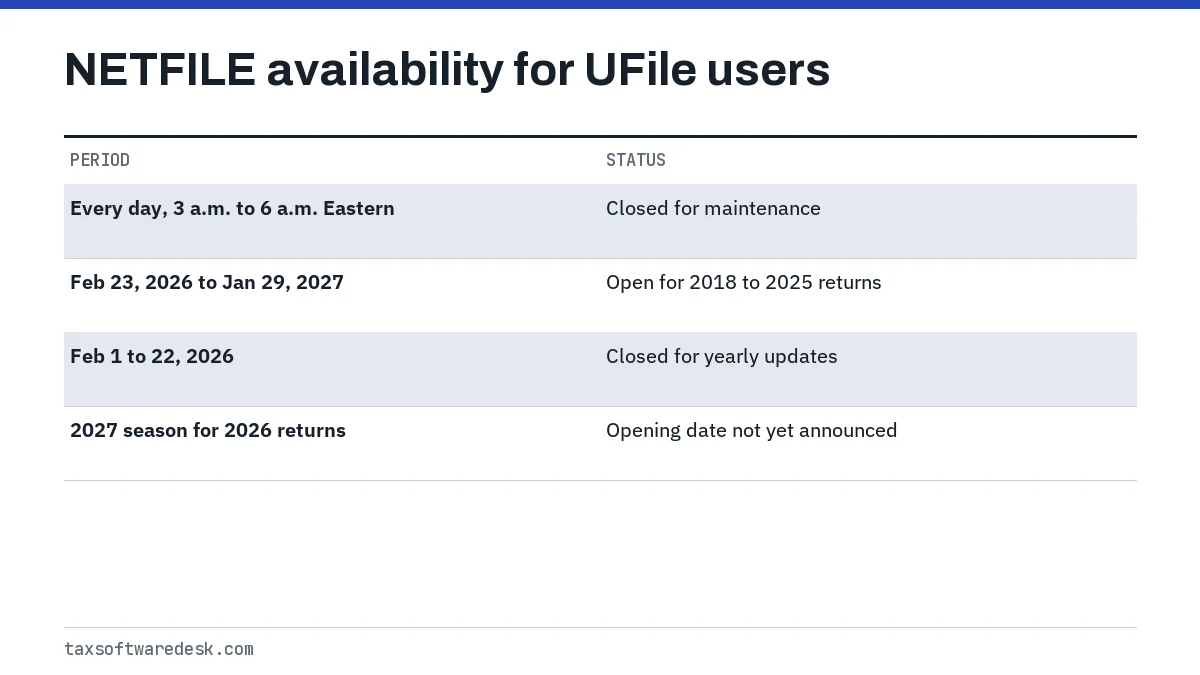
The current season accepts original returns for 2018 through 2025 until Friday, January 29, 2027. The opening date for 2026 returns in the 2027 season is not yet announced; the CRA usually publishes it in January or February. UFile for tax year 2026 must also be released and certified before it can send those returns; see UFile release date.
If the service is open and UFile still cannot connect, the problem is local. Our UFile not working page covers browser, clock and connection issues in UFile ONLINE and the Windows version.
Before you resend: avoid the five-rejection block
UFile's knowledge base states that after five rejections the CRA blocks the account, and the remedy is to contact the CRA. A block stops NETFILE for you in every certified product, so switching software does not help.
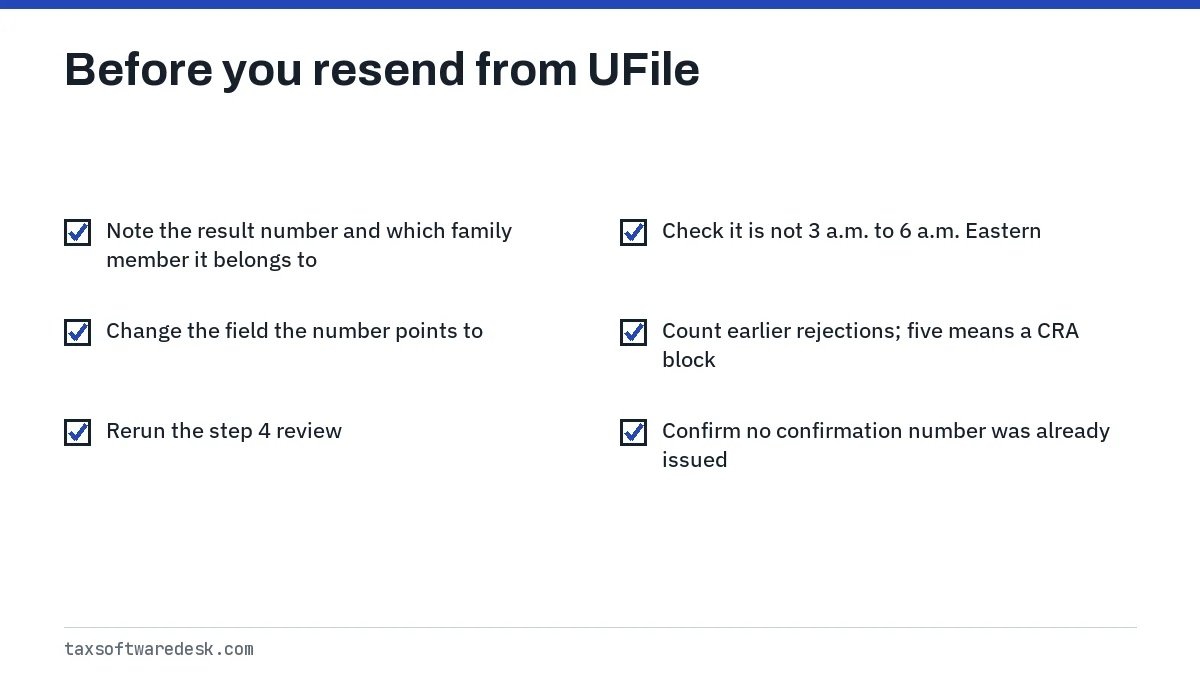
Each family member in a UFile file is checked separately. A rejection on one person's return does not stop the others, and UFile issues a confirmation number for each return that gets through. Note which family member the result belongs to before editing.
When to paper file instead
Mail the return when it is ineligible for NETFILE, when you are blocked and the deadline is close, or when a record held by the CRA needs correcting first. The CRA says anyone who cannot use NETFILE can print the return and mail it.
- In UFile ONLINE, go to step 4 and choose Download PDF, then Federal Print. In UFile for Windows, use the print options in step 4.
- Sign the return and attach any documents the CRA asks for with a paper return.
- Mail one copy to the tax centre for your province, and only if no NETFILE attempt produced a confirmation number.
For every other code and the list that defines it, see the NETFILE error codes guide.
Step by step
Identify the error type
Decide whether UFile blocked the return as not eligible, the CRA rejected it with a result number, or the connection failed.
Fix what the number points to
For a rejection, correct the field linked to the result number in the right family member's return.
Check the time
For a failed connection, retry outside 3 a.m. to 6 a.m. Eastern and within the NETFILE season.
Resend once or mail
Send once and keep the confirmation number, or print and mail if the return is not eligible or you are blocked.
Common questions
Why is UFile NETFILE greyed out or missing?
Usually because the review in step 4 still shows items to complete, or because the return is not eligible for NETFILE. Clear the review messages first; if a restriction remains, the return must be mailed.
Does a UFile rejected message mean my return was filed?
No. A rejected return is not on file with the CRA. Only a confirmation number shows it was received.
Can UFile NETFILE a return for someone who died?
No. The CRA excludes returns for deceased persons from NETFILE, so that return has to be printed and mailed.
Can I NETFILE my 2026 return with UFile now?
Not yet. NETFILE accepts 2018 to 2025 returns until January 29, 2027, and the opening date for 2026 returns is not yet announced.
Why does UFile say the connection to the CRA failed at night?
NETFILE is down every day from 3 a.m. to 6 a.m. Eastern for maintenance. Try again after 6 a.m. Eastern.
Sources
- UFile Help Centre, Filing your return ufile.ca
- UFile FAQ, NETFILE blocked account (CRA) support.drtax.ca
- CRA, NETFILE: who can use it and restrictions canada.ca
- CRA, NETFILE eligibility and service dates canada.ca
- CRA, Sending a tax return with certified software canada.ca
We check figures against these official pages. Rules change; confirm anything that affects a deadline or payment with the agency before you act.
Tell us what happened
Describe your situation and our editors will use it to improve this guide. If you leave your email, we may reply with a pointer to the right page or official contact. We never share your details.