
H&R Block error 1722: fixing the Windows Installer failure
Short answer
H&R Block error 1722 is a Windows Installer error, not a tax error. Windows is saying that a program run as part of setup did not finish as expected. The usual fix is to re-register Windows Installer, repair Windows system files, remove any half-installed H&R Block program, then run the setup file again as administrator with antivirus paused.
- 01Who issues error 1722
- Windows Installer, not H&R Block's tax engine
- 02Full message
- There is a problem with this Windows Installer package
- 03Your tax data
- Stored separately as .tXX files in Documents\HR Block
- 04Admin rights needed
- Yes, for installs and updates
What does H&R Block error 1722 mean?
H&R Block error 1722 comes from Windows Installer, the part of Windows that runs setup packages. The full text Microsoft documents is "Error 1722. There is a problem with this Windows Installer package. A program run as part of the setup did not finish as expected." In plain terms, the H&R Block installer launched a helper step, and that step failed or was stopped.
Because the error belongs to Windows, the fix is almost always on the computer side: the installer service, file permissions, security software or a leftover copy of an older H&R Block edition. Nothing in your tax return caused it, and your saved returns are not touched by a failed install.
H&R Block's help center does not have a dedicated article for error 1722 as of September 2026. It does publish a fix for the closely related error 1721, which points to the Windows Installer service, and its general install checklist. The steps below combine those vendor pages with Microsoft's own repair tools.
Error 1722 Windows Installer causes on a home PC
Four situations account for most H&R Block install error 1722 reports. Knowing which one fits you saves time, because each has a different first step.
| What you notice | Likely cause | Start with |
|---|---|---|
| Error appears at the very end of setup | Security software stopped a setup helper | Pause antivirus, run setup as administrator |
| Error on several programs, not only H&R Block | Damaged Windows Installer registration or system files | Re-register msiexec, then DISM and SFC |
| An older H&R Block year or a failed attempt is still listed | Leftover install blocks the new one | Uninstall old entries first |
| Work or school laptop | No administrator rights | Ask the device owner or use a personal PC |
H&R Block also warns that Windows updates that have not finished installing can break software installs. If Windows has asked you to restart recently, do that restart before anything else.
How to fix error 1722: repair Windows Installer and system files
Step 1: re-register the Windows Installer service
- Press Windows key + R to open the Run box.
- Type msiexec /unregister (with a space before the slash) and select OK. No message appears when it works.
- Open Run again, type msiexec /regserver and select OK.
- Restart the computer.
This resets how Windows Installer is registered, which is the fix H&R Block gives for error 1721. Its own article repeats the unregister command twice; the second command should be /regserver, which registers the service again.
Step 2: run DISM and System File Checker
If the error also shows up with other programs, Windows system files may be damaged. Microsoft's instructions are to open Command Prompt as administrator and run two commands in this order, letting each finish to 100 percent:
- DISM.exe /Online /Cleanup-image /Restorehealth
- sfc /scannow
- Restart when both have completed.
DISM goes first because it fetches the clean files that System File Checker uses for repairs. Microsoft asks you to leave the Command Prompt window open until verification reaches 100 percent, so plug a laptop in before you start.
Remove old H&R Block versions before reinstalling
A half-finished install often leaves an entry in the program list that confuses the next attempt. Clear it out, but protect your tax files first.
- Copy your return files to a USB drive. H&R Block saves them in Documents\HR Block, and each year uses its own extension, such as .t25 for tax year 2025.
- Close all programs and pause your antivirus software.
- Open Control Panel, choose Uninstall a program (or Programs and Features).
- Select each H&R Block entry for the year that failed, including state programs, and choose Uninstall.
- Restart the computer.
Uninstalling the program does not delete the .tXX return files, but a backup costs one minute and removes the risk. Older years you still need, such as a prior return you want to reprint, can stay installed if they are a different edition year.
On Windows 11 there is also a built-in repair path: Settings, then Apps, then Installed apps, where some programs offer Repair or Reset. Microsoft points Windows 10 users to its downloadable Program Install and Uninstall troubleshooter, which fixes corrupted registry keys that block installs and removals.
H&R Block install error 1722: reinstall with admin rights
With the installer repaired and old entries gone, run setup the way H&R Block recommends for blocked installs.
- Download a fresh copy of the installer from the link in your purchase confirmation email. The file name contains the letters HRB.
- Right-click the setup file and choose Run as administrator.
- Accept the default install location on the C: drive. H&R Block says updates will not work if the program is installed on another drive.
- Keep antivirus paused until setup finishes, then turn it back on.
If setup still fails, H&R Block's antivirus article suggests one more setting: right-click Setup.exe, open Properties, then Compatibility, tick Run this program as an administrator, and optionally pick a compatibility mode for a Windows version that edition supports.
If error 1722 keeps coming back
Check that the computer meets the edition's requirements. H&R Block's system requirements page lists Windows 10 or higher for its consumer software and Windows 11 for H&R Block Business, which also needs 8 GB of RAM and 15 GB of disk space. Requirements for the tax year 2026 edition used in the 2027 season are not yet announced; vendors usually post them in the fall.
If the install still fails after these steps, it is worth contacting H&R Block support through its help center, because a setup log may show which helper step fails. For broader symptoms, see our H&R Block not working guide, the software not installing page for other install errors, and our list of H&R Block error codes. Once installed, the next step is often an update, covered in H&R Block software won't update.
Tax Software Desk is independent and is not affiliated with Intuit, H&R Block, TaxAct, FreeTaxUSA, TaxSlayer, Block Inc. (Cash App Taxes), Wealthsimple, UFile or any other software company.
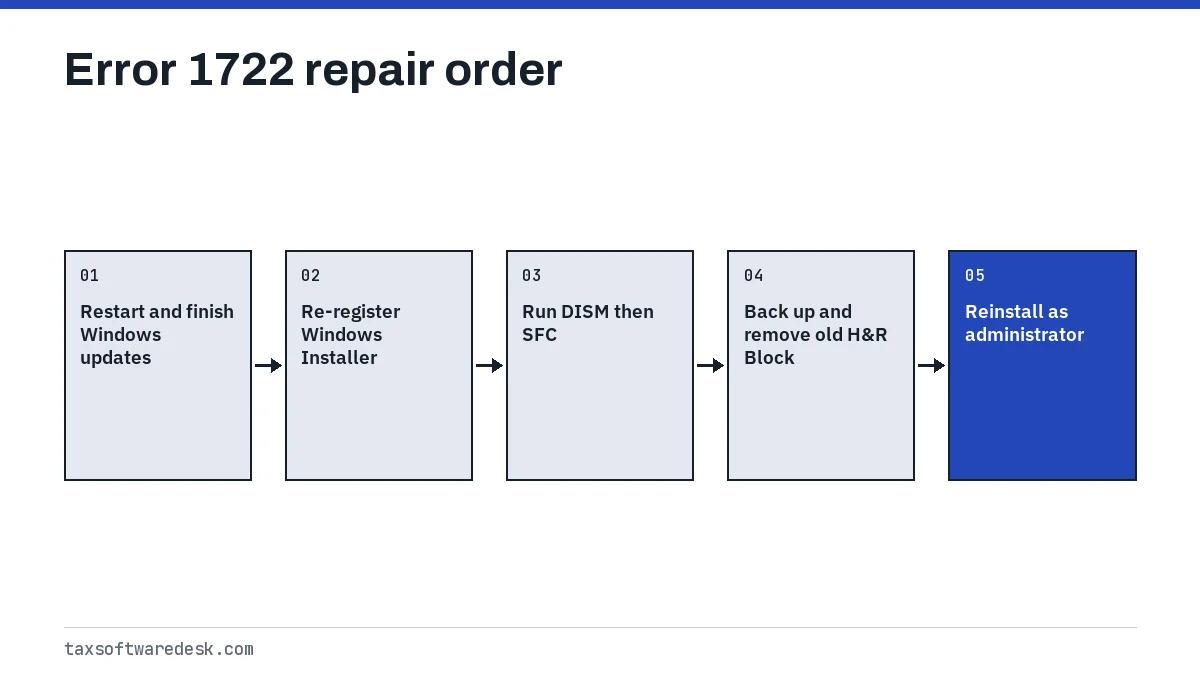
Step by step
Re-register Windows Installer
Run msiexec /unregister, then msiexec /regserver from the Run box, and restart.
Repair system files
In an administrator Command Prompt run DISM.exe /Online /Cleanup-image /Restorehealth, then sfc /scannow.
Back up and remove old versions
Copy Documents\HR Block to a USB drive, then uninstall any failed H&R Block entries and restart.
Reinstall as administrator
Pause antivirus, right-click a fresh HRB setup file, choose Run as administrator and accept the default C: location.
Common questions
What is error 1722 when installing H&R Block?
It is a Windows Installer error meaning a program run during setup did not finish as expected. It points to a problem on the computer, such as the installer service, security software or a leftover install, not to your tax return.
How do I fix error 1722 on Windows 11?
Re-register Windows Installer with msiexec /unregister and msiexec /regserver, restart, run DISM and sfc /scannow as administrator, remove any failed H&R Block entry, then run a fresh setup file as administrator with antivirus paused.
Will uninstalling H&R Block delete my tax return?
No. Returns are saved as separate .tXX files, usually in Documents\HR Block. Copy them to a USB drive before uninstalling anyway, as H&R Block itself advises.
Is error 1722 the same as error 1721?
They are neighbouring Windows Installer errors. H&R Block publishes a fix for 1721 based on re-registering the Windows Installer service, and that same step is the best first move for 1722.
Can I install H&R Block on a work laptop?
Only if you have administrator rights. H&R Block notes that workplace computers often lack the permissions needed to install or update the software.
Sources
- H&R Block: How can I fix error 1721 when installing my tax software? hrblock.com
- H&R Block: Stop antivirus from blocking a program during installation hrblock.com
- H&R Block: How can I uninstall H&R Block software? hrblock.com
- Microsoft Learn: Error 1722, there is a problem with this Windows Installer package learn.microsoft.com
- Microsoft: Use the System File Checker tool support.microsoft.com
- H&R Block: Software system requirements hrblock.com
We check figures against these official pages. Rules change; confirm anything that affects a deadline or payment with the agency before you act.
Tell us what happened
Describe your situation and our editors will use it to improve this guide. If you leave your email, we may reply with a pointer to the right page or official contact. We never share your details.