
H&R Block error codes: what each one means
Short answer
Most H&R Block error codes with four digits, such as 1152, 1500, 1721 and 1722, come from the Windows installer, not from H&R Block, and are fixed in Windows. H&R Block publishes fixes for a handful: faulty temp files for 1152, re-registering the installer service for 1721, and a reinstall for the Mac read-only volume error. Shorter codes like 107, 110 and 134 have no published explanation.
- 01Codes 1100 to 1900
- Windows Installer messages (Microsoft)
- 02Error 1152 fix per H&R Block
- Delete files in the Windows Temp folder
- 03Error 1721 fix per H&R Block
- Unregister and re-register Windows Installer
- 04Codes 107, 110, 134
- No H&R Block explanation found (18 Sept 2026)
How H&R Block error codes are numbered
H&R Block error codes do not come from one list. A four-digit number between 1100 and 1900 shown while installing or updating is almost always a Windows Installer message, defined by Microsoft and shared by every program that installs on Windows. H&R Block has help articles for some of them, but the underlying cause is in Windows.
Other messages are H&R Block's own words, such as the Mac read-only volume message, and a few short numbers that people report, like 107, 110 and 134, appear without any published explanation. Knowing which group your code belongs to tells you whether to look in Windows or contact H&R Block.
H&R Block error code table
The table lists only codes with a published explanation from H&R Block or Microsoft. The meaning column paraphrases the source named in the last column.
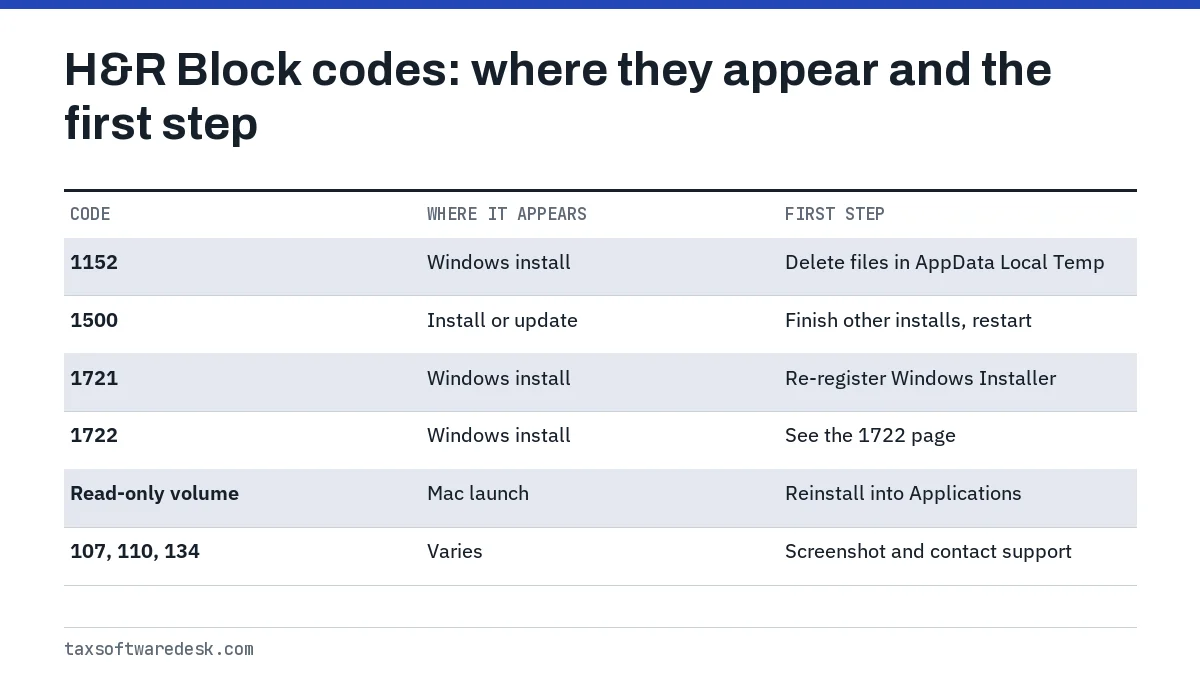
| Code or message | When it appears | What it means | Explained by |
|---|---|---|---|
| 1152 | Installing on Windows | Faulty temporary files | H&R Block |
| 1500 | Installing or updating | Another installation is already running | Microsoft Windows Installer list |
| 1721 | Installing on Windows | A program needed by the installer could not run | H&R Block and Microsoft |
| 1722 | Installing on Windows | A program run during setup did not finish as expected | Microsoft Windows Installer list |
| Cannot run on a read-only volume | Opening on a Mac | The software did not install correctly | H&R Block |
| Cannot be run in DOS mode | Installing on a Mac | The Windows installer was downloaded to a Mac | H&R Block |
Install-time Windows errors and their fixes
H&R Block error 1152: clear the Temp folder
H&R Block says error 1152 points to faulty temporary files. Its fix is to open File Explorer (Windows key + E), go to C:, then Users, then your user name, then AppData, then Local, then Temp, select the files there and delete them. AppData is hidden by default, so turn on Hidden items on the View tab first. Close the installer before you start, and skip any file Windows says is in use.
H&R Block error 1500: another install is running
Microsoft's Windows Installer list defines 1500 as another installation being in progress. In practice that is often Windows Update or a second copy of the H&R Block installer. Let Windows Update finish, restart the computer, then run the H&R Block installer once. H&R Block separately warns that unfinished Windows updates cause install failures, which is the same root cause.
Error 1721 and error 1722
For 1721, H&R Block tells you to unregister and then re-register the Windows Installer service with the msiexec command in the Run box (Windows key + R), restart, and install again. Error 1722 is a close relative in Microsoft's list: a program launched during setup did not finish. It has its own page, H&R Block error 1722, because the causes differ.
Mac messages
The read-only volume message means the app did not install properly. H&R Block's fix is to drag the H&R Block 2025 app to the Trash, reopen the installer from the desktop, drag the green H&R Block icon into Applications and launch it from there. A DOS mode message on a Mac means the Windows installer was downloaded by mistake; H&R Block asks you to contact support for the Mac version. More install causes are in H&R Block software not installing.
H&R Block error code 110, 107 and 134
As of 18 September 2026 we could not find an H&R Block help article explaining error code 110, 107 or 134, and none of them is a Windows Installer code. Rather than guess at a meaning, record where the code appeared and treat it by stage.
- During install or update: run through the install checks (administrator rights, antivirus paused, default C: location, Windows updates finished) and retry once.
- While opening a saved return: copy the file somewhere safe and see H&R Block failed to open database for file-level problems.
- While e-filing or updating: check your internet connection and whether a firewall is blocking the program; an update that stalls is covered in H&R Block software won't update.
- Anywhere else: take a screenshot and contact H&R Block through the support page on hrblock.com.
Where to look up H&R Block error codes and when to contact support
Search H&R Block's help center at hrblock.com/tax-center/support for the exact code first. For a four-digit installer code with no H&R Block article, Microsoft's Windows Installer Error Messages page gives the official wording, which helps you judge whether the problem is Windows or the tax program.
Contact H&R Block when a documented fix has failed, when a Mac shows the DOS mode message, or when a code appears after your return is already prepared. Give them the product and year, the code, the screen it appeared on and what you already tried. For every other symptom, start at H&R Block not working.
Common questions
What does an H&R Block error code mean?
It depends on the number. Four-digit codes from 1100 to 1900 during installation are Windows Installer messages defined by Microsoft. Named messages and a few other codes are H&R Block's own, and some reported codes have no published explanation.
How do I fix H&R Block error 1152?
H&R Block says 1152 is caused by faulty temporary files. Show hidden items in File Explorer, open C:, Users, your user name, AppData, Local, Temp, delete the files there, then run the installer again.
What is H&R Block error 1500?
Microsoft defines 1500 as another installation already in progress. Let Windows Update or any other installer finish, restart the computer and run the H&R Block installer only once.
What is H&R Block error code 110?
We found no H&R Block article that explains code 110 as of 18 September 2026, and it is not a Windows Installer code. Note where it appeared, try the standard install and update checks, then contact H&R Block with a screenshot.
Why does my Mac say H&R Block cannot run on a read-only volume?
H&R Block says the software did not install correctly. Drag the app to the Trash, reopen the installer and drag the H&R Block icon into the Applications folder before launching it.
Sources
- H&R Block: How do I fix an H&R Block error 1152? hrblock.com
- H&R Block: How can I fix error 1721 when installing my tax software? hrblock.com
- H&R Block: Tax software won't install, read-only volume error hrblock.com
- H&R Block: DOS mode (Mac) error while installing hrblock.com
- Microsoft: Windows Installer error messages learn.microsoft.com
We check figures against these official pages. Rules change; confirm anything that affects a deadline or payment with the agency before you act.
Tell us what happened
Describe your situation and our editors will use it to improve this guide. If you leave your email, we may reply with a pointer to the right page or official contact. We never share your details.