
H&R Block rejected return: how to fix it and file again
Short answer
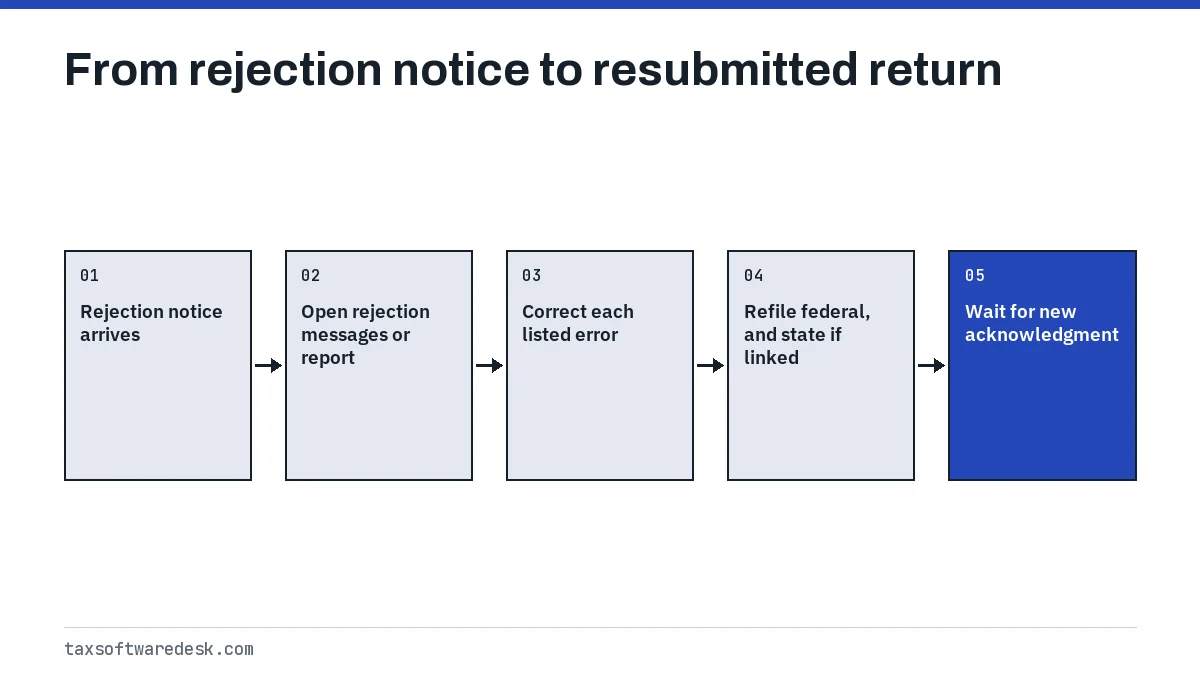
An H&R Block rejected return means the IRS or state refused the e-file, so nothing is filed yet. In H&R Block Online, go to Overview, then Next Steps or Check Status, review the rejection messages and choose Fix Errors. In the software, open the original return, view the E-file Rejection Report, correct each error and select Refile Return. H&R Block does not charge to resubmit.
- 01Cost to resubmit
- No charge, per H&R Block
- 02Software report name
- E-file Rejection Report
- 03Still timely if resent by
- 5th calendar day after the due date (IRS Pub 1345)
- 04Paper fallback window
- Later of due date or 10 days after the rejection notice
What does an H&R Block rejected return mean?
A rejection is a refusal at the door, not a problem with your taxes. IRS Publication 1345 treats a rejected return as not filed, and the acknowledgment explains which business rule failed. H&R Block says the usual reasons are missing information or a name or number that does not match what the IRS has on file.
Because nothing was filed, you correct the same return and send it again. You do not start a new one, and you do not file an amended return.
Finding the rejection in H&R Block Online
Sign in to H&R Block Online and follow the path H&R Block gives for a rejected e-file:
- Choose Overview in the top navigation bar.
- Choose Next Steps or Check Status.
- Follow the steps to the Review the Rejection Messages screen and read each message.
- Choose Fix Errors to jump to the section with the problem, and correct it.
- Choose Continue to File and follow the steps to e-file again.
If you do not see the Review the Rejection Messages screen at all, H&R Block says the return has to be printed and mailed. If sign-in itself is the obstacle, see H&R Block trouble signing in first.
H&R Block efile rejected in the software: fix and resend
In the download software, the tool is the E-file Rejection Report. It lists the errors from your last e-file attempt, and H&R Block points out that it does not update as you make corrections, so work through it as a checklist.
- Open the original e-filed return. H&R Block says you cannot check status from a duplicate file.
- Select the Check Status link next to the file in the Continue with a Saved Return list.
- Select View Rejection Report.
- Correct every error on the report.
- Select Refile Return to e-file again.
If the original file will not open, or the program says the file is damaged, fix that before anything else; see H&R Block failed to open database.
H&R Block rejected return for AGI or PIN
To sign an e-filed return, the IRS asks for last year's adjusted gross income exactly as it appeared on last year's return. A wrong figure is one of the most common rejections. H&R Block's steps in the software:
- Open the return and go to the File menu, then Filing Options.
- Choose E-File and move through the filing screens.
- On the prior-year Adjusted Gross Income (AGI) screen, correct the AGI for you and, if filing jointly, your spouse.
- If the software imported the AGI and it is wrong, right-click the field and choose Override. H&R Block says this does not stop e-file or void its guarantees.
- Finish the filing screens to resubmit, and resubmit the state return too if it went with the federal.
Which number to enter
- Use the AGI from the return as originally filed, not an amended figure.
- The IRS says first-time filers over 16 enter zero as prior-year AGI.
- If you have an IRS Identity Protection PIN, enter it when the software asks; a missing IP PIN is a separate reject.
- If you cannot find last year's AGI anywhere, H&R Block's answer is to print and mail the return.
The wider rules on prior-year AGI and the self-select PIN, including the IRS guidance for a prior-year return still in processing, are covered in prior-year AGI or PIN.
H&R Block state return rejected
When the federal and state returns were e-filed together and only the federal was rejected, H&R Block says the state return was not processed. After fixing the federal errors, you send the state again with the federal. IRS Publication 1345 explains why: a state return linked to a federal submission is denied when there is no accepted federal return under that submission ID.
If the federal was accepted and only the state was rejected, the fix is inside the state section of the return; read the rejection message, correct the state entry, and resubmit the state return alone.
H&R Block keeps rejecting my return
A second rejection with the same message usually means the correction went into the wrong field or came from the wrong source. Check the entry against the actual document: Social Security cards for names and numbers, last year's return for AGI, and each W-2 exactly as printed.
If H&R Block Online rejects the return again after you follow the steps, H&R Block's guidance is to file on paper, and if you owe, to pay the tax by check. The IRS gives you room to do that. Under Publication 1345, a return first sent on time stays timely if corrected and resent electronically by the fifth calendar day after the due date, or if filed on paper by the later of the due date or 10 calendar days after the rejection notice, with an explanation.
| Route | Deadline to stay timely | Example if the rejection notice is dated April 16 |
|---|---|---|
| Fix and e-file again | 5th calendar day after the due date | April 20 |
| Print and mail | Later of the due date or 10 days after the rejection notice | April 26 |
To print and mail from the software, go to File, then Filing Options, choose Print and mail and follow the screens; the printout includes mailing instructions. A step-by-step on the deadlines for every program is in the rejected return resubmission guide.
Does H&R Block charge to resubmit
No. H&R Block states in its software help that you will not be charged for resubmitting a rejected return, and it repeats this in the AGI article. You are sending the same return, prepared with the same product, again.
If the software offers an upgrade while you fix the error, that is a separate purchase for a form your edition may not include, not a resubmission fee. For other program problems during filing, start at H&R Block not working.
Step by step
Find the rejection
Online: Overview, then Next Steps or Check Status. Software: open the original return and select Check Status.
Read the errors
Review the rejection messages or the E-file Rejection Report.
Correct the return
Use Fix Errors in Online, or correct each listed error in the software, including prior-year AGI if flagged.
Resubmit
Choose Continue to File in Online or Refile Return in the software, and resend the state return if it was filed with the federal.
Common questions
How do I fix a rejected return in H&R Block?
In Online, go to Overview, then Next Steps or Check Status, review the rejection messages, choose Fix Errors and then Continue to File. In the software, open the original return, view the E-file Rejection Report, fix each error and select Refile Return.
Does H&R Block charge to resubmit a rejected return?
No. H&R Block says you are not charged for resubmitting a rejected return, whether the fix is an AGI correction or another error.
Why was my H&R Block return rejected for AGI?
The prior-year AGI you entered does not match IRS records. Enter the AGI from last year's original return, use zero if you are a first-time filer over 16, and override an imported figure if it is wrong.
Do I need to resend my state return after a federal rejection?
Yes, if they were filed together. H&R Block says the state return was not processed, so you send it again along with the corrected federal return.
Why can't I see the rejection report in H&R Block software?
You may have opened a copy of the return. H&R Block says status can only be checked from the original e-filed file, using the Check Status link in the saved returns list.
What if H&R Block keeps rejecting my return?
Check each entry against the source document. If it still fails, print and mail the return; the IRS treats it as on time if mailed by the later of the due date or 10 days after the rejection notice, with an explanation.
Sources
- H&R Block: If my H&R Block return was rejected, how do I correct it? hrblock.com
- H&R Block: What should I do if my return is rejected? (Online) hrblock.com
- H&R Block: IRS rejected my tax return because my AGI was wrong hrblock.com
- IRS Publication 1345 irs.gov
- IRS: Validating your electronically filed tax return irs.gov
We check figures against these official pages. Rules change; confirm anything that affects a deadline or payment with the agency before you act.
Tell us what happened
Describe your situation and our editors will use it to improve this guide. If you leave your email, we may reply with a pointer to the right page or official contact. We never share your details.