
H&R Block trouble signing in: security codes, lockouts and lost usernames
Short answer
Most H&R Block trouble signing in falls into three cases. If the security code does not arrive, check that the masked email or phone is one you still use, look in spam, then choose Resend my security code. If the account is locked after three failed attempts, wait 20 minutes. If you forgot your details, use Forgot username/password on the sign-in screen.
- 01Failed attempts before lockout
- 3
- 02Wait before trying again
- 20 minutes
- 03Password length
- 8 to 30 characters
- 04Can H&R Block see your password
- No; it is not kept on file
Why you are having H&R Block trouble signing in
H&R Block trouble signing in usually has a simple cause: a typo in a case-sensitive username or password, a security code going to an old email or phone, or a temporary lock after too many attempts. The fixes below cover the H&R Block online account (MyBlock), which is the account used for H&R Block Online and for account settings.
Before anything else, check Caps Lock. H&R Block usernames and passwords are case-sensitive, so jsmith and JSMITH are different entries. Also confirm you are signing in at hrblock.com through the person icon in the upper right corner, or at the hrblock.com/login page, rather than a saved link to an old address.
Desktop software problems are different. If the installed program will not open your return, see H&R Block failed to open database; if it cannot reach the internet, see cannot connect to server.
H&R Block not sending verification code
H&R Block sends a security code when you sign in from a device or browser it does not recognize. That happens after you switch devices, if you did not tick Remember My Computer the last time you signed in, or if you have cleared your browser's cache since then.
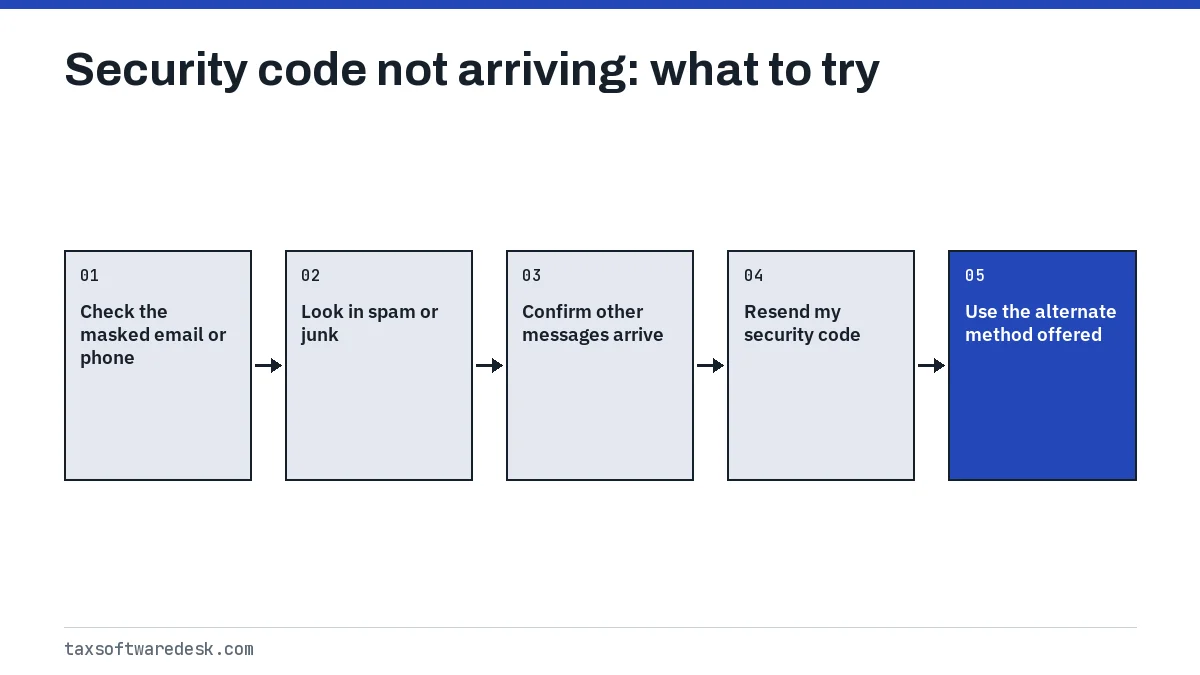
- Read the masked email or phone number on screen. H&R Block hides part of it for security, but you can still tell whether it is an address or number you can reach.
- Look in your spam or junk folder, and in any promotions or filtered-message tab.
- Check that other emails or texts are arriving normally. A full mailbox or a carrier block on short-code texts will stop the code too.
- Choose Resend my security code.
- If it still does not come, H&R Block redirects you to another way to verify. On the forgot-password path this appears as Try something else.
Once you are back in, open Account Settings and update your email and mobile number. H&R Block recommends adding a mobile number specifically so you have a second route in next time.
H&R Block locked account
For security, the account locks after three failed sign-in attempts. H&R Block's instruction is to wait 20 minutes for the lock to clear, then try again. Signing in repeatedly during those 20 minutes does not speed anything up.
H&R Block's lockout page says recovery needs the email address on the account, the last five digits of your Social Security number and the answers to your security questions. Have those ready before you start.
Forgot username or password: H&R Block not letting me sign in
When the details themselves are the problem, H&R Block's recovery flow runs like this:
- On the Sign in screen, select Forgot username/password? under the password box.
- Enter your email, mobile number or username. You get three tries to match your account.
- If none match, fill out the account lookup screen and select Next.
- Enter the security code sent to the email or phone you gave, then select Next. If you cannot reach that email or phone, choose Try something else.
- If more than one account appears, pick the one with the most recent Last Sign In date and choose Reset Password.
| Rule | Requirement |
|---|---|
| Length | 8 to 30 characters |
| Uppercase | At least one |
| Lowercase | At least one |
| Number | At least one |
| Special character | At least one, such as $, #, % or ! |
Finding several accounts is common for people who created a new login in a later year. Choosing the most recent one gets you to the latest return, but older returns may sit in another account.
If you cannot recover the account
H&R Block does not keep passwords on file, so support cannot read yours back to you. If you cannot pass the identity checks, the only route H&R Block offers is to create a new account.
The main thing you lose is easy access to last year's return, which you need for the prior-year AGI used to sign your e-file. H&R Block suggests requesting an IRS transcript instead. Our guide to prior-year AGI or PIN explains where to find that number and what first-time filers enter.
H&R Block keeps signing me out or asking for codes
Repeated code requests usually mean the browser is not keeping H&R Block's device recognition. Tick Remember My Computer when you sign in, and avoid private or incognito windows for your tax session. Browser extensions or settings that clear cookies and cache when the browser closes have the same effect as clearing the cache by hand.
On a shared or public computer, do not tick Remember My Computer; accept the code each time instead. For problems beyond sign-in, see H&R Block not working, and if you use the desktop edition on an older PC, H&R Block on Windows 10.
Tax Software Desk is independent and is not affiliated with Intuit, H&R Block, TaxAct, FreeTaxUSA, TaxSlayer, Block Inc. (Cash App Taxes), Wealthsimple, UFile or any other software company.
Step by step
Rule out typos
Check Caps Lock; usernames and passwords are case-sensitive.
Get the code
Confirm the masked email or phone, check spam, then choose Resend my security code or Try something else.
Wait out a lockout
After three failed attempts, wait 20 minutes before trying again.
Recover or reset
Use Forgot username/password, verify with a code and reset the password on the most recent account.
Common questions
Why can't I sign in to H&R Block?
The usual causes are a case-sensitive typo, a locked account after three failed attempts, or a security code going to an email or phone you no longer use. Check Caps Lock, wait 20 minutes if locked, or use Forgot username/password.
Why is H&R Block not sending my verification code?
The code may be going to an old email or phone, landing in spam, or blocked by your carrier. Check the masked contact shown, look in spam, then choose Resend my security code; H&R Block offers another verification method if it still fails.
How long is an H&R Block account locked?
H&R Block says to wait 20 minutes after the lockout, then try signing in again.
What do I need to recover my H&R Block account?
H&R Block lists the email address on the account, the last five digits of your Social Security number and the answers to your security questions.
Why does H&R Block keep asking for a security code?
It sends a code whenever it does not recognize your device or browser, for example after you clear your cache or if you did not tick Remember My Computer last time.
Can I just make a new H&R Block account?
Yes, and it is H&R Block's fallback when recovery fails. You will not see returns stored in the old account, so get last year's AGI from an IRS transcript.
Sources
- H&R Block: Online login and login issues hrblock.com
- H&R Block: What should I do if my online account is locked? hrblock.com
- H&R Block: Where can I find the security code to sign in? hrblock.com
- H&R Block: What do I do if I forgot my username? hrblock.com
- IRS: Validating your electronically filed tax return irs.gov
We check figures against these official pages. Rules change; confirm anything that affects a deadline or payment with the agency before you act.
Tell us what happened
Describe your situation and our editors will use it to improve this guide. If you leave your email, we may reply with a pointer to the right page or official contact. We never share your details.