
TurboTax import PDF 1099: uploads, consolidated forms and CSV files
Short answer
TurboTax can import a 1099 from a PDF: on the Let's import your tax info screen, choose Enter a different way and upload the PDF (JPG, JPEG or PNG also work). A direct broker import is more complete when your broker is an Intuit partner, and each form inside a consolidated 1099 is entered in its own section.
- 01Upload file types
- PDF, JPG, JPEG or PNG
- 02Brokerage import limit
- 10,000 transactions; 4 MB file (Intuit)
- 03Consolidated 1099s importable
- About February 15 (2026 season)
- 04Desktop file import format
- TXF
- 05Crypto CSV date format
- YYYY-MM-DD HH:mm:ss in UTC
Can TurboTax import a 1099 PDF?
Yes. The TurboTax import PDF 1099 option reads an electronic copy of your form and fills in the matching boxes. You reach it from the 1099 entry screen by choosing Enter a different way on the Let's import your tax info screen, then uploading the file. Intuit lists PDF, JPG, JPEG and PNG as accepted formats for investment forms.
A PDF upload is the middle option. A direct import signs you in to your broker or bank from inside TurboTax and pulls the form data itself, which is more complete for a 1099-B with many sales. Typing the form in is the last resort. Use the upload when your institution is not a TurboTax import partner but gives you a downloadable PDF.
TurboTax import 1099 from a broker versus a PDF upload
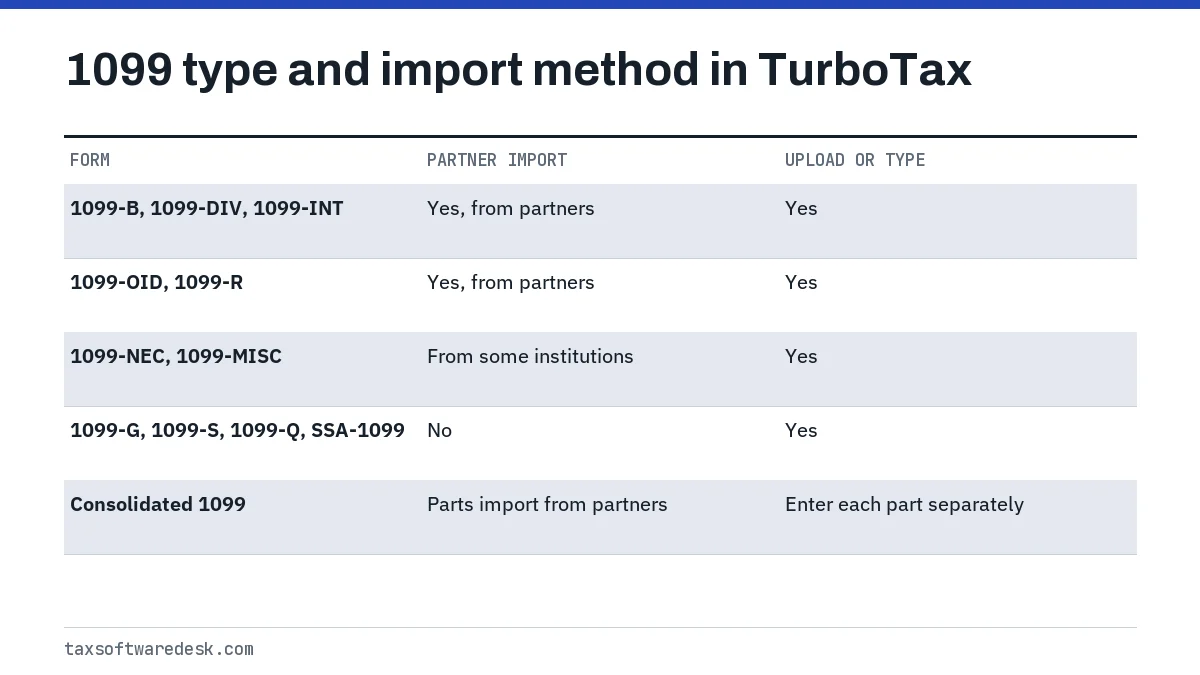
Pick the method by where the form comes from and how many transactions it holds. Intuit's partner imports cover Forms 1099-B, 1099-DIV, 1099-INT, 1099-OID and 1099-R, plus 1099-NEC and 1099-MISC from some institutions. According to Intuit, TurboTax handles up to 10,000 transactions per return and an import file up to 4 MB.
| Your situation | Best method | Why |
|---|---|---|
| Broker is an Intuit partner, many trades | Direct import | Pulls every sale with cost basis |
| Bank not a partner, simple 1099-INT or 1099-DIV | PDF upload | Few boxes, easy to check |
| Scanned or photographed paper form | Type it in | Image reads are the least reliable |
| Form Intuit lists as not importable (1099-G, 1099-S, SSA-1099) | Type it in or upload | No partner import exists |
| Hundreds of crypto trades from an exchange | Exchange sign-in or CSV | PDF summaries drop trade detail |
Some forms can never be imported from a partner, including 1099-A, 1099-C, 1099-G, 1099-LTC, 1099-PATR, 1099-Q, 1099-S, 1099-SA, RRB-1099 and SSA-1099. For those, upload or typing are the only choices. The full list of import routes is on our TurboTax import guide.
How do I import a consolidated 1099?
You import a consolidated 1099 one form at a time. A consolidated tax statement is a single multi-page document that bundles several forms, such as 1099-INT, 1099-DIV, 1099-OID, 1099-B and 1099-MISC. Intuit's help says to enter each form on its own screen, and only the parts that show non-zero amounts. A direct import from a partner broker does this sorting for you; a PDF upload does not always.
- Wait for the final statement. In the 2026 season, Intuit said consolidated forms and 1099-Bs were likely importable by February 15, 2026. Intuit has not yet published the 2027 dates; it usually updates the article in January.
- Try the direct import first from the 1099-B screen, since it brings in all parts at once when the broker is a partner.
- If you must upload, save the consolidated PDF from the broker's website, not a scan.
- If the upload stalls or misreads boxes, split the file: print only the 1099-B pages to a new PDF with your PDF reader's page range option, and upload that. Enter the short 1099-INT and 1099-DIV sections by hand.
- Open each form in TurboTax afterward and compare the totals with the summary page of the statement.
TurboTax desktop import 1099 PDF: what changes in Desktop
TurboTax Desktop handles files differently from Online. In Desktop, go to Federal Taxes, Wages & Income, then Stocks, Cryptocurrency, Mutual Funds, Bonds, Other under Investment Income, and use Import now. Intuit's crypto help describes the Desktop file route as a TXF file (Tax Exchange Format), not a PDF or CSV.
So if your Desktop screen offers no PDF upload, that is expected, not a fault. Download a TXF export from your broker if it offers one, use the partner import, or type the form in. Intuit also notes that direct import from crypto exchanges is not available in Desktop.
TurboTax import CSV file and crypto CSV import
A TurboTax import CSV file is mainly a crypto tool. When TurboTax Online does not support your exchange, Intuit offers a universal template: a CSV of raw transactions in which each row has a date, a transaction type and the assets sent and received. Only Date and Type are required columns.
- Dates must be written as YYYY-MM-DD HH:mm:ss in Coordinated Universal Time (UTC), for example 2026-03-03 10:15:00.
- Use TurboTax's list of transaction types, or Other when none fits.
- Market Value is usually the cost basis for a buy and the proceeds for a sale, including fees.
- The template is for raw transactions. A gain and loss report from a crypto tax tool is a different file and goes in through that tool's own export.
- For Desktop, Intuit points to converting a CSV to TXF before importing.
For stock sales, Intuit's 1099-B help describes only three routes: partner import, uploading a copy of the form, or typing it in. It does not describe a CSV upload for stock trades. The practical choices are the PDF upload or entering sales totals by category, with the detail kept in your records.
Checking imported 1099 numbers before you file
Check totals, not only individual boxes. After any import, compare the totals TurboTax shows against the summary page of your 1099. A PDF read that misses one page will show a lower proceeds total, and TurboTax will not warn you, because it has no way to know what was left out.
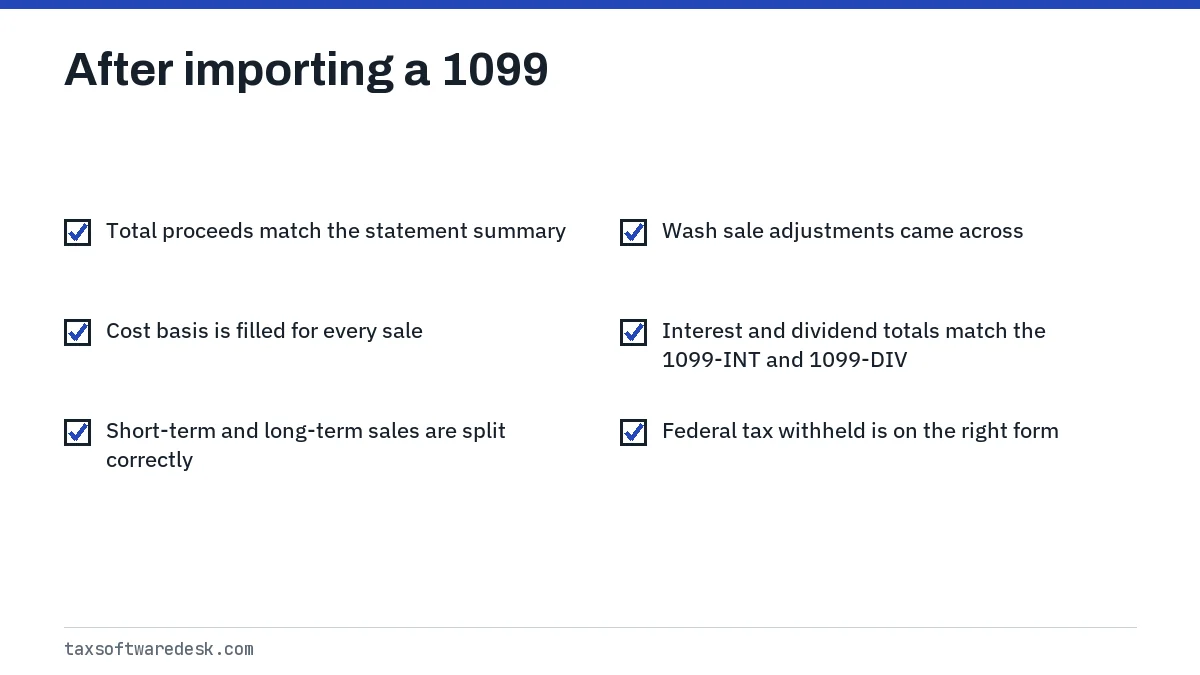
Missing cost basis is the most common flag after an import. TurboTax marks the sale for review, and it stays flagged until you enter the basis from your broker's records. If imports fail entirely rather than coming in incomplete, see TurboTax import not working. If a payment app form is also on your list, the rules for Form 1099-K in TurboTax are different.
Step by step
Open the 1099 entry screen
In TurboTax Online, go to Income in the Federal section and open the 1099-B or other 1099 topic.
Choose how to enter it
On Let's import your tax info, pick your broker for a direct import or choose Enter a different way.
Upload the PDF
Select the upload option and choose the PDF, JPG, JPEG or PNG of your form.
Split consolidated statements
Enter each part of a consolidated 1099 in its own section.
Compare totals
Check imported proceeds, basis and income totals against the statement's summary page.
Common questions
Why won't TurboTax read my 1099 PDF?
The usual causes are a password-protected PDF, a scanned image instead of a broker-generated PDF, or a long consolidated statement. Remove the password, download a fresh copy from the broker's site, or split out the pages you need.
Can I upload a consolidated 1099 as one file?
You can try, but Intuit's help treats a consolidated statement as several forms, each entered on its own screen when it has non-zero amounts. A partner broker import sorts the parts automatically; a single PDF upload may not.
Does TurboTax Desktop let me upload a 1099 PDF?
Desktop's investment import screen uses a partner import or a TXF file. If you do not see a PDF option, type the form in or get a TXF export from your broker.
How many transactions can TurboTax import from a broker?
Intuit lists up to 10,000 transactions per return and a 4 MB limit for an import file. Very large traders can enter sales totals by category instead.
What format does a TurboTax crypto CSV need?
Use Intuit's universal template with dates in YYYY-MM-DD HH:mm:ss format in UTC. Date and Type are the only required columns, and each row is one raw transaction.
When can I import my 1099-B for the 2027 season?
Intuit has not announced 2027 dates yet. In the 2026 season, consolidated forms and 1099-Bs were expected to be importable by February 15, 2026.
Sources
- Intuit: How do I import my 1099s? ttlc.intuit.com
- Intuit: Where do I enter or import a 1099-B? ttlc.intuit.com
- Intuit: What if I can't import my 1099? ttlc.intuit.com
- Intuit: What's a 1099 consolidated tax statement? ttlc.intuit.com
- Intuit: How do I upload a CSV file of my crypto transactions? ttlc.intuit.com
- Intuit: How do I create a CSV file for an unsupported crypto source? ttlc.intuit.com
We check figures against these official pages. Rules change; confirm anything that affects a deadline or payment with the agency before you act.
Tell us what happened
Describe your situation and our editors will use it to improve this guide. If you leave your email, we may reply with a pointer to the right page or official contact. We never share your details.