
The TurboTax .tax file: what it is, where it lives and how to open it
Short answer
A TurboTax .tax file is the data file TurboTax Desktop saves for one tax year, with an extension such as .tax2025 for 2025 returns. Intuit says it opens only in the TurboTax edition for the same year. On Windows it is saved in Documents, TurboTax by default, and Online users can download one from Tax Tools.
- 01Default Windows location
- Documents, TurboTax folder
- 022025 return extension
- .tax2025
- 03Online download file name
- taxReturn.tax2025
- 04Opens in
- TurboTax Desktop for the same tax year only
- 05Old Desktop editions Intuit sells
- Tax years 2022, 2023 and 2024
What is a TurboTax .tax file?
A TurboTax .tax file is the working data file for one return, and the TurboTax tax file extension tells you the year. A file ending in .tax2025 holds a tax year 2025 return (filed in 2026), and one ending in .tax2024 holds a 2024 return. It is not a printable document: it stores your answers and entries in a format only TurboTax software reads.
That makes it different from the PDF of your return. The PDF is the finished forms, readable anywhere and accepted by other tax programs as a prior-year import. The .tax file is what TurboTax needs to reopen, change or amend the return, and to carry data into next year's TurboTax.
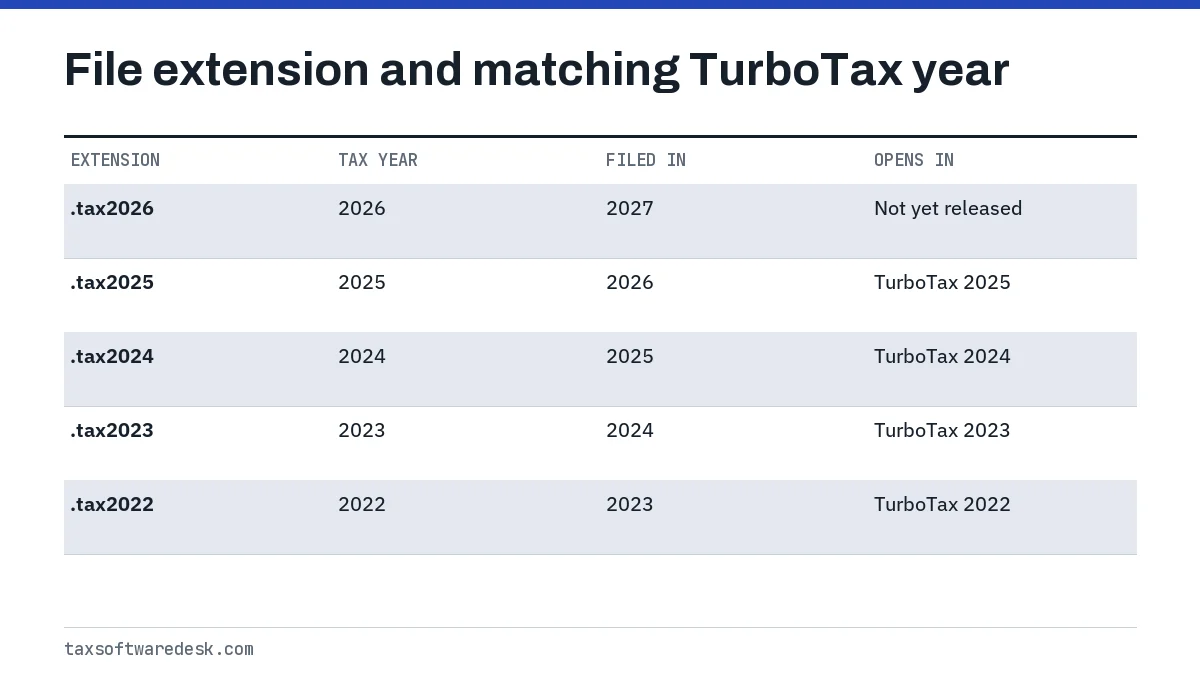
The extension for tax year 2026 returns, used in the 2027 season, has not been announced. Intuit has not yet released that edition; based on the pattern above it would be expected to end in .tax2026, but confirm once the software ships.
Where does TurboTax save my return?
On Windows, TurboTax Desktop saves returns in the TurboTax folder inside Documents unless you chose another folder. On a Mac, Intuit says the default file name is the primary taxpayer's name followed by the two-digit tax year.
Finding the file on Windows
- Open the Start menu and search for the extension, such as *.tax2025.
- In the results, select the arrow next to the file to expand its details.
- Choose Open file location to see the folder it is in.
- Open the return from inside TurboTax with File, Open Tax Return. Intuit warns against double-clicking the file in search results, which can cause errors.
Finding the file on a Mac
Open Spotlight, type .tax and do not press Enter; tax returns appear under Documents. If not, choose Search in Finder, switch to List view and look for items whose Kind is a TurboTax tax return.
How to download a .tax file from TurboTax Online
TurboTax Online can give you a .tax file for the current year so you can finish the return in TurboTax Desktop. Sign in, select Start or Continue on Tax Home, then open Tax Tools, Tools, and in the Tools Center choose the option to save your return to your computer. For a 2025 return the download is named taxReturn.tax2025.
You can rename it, for example to SmithReturn.tax2025, but keep everything after the dot unchanged. For earlier years, Intuit says to select the year on Tax Home and use Download .tax file. The file only helps if you own or buy TurboTax Desktop for the same year; for simply keeping a copy, the PDF is the better download, as explained in downloading a prior-year return from TurboTax.
Can I open a .tax file without TurboTax?
No practical way exists for most people. Intuit states that you need the same year's version of TurboTax to open a tax file, so a .tax2023 file needs TurboTax 2023. Newer editions will transfer data from last year's file into a new return, but they do not open an old year's return for viewing or printing.
| Your situation | What works |
|---|---|
| You still have that year's TurboTax installed | Open it and save a PDF with File, Print/Save for Your Records |
| You filed that year with TurboTax Online | Download the PDF from Tax Home; Online keeps the past seven years |
| File is from 2022, 2023 or 2024 and you need to amend | Buy that year's Desktop edition; Intuit sells 2022 to 2024 |
| File is from 2021 or earlier | Intuit no longer sells those editions; request an IRS transcript for the figures |
| You are switching to H&R Block software | Import the file directly if it is not encrypted |
Be careful with websites that offer to convert a .tax file to PDF. They are not Intuit services, and the file contains Social Security numbers and bank details for everyone on the return. H&R Block's software can read an unencrypted TurboTax file, a route covered in import TurboTax to H&R Block.
Opening old years and moving files between computers
Opening a file on a computer that lacks the right pieces produces errors, not a blank screen. The best known is TurboTax error 190, which appears when a tax file contains state forms that are not installed on that computer. Intuit's fix is to start a new return, download the needed state under State Taxes, close and reopen TurboTax, then open the file again; details are on TurboTax error 190.
When you replace a computer, copy the whole TurboTax folder, not just this year's file, and install each year's edition you might need later. The full process is on TurboTax transfer to new computer.
How to back up your TurboTax tax files
Keep two copies of each year: the .tax file and a PDF of the filed return, stored in at least two places. The .tax file lets you amend or carry data forward; the PDF works even after you stop owning TurboTax.
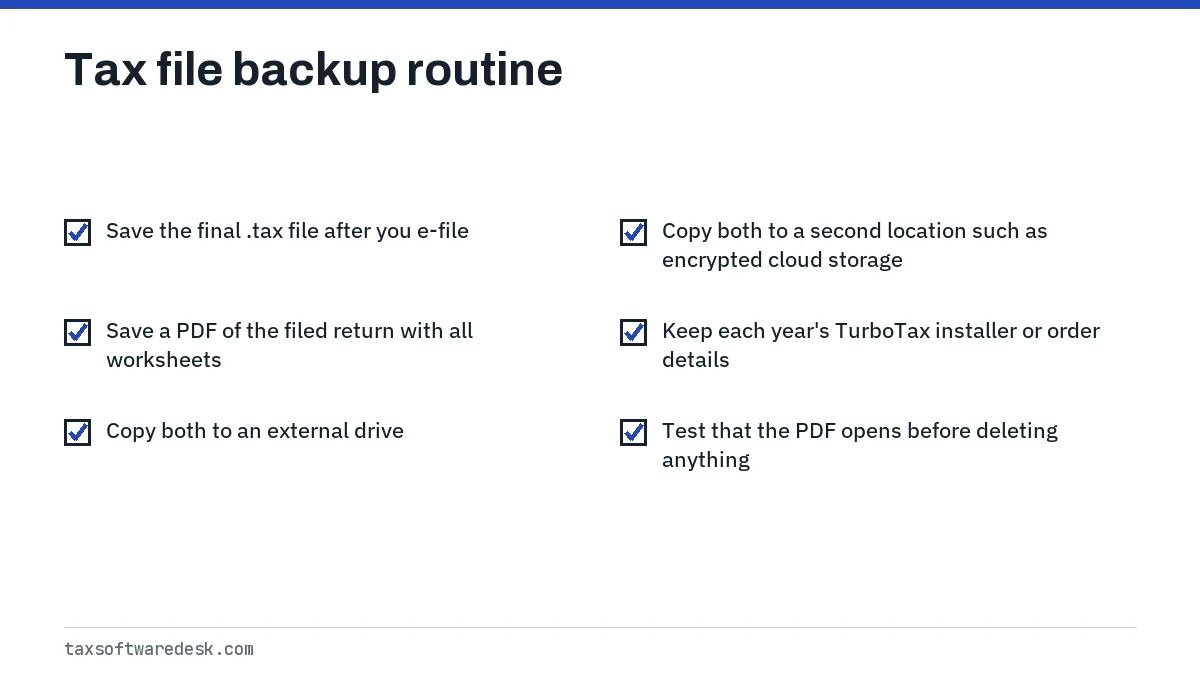
If your backup goes to a cloud service, encrypt it or use a service with account two-step verification, since the file identifies everyone on the return. A saved PDF also needs to print cleanly; if it will not, see TurboTax printing problems.
Common questions
What is a .tax2025 file?
It is a TurboTax Desktop data file holding a tax year 2025 return, the one filed in 2026. It opens only in TurboTax 2025.
What program opens a .tax2024 file type?
TurboTax Desktop 2024. Intuit says each file needs the TurboTax edition for its own tax year, and H&R Block software can also import an unencrypted TurboTax file into its own return.
Can TurboTax Online open my Desktop .tax file?
Intuit documents moving a current-year return from Online to Desktop by downloading a .tax file. For keeping or sharing a return, use a PDF instead.
Why can't I find my TurboTax file after a Windows update?
Search the whole computer for the extension, such as *.tax2025, and check OneDrive and the Recycle Bin. A Documents folder synced to OneDrive often moves the TurboTax folder there.
Should I keep old .tax files after I file?
Yes. Keep the .tax file and a PDF for each year. The .tax file is needed to amend in TurboTax, and the PDF stays readable after the software is gone.
Can I buy an old TurboTax version to open a 2021 file?
Not from Intuit. As of September 2026, Intuit sells TurboTax Desktop only for tax years 2022, 2023 and 2024 among prior years.
Sources
- Intuit: How do I find my tax data file (.tax file) on my Windows computer? ttlc.intuit.com
- Intuit: How do I find my tax data file (.tax file) in Mac? ttlc.intuit.com
- Intuit: How do I save my TurboTax Online return as a tax data file? ttlc.intuit.com
- Intuit: Can I buy old versions of TurboTax? ttlc.intuit.com
- Intuit: Error 190 when opening a file in TurboTax Desktop ttlc.intuit.com
We check figures against these official pages. Rules change; confirm anything that affects a deadline or payment with the agency before you act.
Tell us what happened
Describe your situation and our editors will use it to improve this guide. If you leave your email, we may reply with a pointer to the right page or official contact. We never share your details.