
TurboTax on Windows 10: what still works and what to do next
Short answer
TurboTax Desktop 2025 does not run on Windows 10. Intuit says the 2025 edition needs Windows 11 (64-bit) and offers two paths for Windows 10 users: upgrade to Windows 11 or switch to TurboTax Online, which works in a web browser. Intuit's listing for the tax year 2026 edition also names Windows 11 (64-bit) only. Workarounds that force the desktop program onto Windows 10 are not a safe place for tax data.
- 01Windows 10 support ended
- October 14, 2025
- 02TurboTax Desktop 2025 on Windows 10
- Not supported (Windows 11 64-bit required)
- 03Intuit's two options
- Upgrade to Windows 11 or use TurboTax Online
- 04Windows 10 consumer ESU ends
- October 12, 2027
What changed for TurboTax on Windows 10, and why
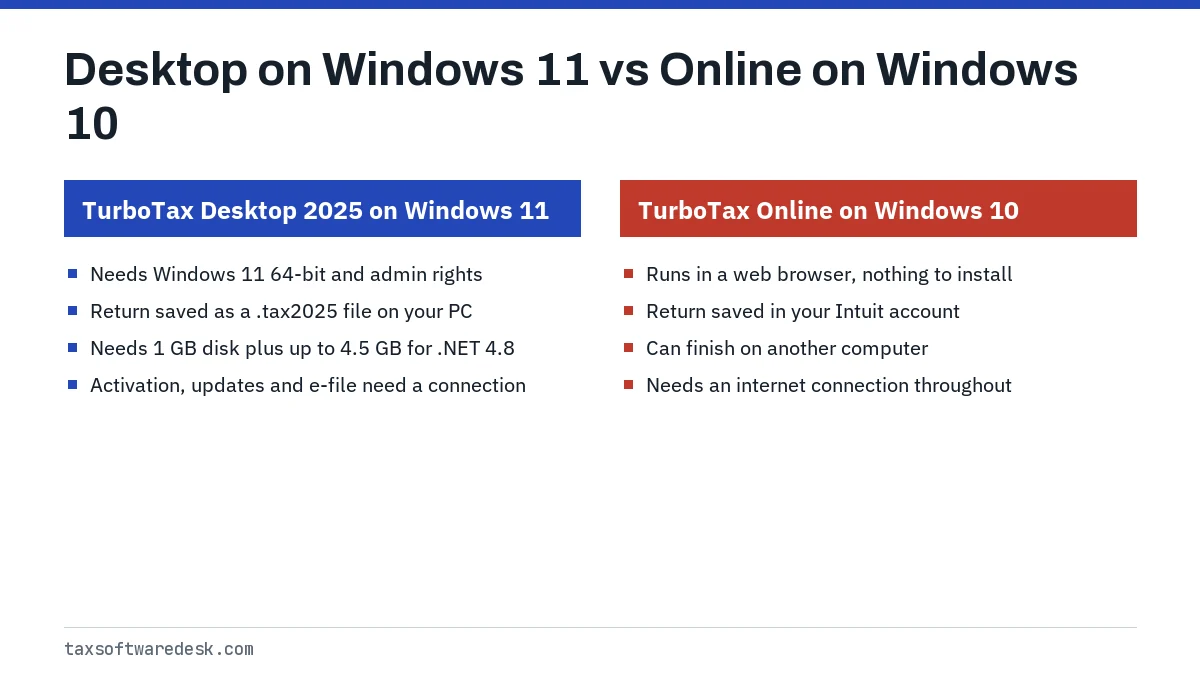
Running TurboTax on Windows 10 stopped being an option for the desktop program with the 2025 edition. Intuit's system requirements page lists Windows 11 in 64-bit form, and its Windows 10 help article states plainly that TurboTax Desktop 2025 cannot be used on Windows 10.
The timing follows Microsoft. Microsoft ended support for Windows 10 on October 14, 2025, which means no more free security fixes or technical help for that system. Microsoft says Windows 10 keeps working but is at greater risk from viruses and malware without updates. Intuit's notice presents its Windows 11 requirement against that end-of-support date.
Can TurboTax run on Windows 10 today?
It depends on which TurboTax you mean. The answer differs for the current desktop edition, older desktop editions and the online version.
| Product | On Windows 10? | What it is good for |
|---|---|---|
| TurboTax Desktop 2025 | No, per Intuit | Tax year 2025 returns, on Windows 11 only |
| Older desktop editions already installed | Not covered by Intuit's Windows 10 notice | Prior-year returns; check that edition's own requirements |
| TurboTax Online | Runs in a web browser | Current-year returns without installing software |
| TurboTax Desktop for tax year 2026 | No, Intuit lists Windows 11 (64-bit) | 2027 filing season |
Prior-year editions
Intuit's Windows 10 notice is written about the 2025 edition and does not address older editions. Intuit still lists manual update files for TurboTax 2022, 2023 and 2024 on Windows and says only 2021 and earlier editions are no longer supported. Keep in mind that IRS e-file for individual returns only covers returns with due dates in the current year and the two previous years (IRS Publication 1345), so an old edition eventually becomes print-and-mail only regardless of Windows.
TurboTax Online is the main Windows 10 alternative
Intuit's own suggestion for Windows 10 users is to switch to TurboTax Online. It runs inside a web browser, so you install nothing and the desktop Windows 11 rule does not apply. Your return is saved to your Intuit account, which also means you can finish on another computer.
Keep the browser itself up to date, because browser makers set their own timelines for supporting older systems. The trade-offs between the two products, including pricing models and how many returns each handles, are compared on TurboTax Online vs Desktop.
Why we do not recommend a TurboTax Windows 10 workaround
Search results offer several ways to force TurboTax Desktop 2025 onto Windows 10: compatibility-mode tricks, edited installers, or tools that push Windows 11 onto hardware Microsoft does not support. We do not walk through any of them, for three practical reasons.
- Intuit says the edition cannot be used on Windows 10. If a forced install misbehaves mid-season, there is no supported fix, and the problem may surface at e-file time.
- Modified installers are a security risk. A changed TurboTax installer from an unknown source is exactly the kind of file that carries malware, and it would handle your full tax identity.
- Unsupported Windows 11 installs may not receive updates reliably. That recreates the security gap you were trying to escape.
Microsoft's Extended Security Updates program for Windows 10 is a separate matter. Home users can enroll for free if they sync PC settings, by redeeming 1,000 Microsoft Rewards points, or with a one-time $30 purchase, and coverage runs until October 12, 2027. ESU keeps Windows 10 patched, but it does not change Intuit's statement that TurboTax Desktop 2025 cannot be used on Windows 10.
Status for the 2027 season edition: Windows 11 again
Intuit has now published the requirements for TurboTax Desktop for tax year 2026, the edition people will use in the 2027 filing season. Its system requirements page, checked October 20, 2026, lists Windows 11 (64-bit) with administrative rights for the Windows download, the same rule as the 2025 edition, and macOS Sequoia 15 or later for the Mac download. Windows 10 is not on the list. The release date itself is not yet announced; new editions usually appear in late fall.
With Windows 10 missing from both the 2025 and the 2026 listings, planning around Windows 10 support returning is not realistic. If you prefer the desktop program, budget for a Windows 11 PC, or a Mac that can run macOS Sequoia 15 or later, before January. A Mac that stops at Sonoma 14 runs the 2025 edition but does not meet the listing for the next one.
Other options for a Windows 10 computer
If you are not tied to TurboTax, other browser-based tax products are not bound by a desktop operating system requirement either, though each vendor sets its own browser support rules. Check the vendor's current requirements page before starting a return.
- H&R Block: its downloadable software has its own Windows requirements; see H&R Block on Windows 10 for what we could confirm.
- A Mac: TurboTax Desktop 2025 for Mac needs macOS Sonoma 14 or later, and Intuit's tax year 2026 listing raises that to macOS Sequoia 15 or later. Setup problems are covered on TurboTax won't open on Mac.
- A new Windows 11 PC: copy your .tax2025 file across and install from Intuit's install page. If the mouse or clicks misbehave inside TurboTax after the switch, see TurboTax mouse not working.
For every other desktop symptom, from installers to crashes, start at the TurboTax Desktop troubleshooting hub.
Common questions
Can I use TurboTax on Windows 10?
You can use TurboTax Online in a web browser on Windows 10. TurboTax Desktop 2025 is a different story: Intuit says it runs only on Windows 11 (64-bit) and cannot be used on Windows 10.
Will TurboTax for tax year 2026 run on Windows 10?
Not according to Intuit's published requirements. The tax year 2026 listing names Windows 11 (64-bit) with administrative rights, the same as the 2025 edition, and does not include Windows 10. On a Windows 10 PC, TurboTax Online in a browser is the option Intuit points to.
Is TurboTax Online an option on Windows 10?
Yes. Intuit names TurboTax Online as one of its two options for Windows 10 users, alongside upgrading to Windows 11. It runs in a browser, so keep that browser up to date.
Does Windows 10 Extended Security Updates let me run TurboTax Desktop 2025?
No. ESU keeps Windows 10 receiving security fixes until October 12, 2027, but Intuit's statement that TurboTax Desktop 2025 cannot be used on Windows 10 still applies.
Can I still file a prior-year return with TurboTax on Windows 10?
Intuit's Windows 10 notice only covers the 2025 edition, so check the requirements for the older edition you have. IRS e-file only accepts returns with due dates in the current year and the two previous years; older returns must be mailed.
Sources
- Windows 10 end of support and TurboTax ttlc.intuit.com
- TurboTax Desktop system requirements turbotax.intuit.com
- Windows 10 support has ended on October 14, 2025 support.microsoft.com
- Windows 10 Extended Security Updates microsoft.com
- IRS Publication 1345 irs.gov
- Manually update TurboTax for Windows software ttlc.intuit.com
We check figures against these official pages. Rules change; confirm anything that affects a deadline or payment with the agency before you act.
Tell us what happened
Describe your situation and our editors will use it to improve this guide. If you leave your email, we may reply with a pointer to the right page or official contact. We never share your details.
Related guides
 TurboTax Desktop Not Working: Fixes Listed by Symptom
When TurboTax Desktop is not working, the cause usually sits in one of four places: the computer no longer meets the 2025 edition…
TurboTax Windows 11 Requirement: What It Means for Your PC
The TurboTax Windows 11 requirement applies to TurboTax Desktop 2025: Intuit says it runs only on Windows 11 (64-bit) with admini…
TurboTax Online vs Desktop: Which One Should You Use
The TurboTax Online vs Desktop difference is where the return lives and how many you can file. Online runs in a browser, saves to…
H&R Block Software on Windows 10: Support Status for 2027
H&R Block's system requirements page, checked 20 October 2026, lists Windows 10 or higher for its consumer tax software, so Windo…
TurboTax Won't Open on Mac: macOS Requirements and Fixes
If TurboTax won't open on Mac, first check that the Mac runs macOS Sonoma 14 or later (Sequoia 15 for the tax year 2026 edition),…